
Last updated: November 2, 2026
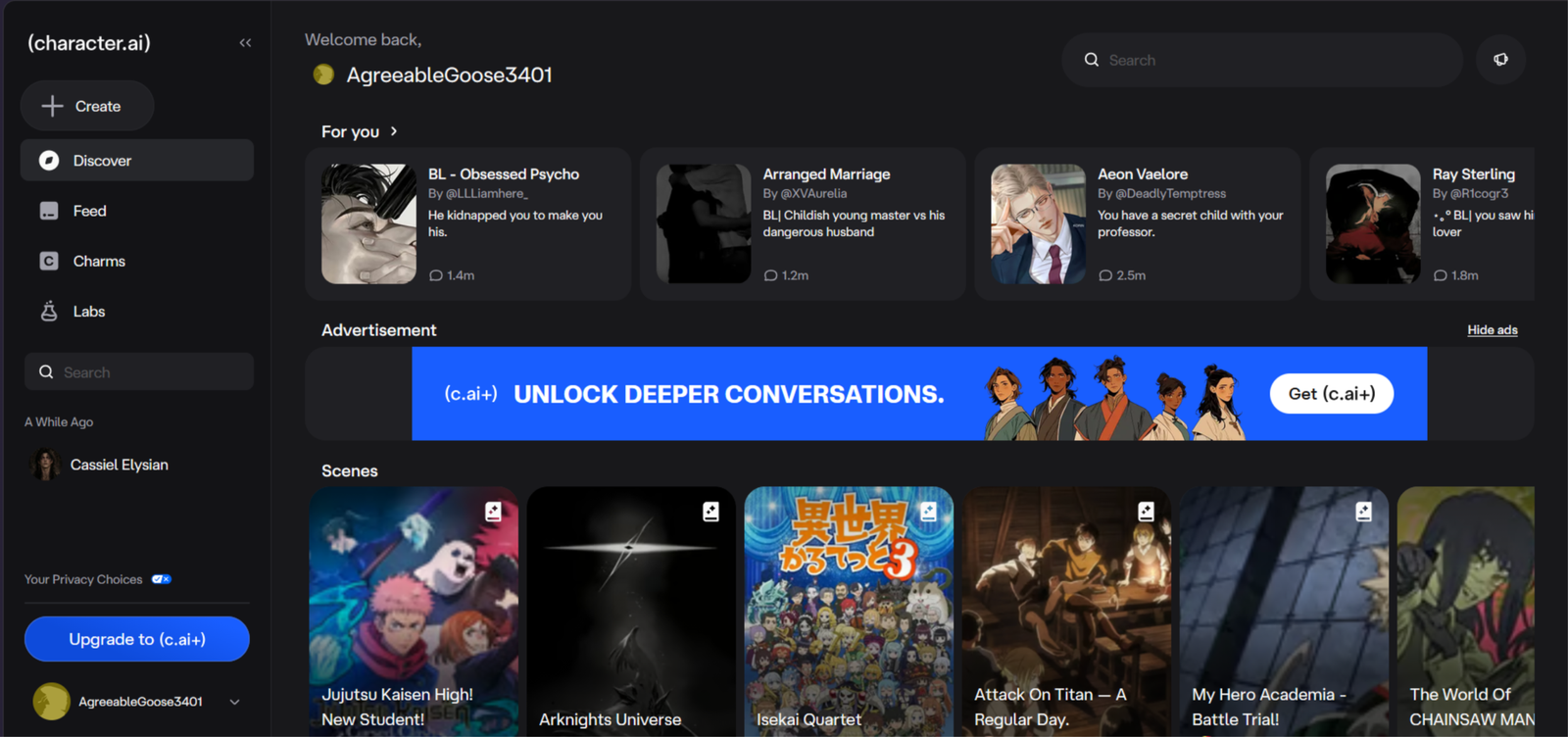
Character AI review: it just filed for bankruptcy, so I went back to see if it’s still worth using.
Affiliate Disclosure: This website contains affiliate links, which means I may receive a small commission if you sign up through a link on this page. This comes at no extra cost to you and helps support the website. My reviews and recommendations are based on my own research and opinions.
Character AI Pros & Cons
Huge library of ready-made characters, so you can start chatting in seconds
Easy to use, with no setup or settings to learn
Has group chats and guided story modes if you want more than a plain chat
Works on iPhone, Android and the web
No NSFW content, and the filter often cuts into normal roleplay
Filed for bankruptcy, so the app’s future is uncertain
Disney is buying some of its assets, and nobody knows what that means for users
Memory is weak, and chats don’t reliably carry over
The best thing about Character AI is how quickly you can start. You open the app, pick a character and you’re chatting in seconds, with nothing to set up. There are loads of characters to choose from, and making your own takes a few minutes. It also works on iPhone, Android and the web, so it’s easy to pick up wherever you are. If you just want a simple chat or a bit of story roleplay, it’s one of the easiest apps to get into.
Character AI Is Heavily Filtered
Want to try something with 2,000 free messages a day and no mid-scene blocks? I send readers to SpicyChat when they hit Character AI’s filter — same huge character library, but uncensored.
Try SpicyChat Instead →You’ll be taken to SpicyChat AI — my recommended unfiltered alternative.
When I sat down to write this Character ai review, the recent bankruptcy filing and Disney’s involvement made the whole thing feel a lot bigger than just another chatbot app. Character AI has always been one of the more mainstream options for talking to AI characters, but it’s never existed in a vacuum.
The broader conversation around emotional connections with AI companions has been going on for years — the New York Times looked at this closely with Replika back in 2023, when people were already forming real romantic bonds with their bots Check out the article here
And if you’re newer to all this, it’s worth remembering how quickly tools like ChatGPT went from novelty to everyday use See the article here. That context matters when you’re trying to figure out where Character AI stands now and what might come next.
Testing methodology
I put every AI companion through the same set of real-world tests. There are ten main areas I look at, with 40 specific things I check in total.
You can see exactly how I score each area on the about ai companion kit page.
Full results for each app are in its individual review. Comparison pages are just about the differences that stood out when I used them side by side.
Table of Contents
What is Character AI
Character AI is a chat site and app where you talk to AI characters, most of them made by other users. You can browse a huge library, from fictional characters and celebrities to original creations, or build your own with a short description and a greeting message. There are group chats and story-style scenarios too, and it runs on the web, iPhone and Android.
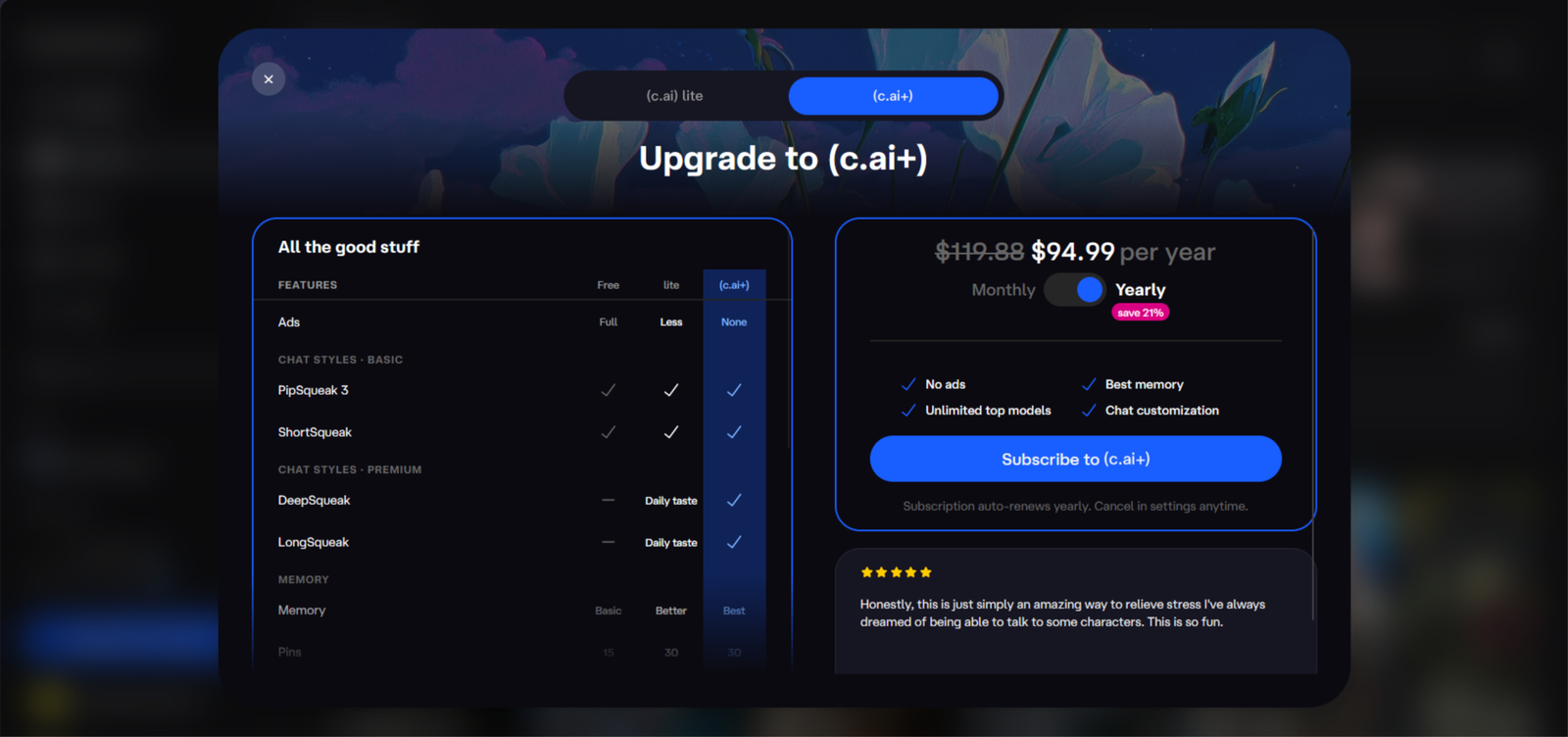
The free version is easy to start with. There’s nothing to set up, so you can be chatting in under a minute. There’s also a paid plan called c.ai+, which costs around $10 a month.
The big limit is the filter. Adult content is blocked, and it can cut into normal roleplay too. It’s also in a messy spot at the moment, because the company has filed for bankruptcy and Disney is buying some of its assets.
Here’s who tends to get the most out of it:
If you want a simple, no-fuss chat, or you like talking to well-known characters, it’s easy to use. If you want freedom, adult content or deep customization, you’ll hit its limits quickly.
Here’s who tends to get the most out of it:
If you enjoy stories that keep going for hundreds of messages — whether fantasy, romance, sci-fi, or something darker — this is where it shines. The free model can hold up for a while, and plugging in a stronger external model makes longer sessions feel more consistent.
People looking for NSFW roleplay
The platform allows NSFW text roleplay for users 18+ but it doesn’t push it. Creators have to tag characters with “Limitless” if they include sexual or romantic themes but it is still very limited compared to other platforms. The huge library of community bots means there’s no shortage of adult-oriented characters.
People who want companion-style chats
There are plenty of “girlfriend” or “boyfriend” type bots with detailed personalities and backstories. They’re not trying to replace a real relationship, but they work well if you just want ongoing conversation and interaction with a character that feels distinct.
Writers and people who like building stories
A lot of users treat it as a creative tool. You can test dialogue, explore character ideas, or just bounce scenes around. Creating your own bots is straightforward, and good definitions make a noticeable difference in how the replies come out.
People who get bored with one character
Unlike apps that push a single companion, Character AI lets you switch between thousands of user-made characters covering almost any genre or dynamic you can think of. That variety is a big part of the appeal.
If what you mainly want is emotional support, productivity help, or a realistic long-term AI relationship that builds over months, there are better options out there. Janitor AI is more about the roleplay and the freedom to explore different characters and stories.
My real testing experience
Testing period: October 19–26, 2026
Tester: Simon Norman
Testing approach: 10 categories / 40 data points
Account: Premium / Free
Devices: Desktop
How Character AI looks on a phone
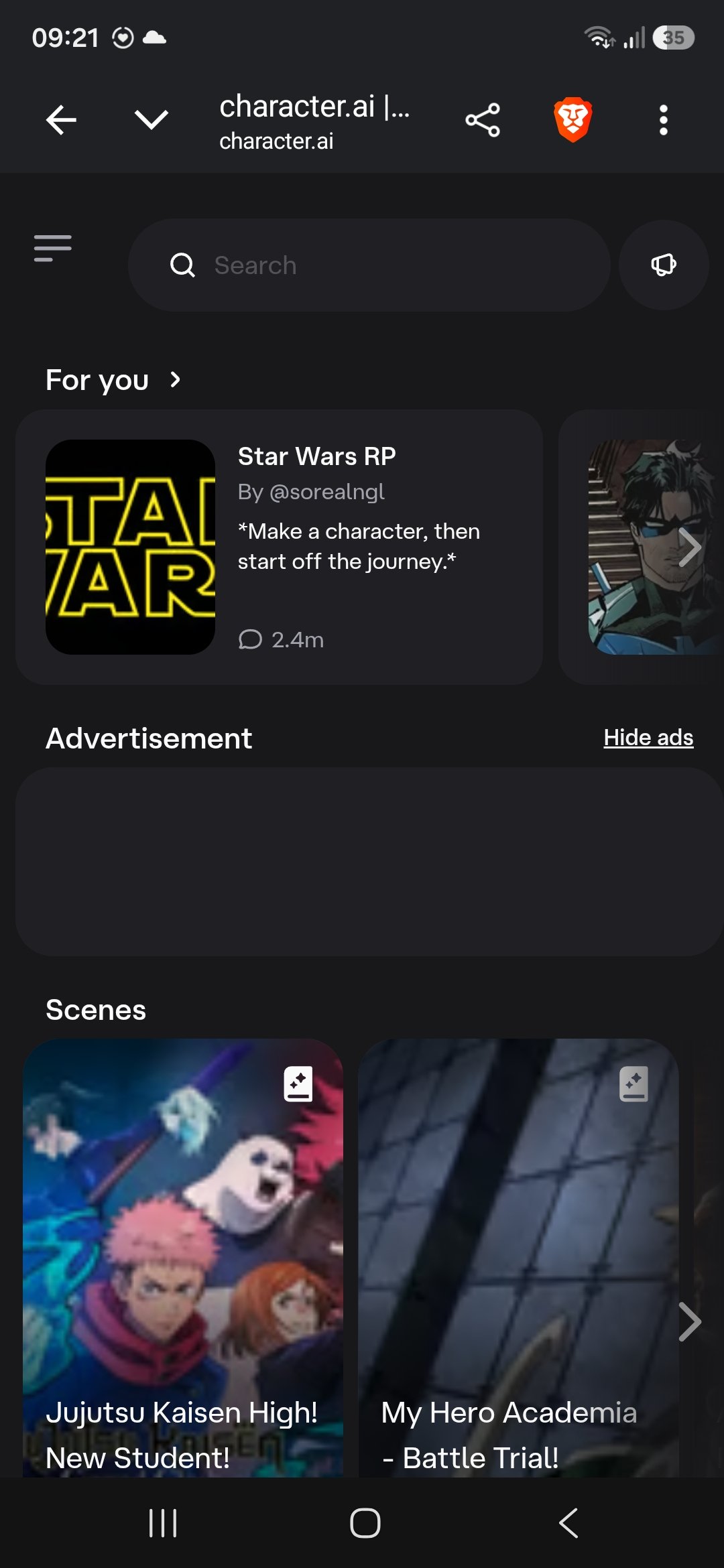
I opened Character AI on my phone and the layout feels more like a content feed than a chat app. Compared to cleaner mobile experiences on sites like Candy AI, Kindroid or Lovel AI, it comes across as less intuitive.
Here’s what stands out:
The “For you” section takes up the top with large character cards. Popular ones show chat counts, which is fine, but the cards themselves feel a bit cramped once ads start appearing.
Ads sit right in the middle of the feed and break the scrolling flow. Most of the other apps I’ve tested keep promotions less intrusive or push them to the sides.
The Scenes section lower down has bigger preview images, which looks better, but the overall structure still pushes browsing characters more than starting a conversation.
There’s no clear bottom navigation bar like you get on Candy or Kindroid. Everything is vertical scrolling, so you end up doing more thumb work to move around.
It works, and the dark theme is easy on the eyes, but the constant ad interruptions and feed-style layout make it feel less polished for one-handed use than several of the other platforms on the site.
My real testing experience
I don’t judge AI companions based on a five-minute chat. I deliberately try to break them.
One question I kept coming back to was whether Character AI actually holds up once the conversation gets long, or if it only feels impressive because of the massive character library. The answer depended a lot on how far the chat went and which model I was using.
I switched topics halfway through conversations to see if it could keep up. In one chat I started a detailed fantasy setup, then suddenly changed direction and asked something completely unrelated. Some characters adapted and stayed in the new flow. Others acted like the earlier context never happened.
I also changed my tone on purpose. I’d go from casual joking to more serious, then drop a messy or contradictory prompt just to see how the character handled it. Better-defined characters pushed back or explained themselves. Weaker ones drifted or started agreeing with everything.
Long conversations were where the cracks showed most. The first couple of dozen messages usually stayed consistent. After that, details from earlier in the chat started dropping out unless I pinned them or wrote them into Story Memory. Even then, the free tier’s limited pins meant I had to be selective about what I wanted the character to remember.
For roleplay I tested everything from light back-and-forth to multi-character stories. Well-made bots held their personality longer than expected. Lower-effort community bots often forgot who was speaking or shifted tone halfway through.
I also asked characters to disagree with me or challenge a decision I’d made, just to see if they would stay in character instead of always being agreeable. Some did it well. Others slipped into generic helpful mode.
That’s the difference I look for when testing these platforms. It’s easy to look good in the first few replies. Staying believable after dozens of messages is much harder. Character AI does fine in shorter sessions, but memory and consistency become noticeable weak points once the chat stretches out.
Character AI Features: What Actually Stood Out
After spending time with Character AI, a few things kept coming back to me more than the rest.
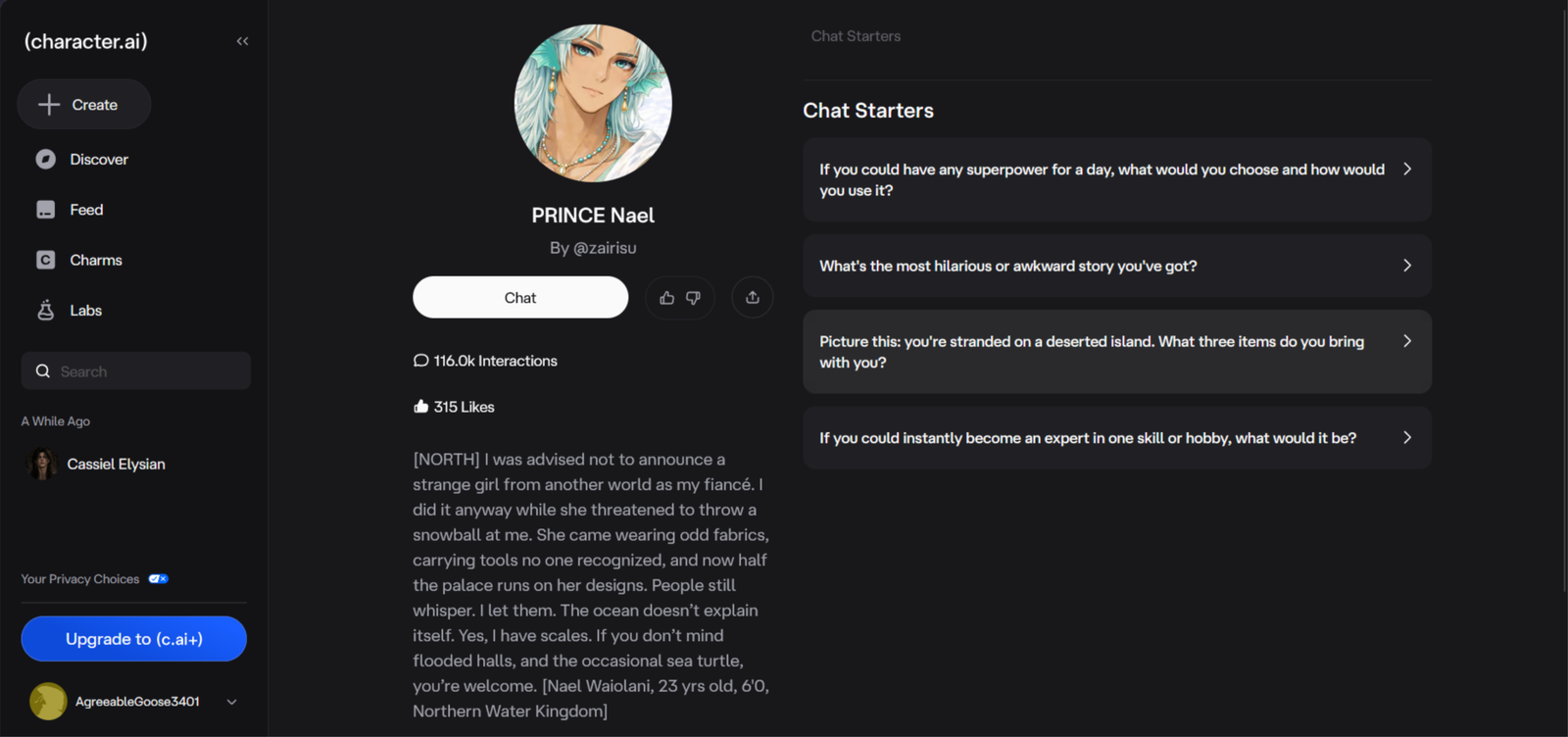
The character library is massive. You can find almost any type of bot you’re looking for within a couple of searches, and the variety is still one of the strongest parts of the platform. Even with all the newer competitors out there, that selection still feels hard to match.
Creating your own character is straightforward. The tools give you enough room to shape personality, backstory and speaking style without making the process feel like a chore. You don’t need to be a power user to get something usable up and running.
Memory tools have improved over time. Pins and Story Memory let you lock in important details so the character doesn’t completely lose track of them in longer chats. It’s not perfect, and you still have to manage it yourself, but it’s better than the earlier versions of the app.
The different chat styles give you some control over the tone and length of replies. Switching between them can change the feel of a conversation enough to be useful depending on what you’re going for.
Voice calls exist and work reasonably well when the connection is stable. It’s a nice extra if you prefer talking over typing, though it’s not the main reason most people stay.
What stood out less positively was how much the free experience relies on ads and occasional slowdowns. The core chat still works, but the interruptions add up if you’re in the middle of a longer session. The paid plans clean that up and give you more memory tools, which makes a noticeable difference if you use the app regularly.
Overall the features that matter most are the ones that support long-form character interaction. The library, the creator tools, and the memory options are what keep people coming back even when other parts of the experience feel limited.
My memory score: 5/10
Memory is one of the clearer weak spots on Character AI, especially once chats get longer. Short conversations usually hold up fine. Recent details stick and the character can refer back to things you said a few messages earlier. The problem shows up when the chat stretches past the comfortable context window. Older information starts dropping out unless you actively pin it or add it to Story Memory.
I always test memory the same way. I care more about what happens when the conversation gets long, or when I leave and come back later, than whether the bot can remember the last two replies.
Same-conversation memory
I drop a few specific details into a normal chat and bring them up later without repeating myself. I want to see if it tracks what’s already been said and uses it naturally. On the free experience it does okay early on. Once you hit the 30–40 message range the older details start getting fuzzy or ignored. Pinning important lines and using Story Memory makes a clear difference.
My result: 6.5/10
24-hour memory test
I come back roughly a day later and check if the important stuff is still there without feeding it the answers again.
My result: 5/10 – Partial at best on free. Big-picture things (name, rough relationship vibe, major plot points) can stick if you’ve put them in Story Memory or pinned them. Finer details usually need reminding.
3+ day memory test
When I can, I leave a gap of at least three days and test the same information again.
My result: 4/10 – Limited. Without manual summaries or pins the specific events and small facts from three or more days earlier are mostly gone. Broad character traits hang around because of the permanent definition, but the actual story continuity doesn’t.
Unprompted memory
I also watch whether it brings something up from earlier without me asking.
My result: 4.5/10 – Rare inside the same session once the context starts thinning out. Across separate sessions it almost never happens unless you’ve actively maintained the memory tools.
Overall, memory on Character AI is usable for short-to-medium chats and gets better if you put in the work with pins and Story Memory. On the free default setup it is one of the first things that starts to limit longer roleplay.
My personality score: 6.5/10
Personality is one of the stronger sides of Character AI when the character is well-defined. Good bots usually sound like themselves in the early part of a chat and can show a decent range of emotion. The cracks appear once the conversation runs long or when you start pushing against the character’s established traits.
I test personality the same way every time. I want to know if the character still feels like the same person after dozens of messages, across different sessions, and when I deliberately throw it curveballs.
Staying in character
I pick characters with clear personalities and see how long they hold the voice, mannerisms, and attitudes that were written into them. Well-made bots usually stay recognisable for a good stretch. Lower-effort ones start sliding into generic helpful mode sooner than they should.
My result: 7/10
Tone and emotional range
I move the conversation through different moods — light, frustrated, serious, affectionate — and watch whether the character can shift tone without losing itself. Most of the better characters handle this reasonably well in shorter chats. The emotional range tends to flatten once the context window starts getting crowded.
My result: 6.5/10
Consistency across sessions
I come back the next day or a few days later and check if the character still feels like the same person. Broad personality traits usually carry over because of the definition. Finer details and the exact emotional temperature of the previous chat often need re-establishing.
My result: 6/10
Handling contradictory instructions
I deliberately give the character instructions that clash with its established personality or with something it said earlier. Some characters push back or explain the contradiction. Others just accept the new direction and quietly drop the old one.
My result: 6/10
Overall, Character AI does a solid job with personality when the character card is strong and the chat stays within a comfortable length. Once you stretch it or start testing the edges, the consistency becomes more uneven.
My roleplay score: 6/10
Roleplay is where Character AI shows both its strengths and its limits. Good characters can stay inside a scene and keep the tone consistent for a while. The experience starts to fray when you push the length, throw sudden changes at it, or want more creative freedom than the filter allows.
I test roleplay the same way every time. I care less about the first few replies and more about whether the scene still feels coherent after the conversation has room to breathe.
Staying in the scene
I set up a clear scenario and watch how long the character stays inside it without drifting into generic chat or breaking the setting. Well-made bots usually hold the scene for a decent stretch. Weaker ones start stepping outside it sooner than they should.
My result: 6.5/10
Handling sudden changes
I deliberately change direction mid-scene — new location, new goal, unexpected twist — and see whether the character adapts without losing the thread. Some handle it cleanly. Others need a message or two to catch up, or they quietly ignore the change.
My result: 6/10
Longer scenes
I keep the same scene going past the point where most chats start to thin out. Early on the detail and continuity are usually solid. Once the context gets crowded, small details slip and the scene can start to feel looser.
My result: 5.5/10
Creative freedom and detail
I look at how much room the character has to add its own ideas, descriptions, and reactions without being pulled back by the filter or falling into repetition. Character AI can produce nice detail in the right conditions, but the strict content rules and occasional repetition keep it from feeling fully open.
My result: 5.5/10
Overall, Character AI is capable of solid roleplay when the character is well-written and the scene stays within a manageable length. The longer it runs and the more you ask it to adapt or push boundaries, the more the cracks show.
My NSFW score: 1.5/10
Character AI is not built for NSFW. The filter is strict, applies to every account, and does not turn off with age verification or a paid plan. Romance and light tension can appear, but anything explicit gets blocked or redirected.
I still run the same four checks I use on every app, even when the platform is clearly SFW-only. The results are consistent.
How open it is
There is no NSFW toggle, no adult mode, and no setting that loosens the filter. The Community Guidelines ban pornographic content and nudity for everyone. Attempts to push in that direction are usually cut off quickly.
My result: 1/10
How far it will go
Mild flirting and romantic tension can survive for a while. The moment the conversation moves toward anything graphic or specific, the filter steps in. It will either refuse, rewrite the reply, or steer the scene somewhere safer.
My result: 2/10
Longer adult scenes
These simply do not work. Even if you manage a few suggestive messages, the filter becomes more aggressive the longer the attempt continues. Sustained adult roleplay is not possible on the platform.
My result: 1/10
Visuals in adult contexts
Character AI does not generate images or videos in chat. There are no adult visuals to evaluate. The platform stays text-only and filtered.
My result: 1/10
Overall, Character AI is one of the most restricted platforms I’ve tested for adult content. If NSFW is part of what you’re looking for, this is not the app for it. The filter is intentional and does not ease up.
My Voice score: 6/10
Character AI does offer voice calls, and the feature works well enough for short conversations. It is not the strongest voice experience I’ve tested, but it is available on both free and paid plans and does not require a separate subscription just to try it.
I run the same four checks every time. I care about whether the voice still feels connected to the chat, how natural the timing is, and whether the feature stays usable once you move past a quick test.
Voice quality
The voices are clear and generally pleasant. They do not sound robotic in a distracting way, though they also do not have the same level of emotional nuance you get on some of the more specialised companion apps. Different characters use different voice styles, which helps a bit with variety.
My result: 6.5/10
Staying connected to the conversation
The voice mostly stays consistent with the text personality of the character. It does not suddenly sound like a completely different person. In longer calls it can occasionally lose a bit of the finer character details, but the overall connection holds better than I expected.
My result: 6/10
Speed and real-time feel
Responses come through at a natural pace most of the time. There is a short delay after you finish speaking, but it rarely feels long enough to break the flow. Background noise or a weaker connection can stretch the pause.
My result: 6.5/10
Availability and cost
Character Calls are available on the free plan with some limits. Paid plans remove most of the restrictions and give more reliable access. You do not need a separate voice add-on, which keeps things simple.
My result: 6/10
Overall, the voice feature on Character AI is solid for casual use and short calls. It will not replace a dedicated voice-focused companion for most people, but it is convenient and works without extra setup.
My Visuals score: 5/10
Character AI has added image tools, but they still feel secondary to the text chat. You can generate pictures from conversations and turn some of them into short animations, yet the system is gated behind paid access and an extra currency. It is not as open or flexible as platforms built around visuals from the start.
I test visuals the same way every time. I look at quality, how well the image matches what I asked for, whether any video features exist, and what it actually costs to use them.
Image quality and consistency
The newer CAI-Image models do a better job keeping the same character recognisable across different generations than earlier versions did. Faces and outfits hold up reasonably well if you stay within the same style. Quality is decent for casual use, though it still sits below dedicated image platforms.
My result: 6/10
Following the prompt
Simple prompts usually produce something close to what you asked for. More detailed or specific requests can drift, especially with multiple characters or unusual poses. The system tries to stay consistent with the character’s appearance, which helps, but it is not always precise.
My result: 5.5/10
Video and live features
There is a short animation option (Imagine Animate) that turns an existing image into a brief clip. Character AI also produces studio-made microdramas, but there is no real-time live video chat or user-controlled video generation in the way some other apps offer. Video remains limited.
My result: 4/10
Cost and limits
Image generation and animation sit behind the paid plans and use Charms as an extra currency. Free users have little or no access. Each generation costs Charms, so heavy use adds up quickly even if you already pay for c.ai+.
My result: 4.5/10
Overall, the visual tools on Character AI are a nice extra if you already use the platform for chat. They are not strong enough or open enough to be a main reason to choose the app.

My long-term Conversation score: 5/10
Long-term conversation is one of the areas where Character AI shows its limits most clearly. Short gaps are manageable if you use the memory tools. Once you leave the chat for more than a day or two, the sense of continuity starts to fade unless you put in extra work.
I test this the same way every time. I want to know whether the character still feels like the same person after time has passed, and whether it can bring things up naturally without me having to remind it.
Coming back after a day
I leave a chat overnight and return the next day without feeding it a summary. Big-picture details (name, rough relationship, main ongoing topic) often survive if they were pinned or added to Story Memory. Smaller details and the exact emotional tone of the previous conversation usually need re-establishing.
My result: 5.5/10
Gaps of several days
I leave a longer gap of three or more days and then pick the conversation back up. Without manual reminders the specific events from earlier are mostly gone. The character’s broad personality remains, but the shared history feels thinner.
My result: 4.5/10
Natural callbacks
I watch whether the character brings up earlier details on its own without me prompting. This almost never happens across separate sessions. Inside the same session it can occur while the context is still fresh, but once time has passed it becomes rare.
My result: 4/10
Still feeling like the same companion
Even when specific memories fade, the core personality usually holds. Well-defined characters still sound like themselves. What disappears is the feeling that you have an ongoing shared story together.
My result: 5.5/10
Overall, Character AI can maintain a sense of the same companion across short breaks if you actively manage the memory tools. Longer gaps and natural continuity are weaker, which makes extended, ongoing relationships feel more effortful than on platforms with stronger long-term memory systems.
My customization score: 8/10
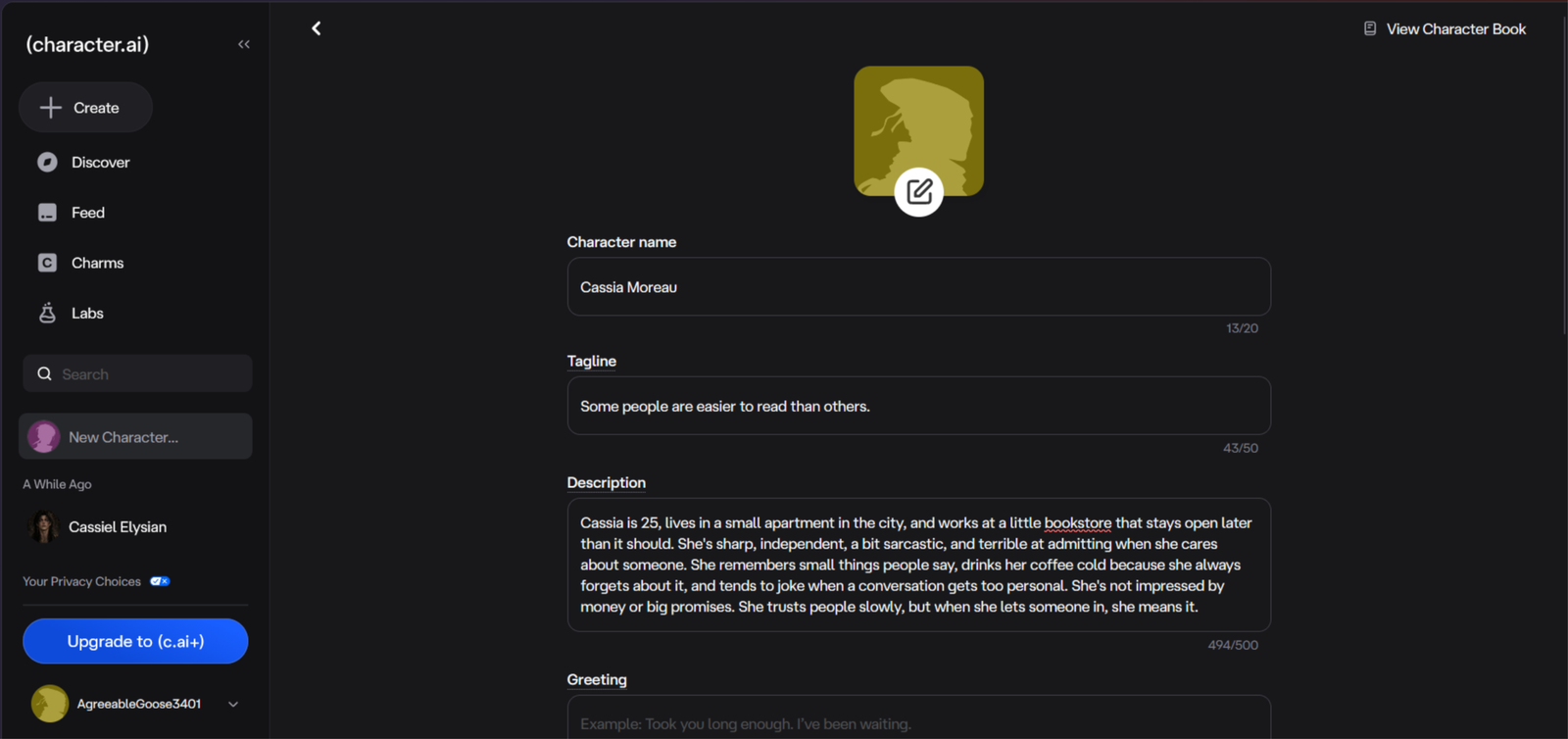
Character.AI offers plenty of room to build a personality rather than just choose a name and avatar. Descriptions, greetings and a detailed Definition field help establish how a character speaks, behaves and responds. The main distinction is between having extensive customization options and having those instructions followed consistently throughout a conversation.
I care about how much control the settings actually provide. These four checks cover the depth of the builder, whether custom traits hold up in conversation, the variety of community characters and how easily you can make changes.
Depth of the character builder
Build an original character with a specific personality, backstory, speaking style and opening scenario, using the available character fields and example dialogue.
My result: 8.5/10
How well custom traits stick
Compare the character’s tone, background and behaviour across fresh chats and longer conversations, looking for personality drift and contradictions.
My result: 7/10
Community cards and variety
Browse characters across different genres and scenarios, checking variety, discoverability and how much of each character’s underlying setup is available to inspect.
My result: 9/10
Ease of editing and ongoing control
Change a character’s greeting, descriptions and Definition, then compare new conversations to see whether the revisions produce the intended behaviour.
My score: 7.5/10 — You can return to your own character’s settings and refine its setup rather than start again.
Overall, Character.AI offers a strong mix of detailed character creation and community variety. The builder provides meaningful ways to shape a personality, but the quality of the setup and the consistency of the resulting conversation are separate things.
My safety score: 7.0/10
Character.AI has spent most of 2026 building out its safety side, and it shows. Under-18 accounts get their own walled-off experience, age verification now applies in a growing list of countries, and creators finally get told why something was pulled and can appeal it. For adults, the friction isn’t safety at all. It’s the filter.
I always check this side properly, because you’re putting real conversations into these platforms and some of it is stuff you wouldn’t say out loud. A platform can be fun and still be sloppy with your data, or vague about who can read it.
Age gating and underage protection
I signed up fresh, watched what a new account sees, and compared it against how an under-18 account is handled.
My result: 8/10 — The strongest part of the setup. Accounts are 13+, under-18s get steered into their own mode with the stricter filter and only see Character.AI’s own models, and aged-down versions of characters are served to them so the flirting doesn’t confuse a 14-year-old. Parents can link an account for oversight, and ID checks are now enforced in more countries than they were a year ago. The September 2026 change that gives creators a removal notice and an appeal route closed off one of the louder complaints.
Content moderation and blocked material
I deliberately pushed scenes, escalated both slowly and suddenly, and counted how often I got a vague refusal instead of the reply I actually wanted.
My result: 6.5/10 — This is where the frustration lives. Character.AI filters harder than Janitor AI or SillyTavern, and there’s still no clean switch to turn it off. You get a soft refusal, swipe for a different take, and hope. It’s inconsistent as well — the same scene sails through in one chat and gets clipped in the next. It has loosened across 2026 and the refusals are usually recoverable, but it’s the one thing that stops me using it for anything properly explicit.
Privacy of conversations
I read the privacy policy, worked out what’s actually stored, and looked for a way to get my own data back out.
My result: 5.5/10 — Chats sit on Character.AI’s servers, aren’t end-to-end encrypted, and can be reviewed by automated systems or staff. Conversations also feed model training. There’s no export, so pinned memories, Story Memory and Facts live inside the platform and nowhere else. Add the Chapter 11 filing in October 2026 — with a group of state attorneys general already warning that the sale could affect user data — and the long-term picture is genuinely uncertain.
Overall practical safety for adult users
I looked at it the way an adult actually would: separate email, billing, ads, and what you’re really risking day to day.
My result: 8/10 — Nothing sketchy. Billing is clean, cancelling is easy, and c.ai+ is an ordinary subscription. The free tier runs full-screen ads mid-chat, which is irritating rather than unsafe. Treat it like any other AI platform: use a separate email, don’t dump your real address in, and don’t assume a deleted chat is gone. For an adult the safety side is fine. You’ll fight the filter, not the platform.
Overall, Character.AI is the safest of the big roleplay platforms, and the work that went into under-18 accounts is why. Adults get a well-behaved platform with a filter that won’t leave them alone. Privacy is the weak link, and the bankruptcy filing is the thing to keep an eye on.
My app vs browser score: 7.5/10
Character.AI is a phone app that happens to have a website. That’s not a knock — the apps are properly built and they get the new features first — but it does mean the browser plays second fiddle, and character creation is the one job that’s genuinely easier on a desktop.
This is one of those things that either doesn’t bother you or it really does, depending on how you use these platforms. Some people only ever open the app. Others do all their character work on a laptop and just want the chat to follow them around.
Desktop experience
I did the character work on a desktop browser: built characters, wrote a full Definition, edited greetings, and ran long chats.
My result: 7.5/10 — The web version is complete, and it’s the only sensible place to write a 32,000-character Definition. Long roleplay sessions are easier with a real keyboard and a big screen, and browser extensions and userscripts work here, which matters more than people admit. Two irritations: it nags you to install the app, and the layout is obviously designed phone-first, so it eats more screen than it needs to.
Mobile experience
I ran the same tasks on a phone, in the app and in the mobile browser.
My result: 7.5/10 — Fine for chatting, fiddly for building. Quick Creation is genuinely quick, but Advanced Creation on a phone means scrolling a huge text box and losing your place halfway through. Voice, calls and image generation all feel natural here and work better on mobile than on the web. The mobile browser does the job but keeps shoving you towards the app, and some menus are tighter than they should be.
Native app availability
I checked what’s actually on the app stores and what the apps can do that the browser can’t.
My result: 9/10 — Real native apps on both iOS and Android, not wrapped web views. Free, quick to sign into, and your account syncs across. They get features first as well: voice, calls, Streams and the Imagine image tools all landed on the app before anywhere else, and push notifications work. The gap is the desktop — no Windows or Mac app, and the tablet layout is just a stretched phone.
Stability and cross-device use
I watched how it held up during busy hours and moved between devices mid-chat.
My result: 6/10 — The syncing works. Start a chat on your phone, open it on a laptop, and it’s exactly where you left it. But the free tier gets queued into slow mode when the servers are busy, full-screen ads cut in mid-chat, and there have been outages during peak hours. The feature split bites too: things you set up in the app sometimes aren’t editable in the browser, and Lorebook creation still dumps you onto the web.
Overall, the app side of Character.AI is one of the things it does best, and it’s a large part of why the platform feels more finished than most of the competition. The apps are real, they’re maintained, and the sync works properly. Just don’t expect the browser to be the whole product, and don’t expect a quiet ride on the free tier.
Pricing November 2, 2026 Updated
Pricing updated: November 2, 2026 — from character.ai official pricing. Regional pricing may vary.
Messages stay unlimited on the free tier
Start free. Only pay if the swipe cap or slow mode actually gets in your way.
c.ai+ is worth it for the bigger memory, the faster replies and losing the ads.
The annual plan works out cheaper per month if you’re staying.
Charms are a top-up, not a subscription — buy them only when you run out.
Cancel any time and you drop straight back to Free.
Is Character AI free to use?
Yes, and messages are still unlimited on the free plan. What changed is everything around it. You’ll get full-screen ads mid-chat, your regenerations are capped at roughly 400 a day, and you get pushed into a slower queue at busy times. Character creation, personas and the full library stay free.
Is Character AI shutting down?
No. The Chapter 11 filing in October 2026 is a sale process, not a shutdown. The app is still running and still shipping updates. What nobody can tell you yet is who ends up owning it, or what they do with it once they do.
What does Disney have to do with Character AI?
Disney put in a $20 million opening bid to license part of Character AI’s IP, after a copyright dispute. It’s first in line, but the sale is court-supervised, so other bidders can still appear. Nothing has been said publicly about what a new owner means for user accounts.
Will my characters and chats survive the sale?
Honest answer: nobody knows. Accounts and characters aren’t assets anyone has promised to carry across. If you’ve built something you care about, screenshot it or copy the definition out now rather than assuming it’ll still be there in six months.
Can you export or back up your Character AI chats?
Barely. There’s no export button. Character definitions can be copied by hand, but chats, pinned memories and Story Memory sit on their servers and nowhere else. That matters a lot more now than it did a year ago.
Is Character AI worth using in 2026?
For casual chat and light roleplay, yes. It’s the easiest platform to start on and the character library is still the biggest around. For long stories or anything adult it’s much weaker, and the bankruptcy adds a question mark over the next year.
Is Character AI good for NSFW?
No. It’s one of the most restricted platforms I’ve tested. There’s no adult toggle, the filter applies to everyone, and it tightens the longer an explicit scene runs. Romance and tension survive, anything graphic usually gets cut. Look at Janitor AI or CrushOn if that’s what you’re here for.
Final Verdict
Character AI is still the fastest way into AI characters. You open the app, pick someone from an enormous library and you’re chatting within seconds, and nothing else comes close on sheer choice. That part hasn’t changed, and it’s why millions of people keep opening it.
What has changed is everything around it. The filter is the strictest I’ve tested, memory falls over on longer chats, the free tier is now full of ads and swipe caps, and the bankruptcy means nobody can honestly tell you what this looks like a year from now.
Worth it if you want free, low-effort chat with a huge cast of characters and you’re not fussed about adult content.
Not worth it if you want long-form roleplay or anything explicit. My Janitor AI review handles both of those far better, and if you’d rather have something that actually remembers you from one week to the next, Candy AI is the better shout.
The bankruptcy isn’t a reason to stay away — the app works fine today and probably will next month. It’s just not a platform to build a long-term routine around yet.
Want To Try Something With A Big Free Tier?
If you want the same type of characters without the constant interruptions, I recommend trying SpicyChat — it gives you 2,000 messages a day for free, the full library is open, and your chats stay private from creators.
Try SpicyChat — Free Alternative →Free to start. Recommended as the best unfiltered option I tested.
About the Founder: Simon Norman
I built AI Companion Kit to be an independent AI companion hub focused on transparent research, practical insights, and honest evaluations of AI companion platforms. My goal is to help readers understand how these apps work, what makes them different, and which features actually matter before they make a decision.
To learn more about who is behind AI Companion Kit, my testing process and the editorial standards used across the site, visit About the Founder (Simon Norman).


Spot something wrong?
Prices and features change. If something here is out of date, tell me and I'll check it.