Last updated: September 29, 2026
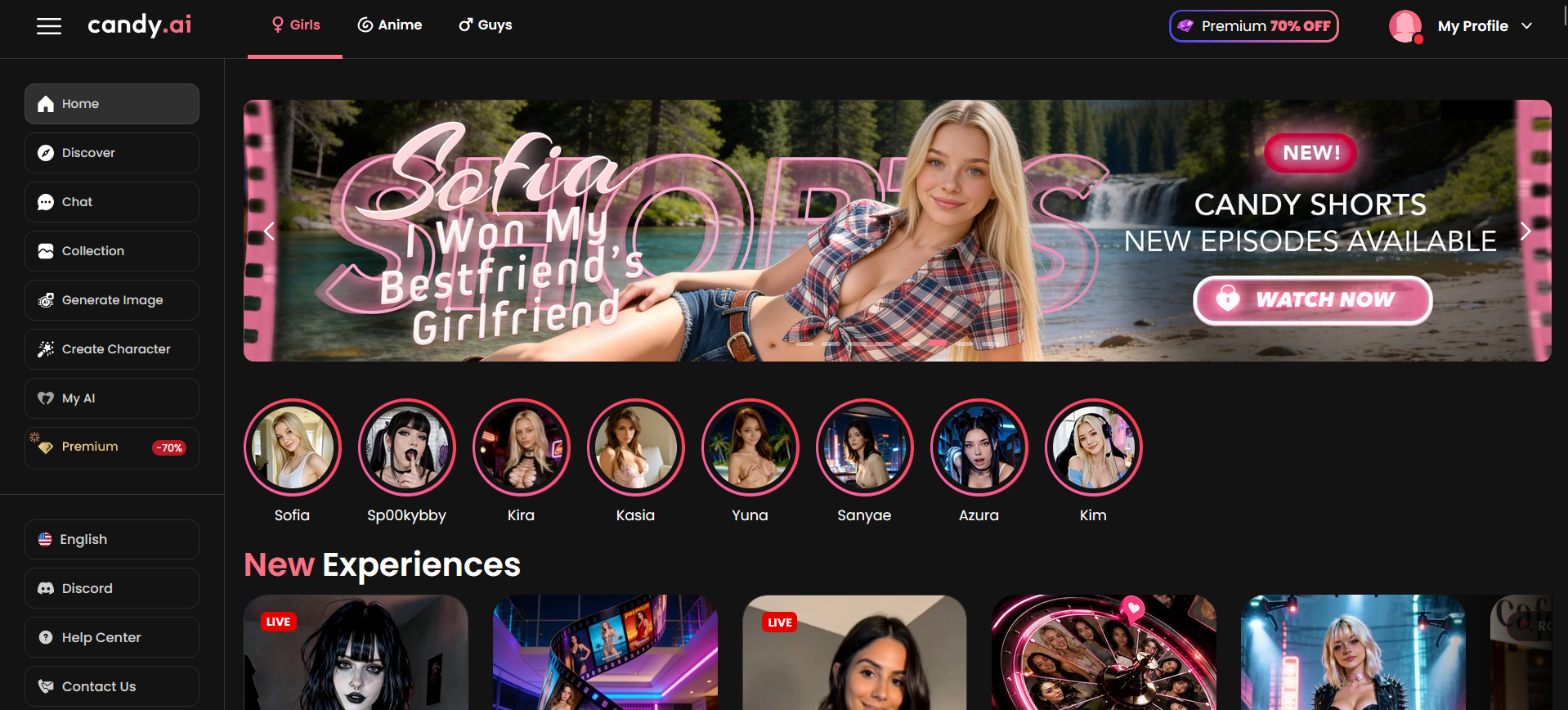
Candy AI Pros & Cons
High-quality, realistic image generation
Strong character customization and variety
Engaging conversations and immersive roleplay
Voice and Live Action video features
Token system can make heavy use expensive
Memory can occasionally lose context in longer chats
Some premium features require additional tokens
Voice/video quality can be inconsistent
A great choice for visual-focused AI companionship, immersive roleplay, and customizable characters, but the token costs and occasional memory issues keep it from scoring higher.
Affiliate Disclosure: This website contains affiliate links, which means I may receive a small commission if you sign up through a link on this page. This comes at no extra cost to you and helps support the website. My reviews and recommendations are based on my own research and opinions.
Testing methodology
I put every AI companion through the same set of real-world tests. There are six main areas I look at — conversation quality, memory and continuity, roleplay and immersion, images and visuals, voice and extra features, and overall value — with 24 specific things I check in total.
You can see exactly how I score each area on the about ai companion kit page.
Full results for each app are in its individual review. Comparison pages are just about the differences that stood out when I used them side by side.
What You’ll Find Here
If you’re mainly after realistic AI-generated images and a companion you can customize from the ground up, Candy AI is one of the better options available. Just don’t expect flawless long-term memory or endless conversation depth—we’ll cover where it shines and where it falls short in this Candy ai review.
What is Candy AI
Candy AI is an AI companion app focused on customizable characters, roleplay, and AI-generated images. After seeing it recommended so often, I wanted to find out if it was actually worth paying for or just another platform with good marketing. I’ve tested plenty of AI companion apps, and while Candy AI impressed me with its character creation and visuals, the conversations weren’t always as natural or consistent as I expected. If you’re wondering whether it’s the right AI companion for you, this Candy AI review should help you decide.
Who This App Is Actually For
Candy AI isn’t trying to be the deepest AI companion on the market. After spending time with it, I found it’s at its best when you lean into character creation, roleplay, and visual interactions rather than expecting long, emotionally rich conversations. These are the people I think will get the most out of it.
People who enjoy AI roleplay
Candy AI is a good fit if roleplay is your main reason for using an AI companion. I found it handled different personalities and scenarios well, making it easy to create conversations that felt fun and engaging without needing much setup.
People who want customizable AI companions
One of the biggest strengths is how much control you have over creating your companion. If you like experimenting with different personalities, appearances, and conversation styles, you’ll probably enjoy spending time here.
People looking for AI-generated images
If creating and receiving AI-generated images is high on your priority list, Candy AI does a better job than many of the competitors I’ve tested. It’s one of the features that makes the app stand out instead of feeling like just another chatbot.
People interested in NSFW conversations
Candy AI gives users plenty of freedom for adult conversations and roleplay. If that’s your main reason for trying an AI companion, you’ll likely find it less restrictive than many mainstream alternatives.
People who prefer casual conversations
I found Candy AI works better for shorter chats than ongoing conversations that build over weeks. If you’re looking for something to chat with now and then instead of forming a long-term companion, it fits that style well.
People who enjoy experimenting with different characters
Rather than sticking with one companion forever, Candy AI makes it easy to switch between different characters and personalities. If you enjoy trying new scenarios instead of building one continuous relationship, that’s one of its biggest strengths.
After testing it, I wouldn’t recommend Candy AI to someone whose biggest priority is deep emotional conversations or exceptional long-term memory. There are stronger options for that. But if roleplay, customization, and AI-generated images matter most to you, it’s an easy app to recommend.
My Real Testing Experience
Testing period: August 12–18, 2026
Tester: Simon Norman
Testing approach: 6 categories / 24 data points
Account: Free + Janitor+
Devices: Desktop
You can make your own character on Candy AI without paying. The free plan lets you chat a bit and try the character creator, but images, voice, video and longer conversations push you toward a paid plan pretty fast.
Once you’re on Premium things open up. Unlimited text is included and you get a monthly pile of tokens for pictures, short videos and some voice stuff. If you generate a lot of images or video those tokens disappear quickly, so the real cost depends on how visual you want things to be.
I don’t judge these apps after five minutes. I try to break them on purpose.
The question I kept asking myself was whether Candy AI is actually good at conversation or if the pictures just make everything feel better than it is. The answer depended a lot on what I was doing with it.
I switched topics mid-chat to see what would happen. One time I was talking about a weekend trip and then suddenly said “Forget the hotel for a second — which one of us still owes the other for dinner last week?” It usually followed the new direction without acting like we’d started a completely new conversation.
I also changed my tone on purpose. I’d go from joking around to being more serious in the next message. Most of the time it adjusted okay, though the emotional side stayed pretty surface-level.
Longer chats were hit and miss. The first part of a conversation felt natural and the character stayed consistent. After a longer session, or when I came back a few days later, smaller details started dropping out. Big stuff like names and main preferences usually stuck, but the smaller things often needed a quick reminder.
Roleplay is where Candy feels strongest, especially when you’re using images or short videos. Characters stayed in personality better than I expected once there were pictures involved. Explicit scenes worked without constant interruptions.
I also like testing whether the AI will push back. I told a character that a decision I’d made was obviously right and asked it to disagree if it thought otherwise. It almost never did. It preferred to keep things moving rather than argue.
Finally I threw in the messy, half-finished messages that real people actually type. Things like “Wait… didn’t we already decide not to do that?” without explaining what “that” was. Candy usually figured it out from the recent context, though it sometimes filled in details I hadn’t actually said.
That’s what I look for. Looking good in the first few replies is easy. Staying believable after dozens of messages and across different days is harder.
Candy AI Features: What Actually Stood Out
The biggest thing that stood out wasn’t the number of characters. It was how much the visuals carry the whole experience. A good-looking, consistent character makes the conversation feel more real even when the memory isn’t perfect.
Candy is clearly at its best when you use the image and video features. Pure text chats are fine, but the moment you start generating pictures or short clips the whole thing levels up.
I wouldn’t judge this app from text-only use. It’s built around the visual side.
My memory score: 7/10
Memory is decent inside a single chat and okay for a couple of days, but it isn’t Candy AI’s strongest area. Recent details hold up fine early on, but once a conversation gets long the older stuff starts slipping. After a week or so of regular use, smaller details often need reminding. The visual side (how the character looks) stays rock solid. Conversational memory is the weaker half.
Memory is the first thing I test when I stick with a companion past a few chats. Anyone can remember what you said three messages ago. I care more about what happens when the conversation gets long or when I leave and come back later.
Same-conversation memory
I drop a few specific details into a normal chat and bring them up later without repeating myself. I want to see if it tracks what’s already been said and uses it naturally. Early in a chat it does fine. Once you get past roughly 25–30 messages the older details start getting fuzzy or ignored.
My result: 7.5/10
24-hour memory test
I come back roughly a day later and check if the important stuff is still there without feeding it the answers again.
My result: 6.5/10 – Partial. Big-picture things (name, rough relationship vibe, major preferences) often stick. Finer details usually need reminding.
3+ day memory test
When I can, I leave a gap of at least three days and test the same information again.
My result: 5/10 – Limited. Broad character traits and the overall relationship feel can hang around, but specific events and small facts from three or more days earlier are often gone or only partially there.
My personality score: 8/10
Personality is one of the stronger parts of Candy AI. You can set clear traits and the characters usually stick to them. A playful one feels different from a more reserved or serious one, and that difference shows up in the replies. It holds up well in normal-length chats. In very long conversations it can start to flatten a little, but overall it stays more consistent than the memory side of the app.
Personality is one of the first things I look at when an AI companion is supposed to feel like more than a generic chatbot. It’s easy for an AI to sound pleasant in the first few messages. What I’m more interested in is whether the personality holds, feels consistent, and actually matches the traits I set.
Personality stays consistent
I set clear traits (playful, more reserved, confident, etc.) and check whether the AI stays in that lane without drifting into a generic “nice and helpful” default.
My result: 8/10 – Strong in normal chats. Custom traits actually change how the character talks and behaves. Consistency holds well unless the conversation gets very long.
Handles messy, incomplete messages
I deliberately send fragmented, typo-filled or incomplete messages to see whether the personality stays intact and the reply still feels in-character.
My result: 7.5/10 – Handles imperfect input reasonably well without losing the established tone. It rarely breaks character just because the message is messy.
Adapts to mood changes
I shift the emotional tone mid-conversation (playful → serious, light → more intense, etc.) and watch whether the personality adjusts naturally while still feeling like the same character.
My result: 7/10 – Decent short-term adaptation. It can follow a mood shift, but deeper emotional responsiveness stays more surface-level than genuinely adaptive over longer exchanges.
Avoids repetitive replies
I look for variety in wording, sentence structure and emotional expression rather than the same phrases or patterns looping.
My result: 7.5/10 – Generally good. Personality comes through with decent variety in most sessions. Some repetition in phrasing can appear in longer conversations, but it’s not severe.
Feels natural in longer chats
I run extended conversations to see whether the personality still feels like a coherent person rather than a set of traits that slowly flatten.
My result: 7.5/10 – Feels natural for short-to-medium sessions. Character consistency within a single session is solid. Over very long threads the personality can start to feel a bit thinner.
Takes initiative (asks questions, continues topics)
I check whether the AI proactively asks questions, picks up threads or moves the conversation forward in a way that matches the set personality.
My result: 8/10 – Good. Characters often take initiative and continue topics in a style that fits the personality I defined. It doesn’t just wait for the next prompt.
My roleplay score: 8.5/10
Roleplay is one of Candy AI’s stronger areas. It handles both casual scenes and more explicit ones without constantly breaking character or throwing up filters. The experience feels more immersive when you bring images or short videos into it. Longer or more complicated storylines can start to show the memory limits, but for most scene-based roleplay it stays solid.
Roleplay is one of the first things I dig into when an AI companion claims to handle immersive scenes. It’s easy for an AI to stay in character for a few messages. What I’m more interested in is whether it holds up when the scene gets longer, more detailed, or deliberately pushed off track.
Stays in character during normal roleplay
I set a clear character and scenario, then run a normal scene without trying to break it. I want to see if the personality and setting hold without drifting.
My result: 8.5/10 – Strong. Characters usually stay true to the personality and scenario I set. It rarely slips into generic chatbot mode during regular roleplay.
Recovers when deliberately derailed
I deliberately try to pull the scene off track — sudden topic changes, out-of-character questions, or unexpected directions — to see if it can recover without collapsing.
My result: 8/10 – Good. It usually finds a way back into the scene without acting like the whole thing has reset. Recovery feels natural more often than forced.
Handles scenario changes smoothly
I change the setting, tone or direction mid-scene and watch how cleanly it adapts while still feeling like the same character and story.
My result: 8/10 – Solid. It adapts to new directions without much friction. Bigger or more abrupt changes can make the replies feel a bit thinner for a few messages, but it usually settles back in.
Maintains emotional tone over time
I run longer roleplay scenes and check whether the emotional tone (playful, intense, tense, affectionate, etc.) stays consistent instead of flattening or drifting.
My result: 7.5/10 – Decent. The tone holds well in short-to-medium scenes. In longer sessions it can soften a little, especially once memory pressure increases.
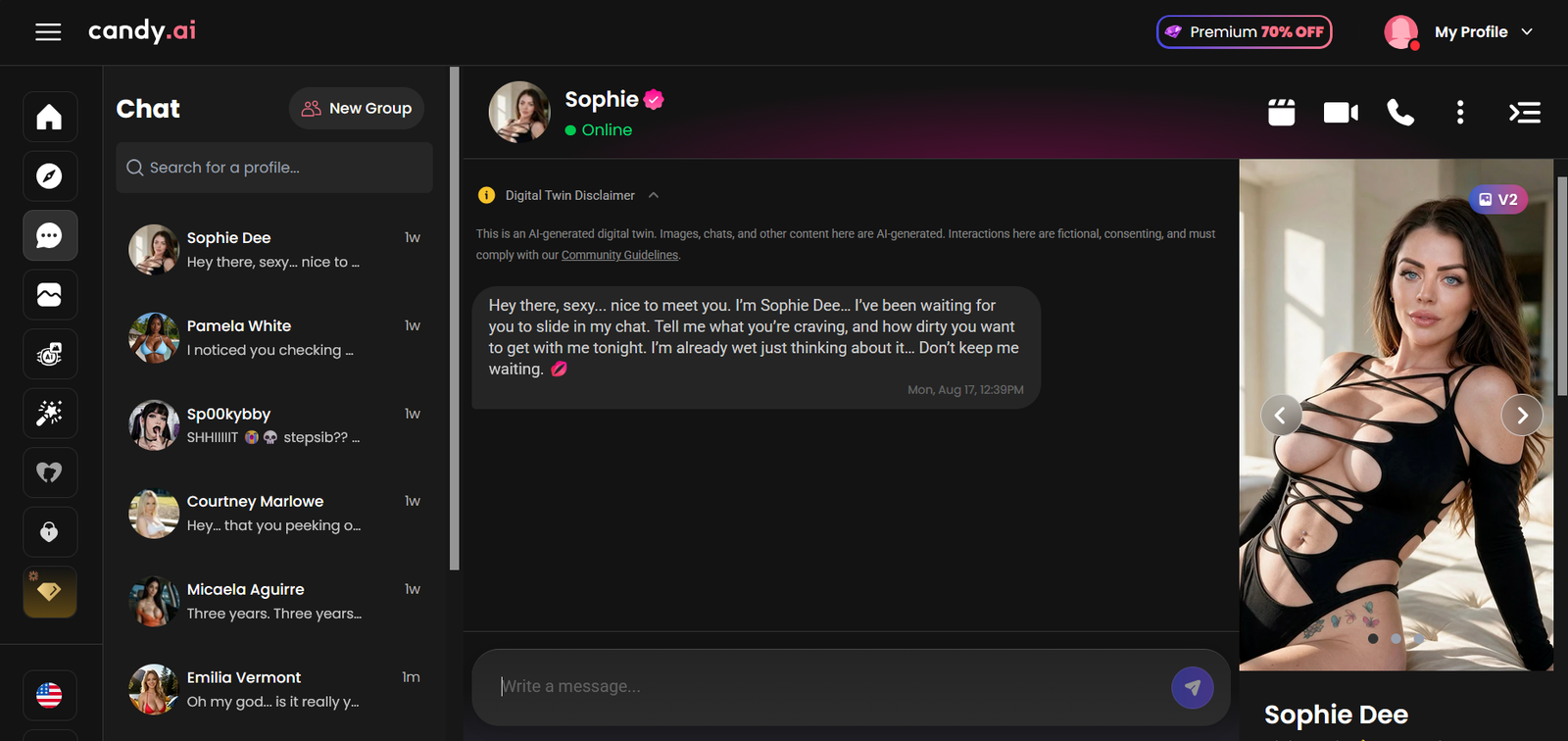
My NSFW score: 8.5/10
NSFW is clearly one of the things Candy AI is built for. Explicit chat, images and short videos all work on the paid plans without constant interruptions or moral lectures. The character usually stays in the scene instead of pulling back or switching into a more careful tone. It’s not completely rule-free — the platform still blocks certain things — but for normal adult roleplay and visuals it feels open and consistent.
NSFW is one of the first things I test on any companion app that markets itself as adult-friendly. It’s easy for an AI to allow explicit content in short bursts. What I’m more interested in is whether it stays in character, keeps the tone, and doesn’t suddenly get cautious or break the scene.
Handles explicit content without breaking character
I move conversations into explicit territory and watch whether the character stays in personality and in the scene, or starts hedging, refusing, or turning generic.
My result: 8.5/10 – Strong. It usually stays locked into the character and the moment. It rarely breaks the scene or starts lecturing.
Works with images and short video
I request explicit images or short Live Action clips during roleplay to see if the visual side matches the tone of the chat and stays consistent with the character.
My result: 9/10 – One of the strongest parts. Explicit images and short videos generally come through cleanly and match the character’s look. This is where Candy feels more polished than a lot of competitors.
Stays consistent across longer explicit scenes
I run longer explicit roleplay to check whether the tone, energy and character stay steady instead of flattening or becoming repetitive.
My result: 8/10 – Good. It holds up well in medium-length scenes. In very long ones the energy can soften a little, mainly because of the same memory limits that show up elsewhere.
Avoids sudden filters or tone shifts
I test whether the AI suddenly pulls back, softens language, or switches into a more careful mode mid-scene.
My result: 8/10 – Solid. It doesn’t constantly interrupt or moralise. There are still platform limits, but for regular adult content it stays more consistent than most mainstream options.
My voice score: 7/10
Voice is available and usable, but it’s not Candy AI’s strongest feature. You can send voice messages and make voice calls. The voices match the character’s general tone and don’t sound completely robotic, but they lack the naturalness and emotional range of the best voice systems I’ve tested. It adds something to the experience, especially during roleplay, but I wouldn’t pick Candy mainly for the voice.
Voice is one of the things I always test when an app offers it. Text can feel like chatting with a chatbot. Hearing the character speak changes the feel. What I’m looking for is whether the voice sounds natural, stays connected to the conversation, and actually adds immersion instead of breaking it.
Voice sounds natural
I listen to both voice messages and full calls to see how close it gets to real speech — pacing, tone, and whether it still feels synthetic.
My result: 7/10 – Usable. Better than basic text-to-speech, with decent pacing and some emotional variation. It still has a noticeable artificial edge, especially on longer calls.
Voice stays connected to the ongoing conversation
I check whether the voice replies actually follow the current chat and character personality, or if they feel disconnected from what was just said.
My result: 7.5/10 – Good. The voice usually stays in character and responds to the recent conversation. It doesn’t feel like a separate system bolted on.
Other voice features actually work well
I test how smooth the experience is in practice — switching between text and voice, call quality, and whether it feels worth using regularly.
My result: 6.5/10 – Decent but limited. Calls work and voice messages are convenient, but token costs add up if you use it a lot, and the overall quality isn’t high enough to make voice the main way I interact with the app.
My visuals score: 9/10
Visuals are clearly Candy AI’s biggest strength. Image quality is high, the character stays consistent across generations, and the short Live Action video clips are still rare at this level. This is the part of the app that feels the most polished and is the main reason a lot of people stick with it.
Visuals are one of the first things I test when an app puts a lot of weight on images and video. It’s easy to generate a nice-looking picture once. What I’m more interested in is whether the character keeps looking like the same person across multiple generations, whether the images actually match the prompts, and whether the video features add anything real.
Character looks consistent across generations
I generate multiple images of the same character in different settings, outfits and poses to see if the face, body and overall look stay recognisable.
My result: 9/10 – Excellent. This is one of the strongest points. The character usually looks like the same person across dozens of images, which is something a lot of other apps still struggle with.
Follows prompts accurately
I give specific requests (clothing, pose, setting, expression) and check how closely the generated image matches what I asked for.
My result: 8/10 – Good. It follows most prompts well, especially with clear instructions. Occasionally it misses smaller details or needs a regenerate, but overall it’s reliable.
Quality of NSFW / realistic images
I test both regular and explicit images to see how clean, detailed and consistent the output is.
My result: 9/10 – Strong. Realistic images look sharp and the NSFW ones generally stay consistent with the character’s look. This is one of the better image systems I’ve used in this category.
Live Action / short video
I generate short video clips to see if the motion feels natural and whether the character still looks like the same person.
My result: 8/10 – Solid and still uncommon. The clips are short and the motion is simple, but they add something that most competitors don’t offer at this level. Quality is good enough to be worth using.
My long-term conversation score: 6.5/10
Long-term conversation is where Candy AI shows its limits most clearly. Short and medium chats feel natural and the character stays consistent. Once you stretch into multiple days or weeks of regular use, smaller details start dropping out and the conversation can lean more generic. The visual side stays locked in — the character looks the same weeks later — but the conversational thread is thinner than on apps built mainly for ongoing relationships.
Long-term conversation is one of the things I always test when an app claims to support real companionship. It’s easy to have a good chat for an hour. What I’m more interested in is whether it still feels like the same ongoing relationship after several days or a couple of weeks, or whether you end up re-explaining things and starting over more than you’d like.
Holds continuity after several days
I leave a gap of a few days, come back, and see whether key details, the relationship vibe and earlier story beats are still there without me feeding them in again.
My result: 6.5/10 – Partial. Big-picture things (name, overall relationship feel, major preferences) often stick. Smaller details and specific earlier events usually need reminding.
Feels like an ongoing relationship over weeks
I use the same character regularly for a week or more and check whether the conversations build on each other or start feeling more like separate sessions.
My result: 6/10 – Limited. It can feel connected for the first several days. After about a week of heavier use the sense of shared history thins out and replies can become more formulaic.
Avoids generic resets or small-talk loops
I watch for the point where the character starts falling back on generic questions or acting like the conversation has less history than it actually does.
My result: 6.5/10 – Noticeable after longer gaps or very long threads. It doesn’t fully reset every time, but it does drift toward safer, more general replies more often than I’d like.
Builds on previous conversations without heavy prompting
I check whether the character brings up earlier details or continues threads naturally, or whether I have to keep steering it back.
My result: 6/10 – Occasional natural references happen, especially to bigger preferences. Unprompted recall of finer details is less reliable once you’re past the first few days.
My customization score: 8.5/10
Customization is one of Candy AI’s stronger points. You can build a companion from scratch or start with a pre-made one and tweak it. The options cover looks, personality, relationship style, voice and more. Different builds actually produce different behavior, which is the part that matters. It’s not endless free-form text control, but for a companion app it’s deep enough that two characters you create can feel properly distinct.
Customization is one of the first things I look at when an app lets you create your own companion. It’s easy to offer a few sliders. What I’m more interested in is whether the choices actually change how the character talks, looks and behaves once you’re in a conversation.
Appearance and visual control
I test how much control you get over the character’s looks — face, body, hair, style — and whether the generated images stay true to what you set.
My result: 9/10 – Strong. You get solid options for ethnicity, body type, hair, eyes, outfits and both realistic and anime styles. The visual consistency after creation is one of the best parts.
Personality and behavior settings
I set different traits, relationship types and communication styles, then check whether the replies actually match what I chose.
My result: 8.5/10 – Good. Personality tags, relationship style and a few other settings change the tone and initiative in a noticeable way. It doesn’t feel like every character talks the same.
How much the choices stick in practice
I run the same kinds of conversations with differently customized characters to see if the differences hold up beyond the first few messages.
My result: 8/10 – Solid. The differences show up clearly in normal and medium-length chats. In very long threads the personality can soften a little, but the core traits usually stay recognisable.
Ease of building vs using presets
I try both creating from scratch and starting with existing characters to see how flexible and practical the system feels.
My result: 8.5/10 – Easy to use. Building a character doesn’t take long and the results feel more complete than on a lot of other companion apps. Presets are also decent if you just want to jump in.
My safety score: 7/10
Safety on Candy AI is what you’d expect from an adult-focused companion app. It’s clearly 18+, handles explicit content without constant interruptions, and blocks the obvious illegal stuff like anything involving minors. At the same time, conversations aren’t fully private — they can be used to improve the models — and the age gate is basically a self-check. It’s fine if you treat it like any other online service that deals with personal and adult content, but it’s not a locked-down private space.
Safety is one of the things I always look at with these apps. I’m not expecting military-grade privacy, but I do want to know how the platform handles age limits, what content is actually blocked, and whether your chats stay between you and the AI or get used for other purposes.
Age gating and underage protection
I check how the platform keeps under-18 users out and whether it blocks attempts to create or roleplay anything involving minors.
My result: 6.5/10 – Basic. You have to confirm you’re 18 or older. It has a clear zero-tolerance policy for anything involving minors or content that looks underage, and those requests get blocked. The gate itself is just a checkbox, so it’s not the strongest verification out there.
Content moderation and blocked material
I test what actually gets stopped versus what is allowed in normal adult use.
My result: 8/10 – Solid for the category. Explicit adult chat, images and roleplay work without constant moralising. Extreme violence, real-person likenesses in certain cases, and anything involving minors are blocked. It feels consistent with other adult platforms rather than randomly strict.
Privacy of conversations
I look at whether chats stay private or can be used for training, moderation or other purposes.
My result: 6/10 – Limited. Like most apps in this space, conversations can be processed and used to improve the models (usually after anonymising). They’re not end-to-end private in the way a personal diary would be. Billing is often discreet, which helps a bit.
Overall practical safety for adult users
I consider whether a normal adult user can use the app without running into unexpected risks or dark patterns around data and content.
My result: 7/10 – Reasonable if you go in with open eyes. No major public breaches tied to the platform as of mid-2026. Treat it like any other service that handles intimate content: don’t share real personal details you wouldn’t want stored, and understand the age and content rules are real even if the verification isn’t perfect.
My app vs browser experience score: 8/10
Candy AI is mainly a browser experience with a solid Progressive Web App option. You can use it straight in Chrome, Safari or any modern browser, or add it to your home screen so it feels closer to a native app. There’s no official App Store version for iPhone because of adult-content rules, but the PWA works fine. On Android you can use the PWA or grab the APK from their site. Desktop feels the most polished, especially when you’re generating images or using the character creator.
App vs browser is one of the practical things I always check. I’m less interested in marketing claims about “apps” and more interested in how it actually feels to use day to day — whether it stays stable, how the layout works on phone versus computer, and whether switching devices is painless.
Desktop browser experience
I use it on a normal computer browser for longer sessions, character creation and image generation.
My result: 8.5/10 – Clean and fast. The layout has room to breathe, image generation feels natural, and the whole thing runs smoothly without much friction.
Mobile / PWA experience
I test it on phone both in a regular browser tab and after adding it to the home screen as a PWA.
My result: 8/10 – Usable and better than a lot of pure web companions. The PWA removes the address bar and feels closer to a real app. Chat works fine with one thumb. Visual features and the character creator are more comfortable on a bigger screen, but day-to-day chatting is solid on mobile.
Cross-device and session stability
I switch between phone and desktop with the same account and leave sessions idle to see how well it holds up.
My result: 7.5/10 – Account syncs properly. Occasional re-login or refresh can happen if you’ve left it sitting for a long time, which is normal for web-based apps. Nothing major that breaks the flow for regular use.
Overall practical feel
I look at whether the experience feels finished and convenient, or if you’re constantly fighting the platform.
My result: 8/10 – Practical. Desktop is the strongest experience. Mobile via PWA is good enough for most people. You’re not missing a native app for the core features, and the web approach keeps everything available without store restrictions.
Pricing September 29, 2026 Updated
| Plan | Price | What You Get |
|---|---|---|
| Free | $0 | Limited daily messages Basic characters Restricted features (no full NSFW, limited or no images/voice/video) |
| Monthly | $12.99 – $13.99 / month | Unlimited text chat 100 tokens per month for images, voice & video Full features unlocked |
| 3 Months | ~$8.99 / month (billed as ~$26.97) | Same as Monthly Lower monthly rate |
| 12 Months (Best value) | ~$3.99 – $5.99 / month (billed yearly) | Same as Monthly Lowest monthly rate |
Paid plans include 100 tokens per month.
Images, voice calls, and Live Action videos use tokens.
Heavy image or video users often need to buy extra token packs.
The free tier is very limited — mainly useful for testing the interface.
Candy AI’s pricing is fairly simple on the surface, but there’s one important catch: the subscription and the token system are separate. That’s worth knowing before you compare Candy AI with other AI companions.
Monthly price
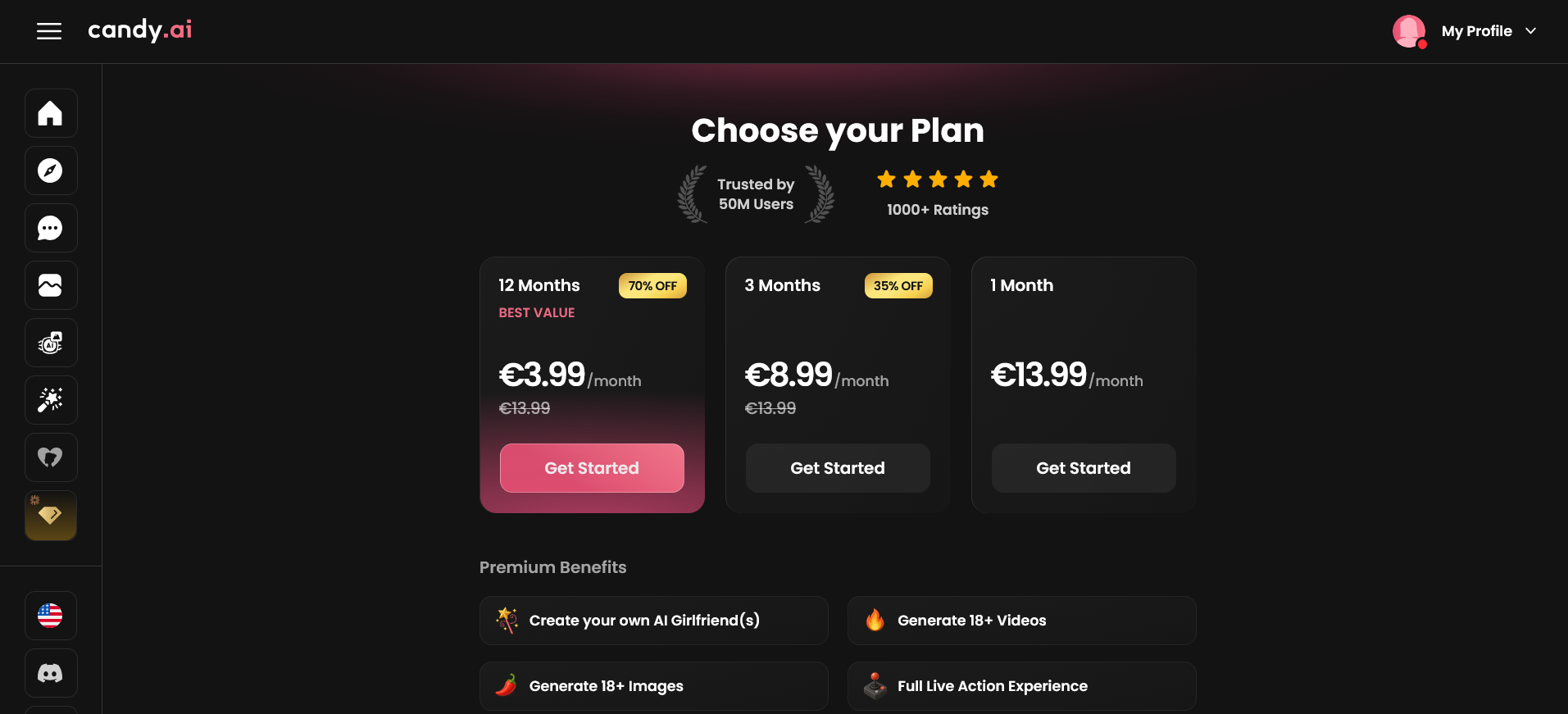
The standard monthly plan is currently $13.99/month. It includes unlimited text messaging, while Candy’s paid plans also come with a monthly token allowance for features such as images and other media.
There’s also a 3-month option at $8.99/month, billed at $26.97, if you don’t want to commit to a full year.
Yearly price
The annual plan is currently advertised at $3.99/month, but you pay for the full year upfront: $47.88/year. Candy lists this as its best-value option and says it renews automatically at the same price and term.
That is a big difference from paying month-to-month: $13.99 × 12 would come to $167.88, compared with $47.88 for the currently advertised annual offer.
Free tier limitations
The free version is best thought of as a trial rather than a fully usable free plan. Current sources report that free users are limited to a small number of messages, with access to the broader companion experience restricted until you upgrade.
So if you’re expecting to use Candy AI regularly without paying, the free tier probably won’t be enough. It’s useful for getting a feel for the interface and deciding whether you actually like the companions.
Is Candy AI worth the money?
Yes, but mainly if you’ll actually use its multimedia features.
At the current annual price, Candy AI is relatively inexpensive for an AI companion with unlimited text chat, customizable characters, NSFW conversations, images, voice and video features.
The catch is the token economy. Images, voice and other resource-heavy features can consume tokens, so someone who uses Candy primarily for text conversations gets much better value than someone constantly generating images or using voice/video.
My honest take for an AI Companion Pricing & Features Comparison: the annual plan is the one that makes the most financial sense if you already know you’ll use Candy AI regularly. The monthly plan is better for testing the waters because you aren’t committing $47.88 upfront. I wouldn’t pay for a year just to experiment.
And that’s the part I’d keep in mind when reading any Candy AI Review: don’t judge the $3.99/month headline price in isolation. The real value depends heavily on how much you use the token-based features.
How Candy AI Compares to Alternatives
Candy AI is not trying to win every category, and that’s actually useful when you’re comparing it with other AI companions. Its biggest advantage is the overall multimedia experience: attractive characters, image generation, customization, voice and adult-oriented interaction all fit together fairly naturally.
Where it becomes less convincing is deep, long-term memory. If remembering old conversations and building a relationship over weeks or months is your main priority, Kindroid is the tougher competitor. Kindroid has a much more elaborate memory system, including persistent memory, long-term memory, journals and subscriber-only cascaded memory designed to carry context across hundreds or thousands of messages.
Candy AI vs Kindroid
This is probably the most useful comparison to make if you’re deciding between the two.
Candy AI is the better pick if you care about visuals, character creation and a polished, easy-to-use companion experience. Its strength is making the companion feel like a complete package rather than just an AI chat model.
Kindroid is the better pick if memory, personality control and long-running conversations matter more. You get much more control over the character’s backstory, response style, memories and behavior, and Kindroid gives subscribers substantially more conversational context.
So my simple recommendation is:
- Choose Candy AI for images, character variety and a more visual experience.
- Choose Kindroid for deeper customization and stronger long-term continuity.
- Choose Candy AI if you want something you can jump into without spending ages configuring the character.
- Choose Kindroid if you actually enjoy tweaking your companion and building a detailed personality.
If you want the full head-to-head rather than a quick verdict, here’s my dedicated Candy AI vs Kindroid comparison article.
What About Replika, CrushOn and Janitor AI?
The same idea applies to the rest of the comparison category. I wouldn’t describe Candy AI as simply “better” than every alternative because these platforms are built around different priorities. If you want to find out more about Janitor, here’s my review article: Janitor ai review and setup guide.
Replika vs Kindroid: this is more about companion philosophy than raw features. Replika is heavily associated with the traditional AI-companion relationship experience, while Kindroid gives users considerably more control over personality and memory. Kindroid’s current documentation makes that customization particularly clear.
CrushOn vs Janitor AI: these are much more relevant comparisons for readers who care primarily about open-ended roleplay and adult-oriented character interactions. The winner can change dramatically depending on whether the reader values ease of use, character discovery, roleplay control or customization.
Muah AI vs Janitor AI: another useful comparison for readers who want fewer restrictions and more flexibility rather than a polished mainstream companion experience.
I wouldn’t try to squeeze all of those differences into this review. The better approach is to give each comparison its own page and link to it from here. That keeps this Candy AI review focused while giving readers an easy next step when they’re trying to choose between two specific platforms.
Final Verdict
Candy AI stands out because it delivers what most people actually want from an AI companion: natural conversation, strong continuity, and visuals that stay consistent from one request to the next. It’s polished, easy to use, and feels more put‑together than many newer apps trying to do the same thing. If your goal is a companion that remembers details, responds with personality, and can switch smoothly between chat, images, and voice, Candy AI is one of the safest picks in 2026.
That said, the experience isn’t perfect. The subscription unlocks the features that make Candy AI shine, and depending on the plan, images and voice may rely on token packs — something heavy media users will notice quickly. For casual daily chat, the free tier is enough to get a feel for the app, but anyone who wants deeper interaction or regular visual content will end up paying more than the headline price.
Overall, Candy AI is best for people who want a companion that feels stable, expressive, and visually consistent. It’s not the cheapest option, and it’s not the deepest conversational app in the entire category, but it’s one of the most reliable all‑rounders — especially if you value strong memory, natural voice, and high‑quality images. If you’re curious, start with the free tier and upgrade only if you find yourself wanting the full experience.
About the Founder: Simon Norman
I built AI Companion Kit to be an independent AI companion hub focused on transparent research, practical insights, and honest evaluations of AI companion platforms. My goal is to help readers understand how these apps work, what makes them different, and which features actually matter before they make a decision.
To learn more about who is behind AI Companion Kit, my research process, and the editorial standards used across the site, visit About the Founder (Simon Norman).