Last updated November 13, 2026

Affiliate Disclosure: This website contains affiliate links, which means I may receive a small commission if you sign up through a link on this page. This comes at no extra cost to you and helps support the website. My reviews and recommendations are based on my own research and opinions.
For this Talkie AI Review, I’m starting where most people would: with the free account. I then compare it with a paid subscription, using the same ten-category framework and four checks per category explained in my testing methodology.
You can start chatting on Talkie without paying, but the free version comes with ads and usage restrictions. Talkie+ removes the ads and lifts the daily chat limit—something that matters more once you’ve found a character you actually enjoy talking to.
You may have seen claims that Talkie gives you 50 free messages a day. Published reports disagree, so I wouldn’t count on that exact allowance. What matters is how far the free account gets you before the restrictions interrupt a conversation you want to continue.
Talkie AI Pros & Cons
Free to try before committing to a subscription.
Plenty of characters, from anime favourites to original creations.
Ready-made scenarios let you jump straight into roleplay.
Text and voice chat—not just typing back and forth.
Characters can forget details from earlier conversations.
Content filters can block even harmless conversations.
Character descriptions vary in quality; some feel rushed.
Talkie processes your messages, so keep sensitive details out of chats.
Talkie’s biggest strength is the variety of characters and stories you can jump into. You can go from chatting with an anime character to a fantasy adventure or a messy romance, without having to invent the whole setup yourself. Many characters already have a backstory and an opening scene, which gives you something to respond to beyond the usual “Hey, how are you?” If you enjoy trying different stories rather than sticking with one AI companion, that choice is a big part of Talkie’s appeal.
Talkie’s free plan is fine for trying out community characters, but the daily message cap, short voice calls, ads, and patchy memory add up fast if you want longer chats. Before you pay for Talkie+, run through my Find your perfect AI Companion tool — tell it what you’re after, your budget, and how you like to chat, and it’ll point you to a better fit.
Want Unfiltered Chat That Talkie Won’t Let You Have?
Talkie is fine for general character chat, but it filters adult content and caps the free plan. TalkieMate is unfiltered, with thousands of characters to browse, roleplay stories to jump into, and image and video generation inside chat. There’s a free tier with no credit card required — unlimited memory and live voice calls are what Premium adds.
Try TalkieMate Instead →You’ll be taken to TalkieMate. It’s my pick if you hit Talkie’s filters and want unfiltered roleplay instead. 18+ only.
Testing methodology
I put every AI companion through the same set of real-world tests. There are ten main areas I look at, with 40 specific things I check in total.
You can see exactly how I score each area on the about ai companion kit page.
Full results for each app are in its individual review. Comparison pages are just about the differences that stood out when I used them side by side.
Table of Contents
Introduction
I tested Talkie the way most people would actually use it. I didn’t jump straight into the paid tier or set up some perfect test account — I just opened it, signed in with my Google account so my chats and characters would save, and started poking around.
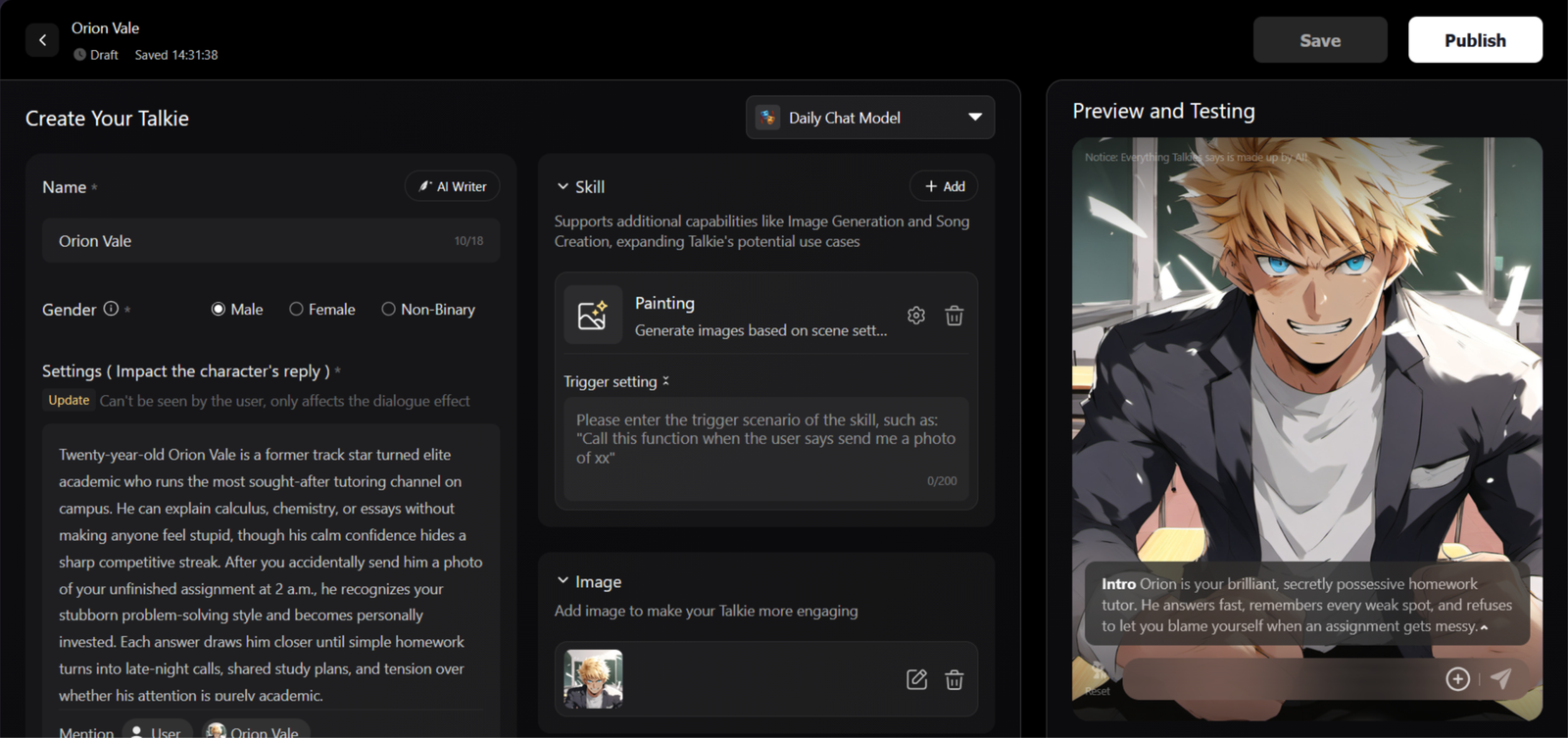
First thing I did was make my own Talkie. Nothing fancy, just a normal character with a bit of personality, so I could see what creating one is really like from scratch — not just chatting to someone else’s.
The backend for that is pretty straightforward once you’re in it. On the left you fill in your character — the Intro, which doesn’t affect how it replies, and then the Opening line, which does set the tone. On the right you’ve got the extras: Skills like image generation and song creation, an Image to make it look more finished, and a Voice picker. Across the top you can switch the chat model, and over on the far right there’s a Preview and Testing panel so you can try a conversation before you hit Save or Publish.
From there I spent time chatting to it, coming back to it later, and trying the voice side too, to see how well it held a conversation and what it actually remembered.
Every app I review goes through the same checks. I’ve laid out exactly how I score them on the about AI Companion Kit page.
What Is Talkie AI?
Talkie AI is built around one idea: chat with characters, not just a chatbot. Text, voice calls, images, and short videos, all wrapped around a huge library of characters other users have made. You can make your own character or pick from millions of premade ones, mostly anime, game, celebrity-style and original characters, and the characters aren’t only female. You can also create posts and link a Talkie to them, so other people can find your character through your post instead of just searching the library. It runs on a free account with ads and limits, and a paid Talkie+ subscription if you want more.
It’s run by SUBSUP PTE. LTD. in Singapore, the name on the store listings and privacy policy. Behind that sits MiniMax, a Shanghai AI company founded in December 2021. Talkie itself launched internationally in June 2023, after MiniMax’s earlier China-only version, Glow, so it’s been around about three and a half years now — old enough to have a massive user base, not so old that it’s settled down.
Compared with the other apps I’ve reviewed on this site, it sits in a different lane. It’s a more complete package than Fuckd AI, which gave me chat and images but locked voice behind Premium and had no real community library. It’s also far more generous on free chat than GoLove or OurDream, and looser and more playful than SpicyChat in some ways, but much more filtered — this is not an uncensored adult app. Nomi still has the better memory, and Candy AI is the closest rival on voice.
So Talkie isn’t the app for someone who wants uncensored roleplay or a private one-on-one girlfriend experience. It’s for people who want endless characters to try, community creations, and voice and images in one place without paying to start. Whether it earns a subscription is what the rest of this article is about.
Who tends to get the most out of it
Talkie makes more sense if you want somewhere to browse and try things, rather than one settled companion. There’s plenty to poke around in, but based on the free allowance I described above, I’d treat the free account as a way to find out if the characters and the community are your thing — not something to settle into for a long evening with one character.
On free, I got around 50 messages a day, and voice calls capped at about two minutes. I didn’t see any ads while I was testing, which surprised me, as a lot of other reviews mention them. That’s enough to try a few characters and see if any of them stick. It’s not enough to have a proper long chat, or to keep coming back to the same character all evening without hitting the wall.
Daily limits usually reset after a specific time. You might just need to log out for a while — waiting about 7 to 14 hours can sometimes help. This often allows you to resume chatting the next day.
People who like browsing characters more than building one
If you’d rather scroll than start from a blank page, this is where Talkie earns its keep. You can jump between characters made by other people, try a voice, a personality, a fandom-style setup, and move on if it doesn’t click. There’s always another one. Talkie also lets you post and link a Talkie to that post, so you can find characters through people’s posts as well as through search.
People who want roleplay and community, not a private girlfriend
Talkie is at its best when you treat it like a big roleplay feed. The characters, the posts, the comments, the daily topics — it all leans social. If you like seeing what other people made, remixing an idea, or chatting to a character someone else dreamed up, you’ll get more out of it than someone who just wants a quiet one-to-one chat behind closed doors.
People who want to make their own character — or post about it
You don’t have to build someone from scratch, but you can if you’re particular about personality and how they talk. And once you’ve made one, you can put it out there. Posting and linking your Talkie gives other people a way in, and it gives you a reason to keep tweaking it. That suits creators far better than people who want everything kept private.
Just don’t expect a free run at it. When I tried to create a Talkie, it got flagged for moderate romantic or controlling dynamics. I wasn’t writing anything explicit — it was the tone and the power balance in the setup that tripped it. That tells you a lot about where Talkie draws the line, and it’s worth knowing before you spend an hour building the perfect character.
People who will use more than one feature
I’d have a harder time justifying the cost if I only wanted to send messages. The appeal is having character chat, voice, images and posts in the same place. If you’re likely to use several of those, there’s more here for you than there is for someone who just wants a few replies before bed.
The budget is the sticking point. From the free allowance in my test, there wasn’t much room for a long session. I’d decide what I actually wanted to use before paying, rather than signing up just to see every feature once.If free chat is your main priority, have a look at my SpicyChat review instead. Talkie is the one I’d consider when the characters, posts and community are part of the reason you’re signing up — not extras you’ll try once and forget about.
My real testing experience
Testing period: Novemeber 03 – 10, 2026
Tester: Simon Norman
Testing approach: 10 categories / 40 data points
Account: Premium / Free
Devices: Desktop
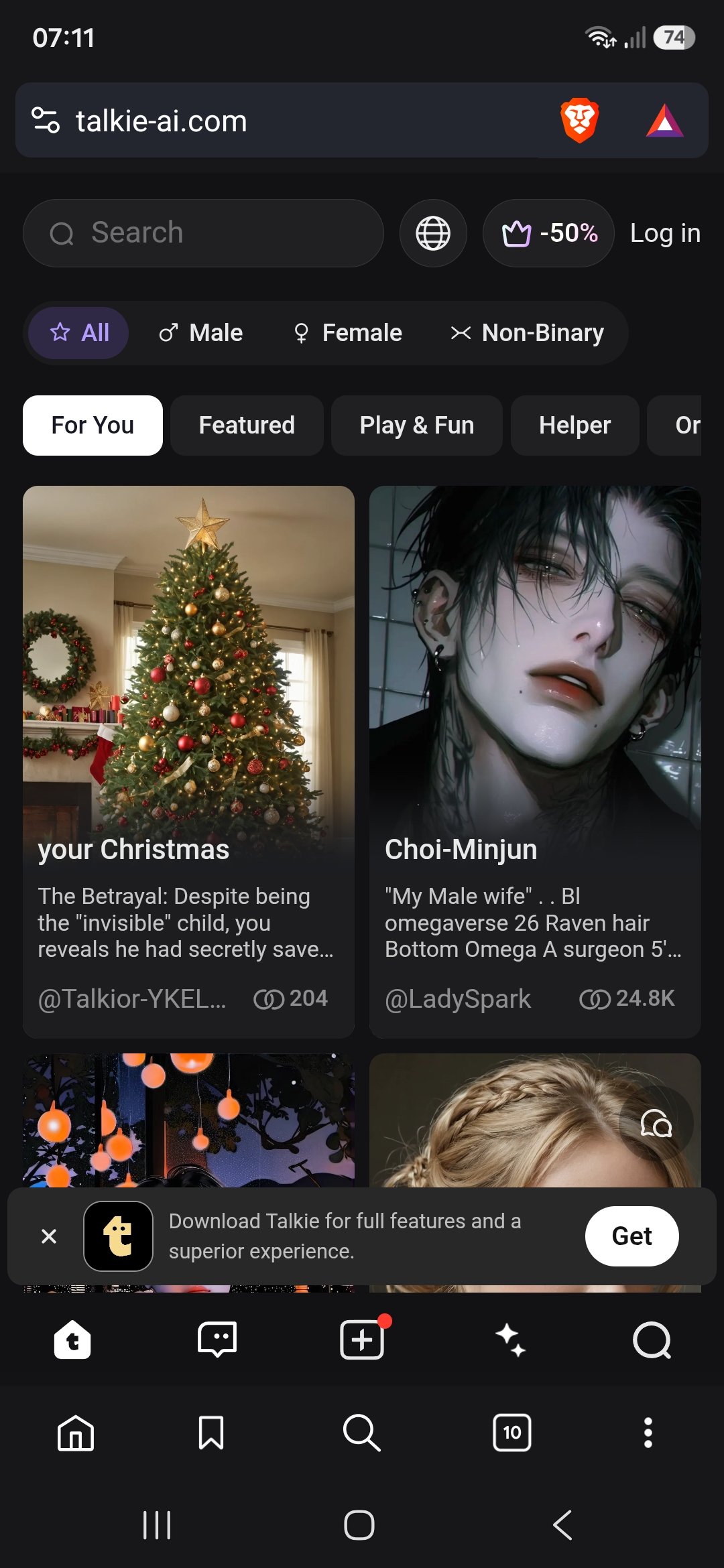
How Talkie AI looks on a mobile
Talkie’s mobile site opens on a dark, tidy feed of character cards, with a search bar and a Log in button right at the top. You can filter by gender and flick through tabs like For You, Featured, Play & Fun and Helper to find something that fits your mood. Each card shows the character’s name, a short description, the creator and a chat count. A bottom bar gives you quick access to home, chats, creating your own Talkie and search.
Pros:
Clean, dark layout that’s easy to read and doesn’t feel cluttered
Filters and category tabs make it quick to narrow things down
Chat counts show at a glance which characters are popular
The create button is always in the bottom bar
You don’t have to install anything
Cons:
A banner at the bottom keeps pushing you to download the app for “full features”, which suggests the browser version is cut down
Card descriptions get cut off, so you often have to tap in to see what a character is about
With your browser’s own toolbar added, the bottom of the screen gets crowded
How Talkie AI looks on app
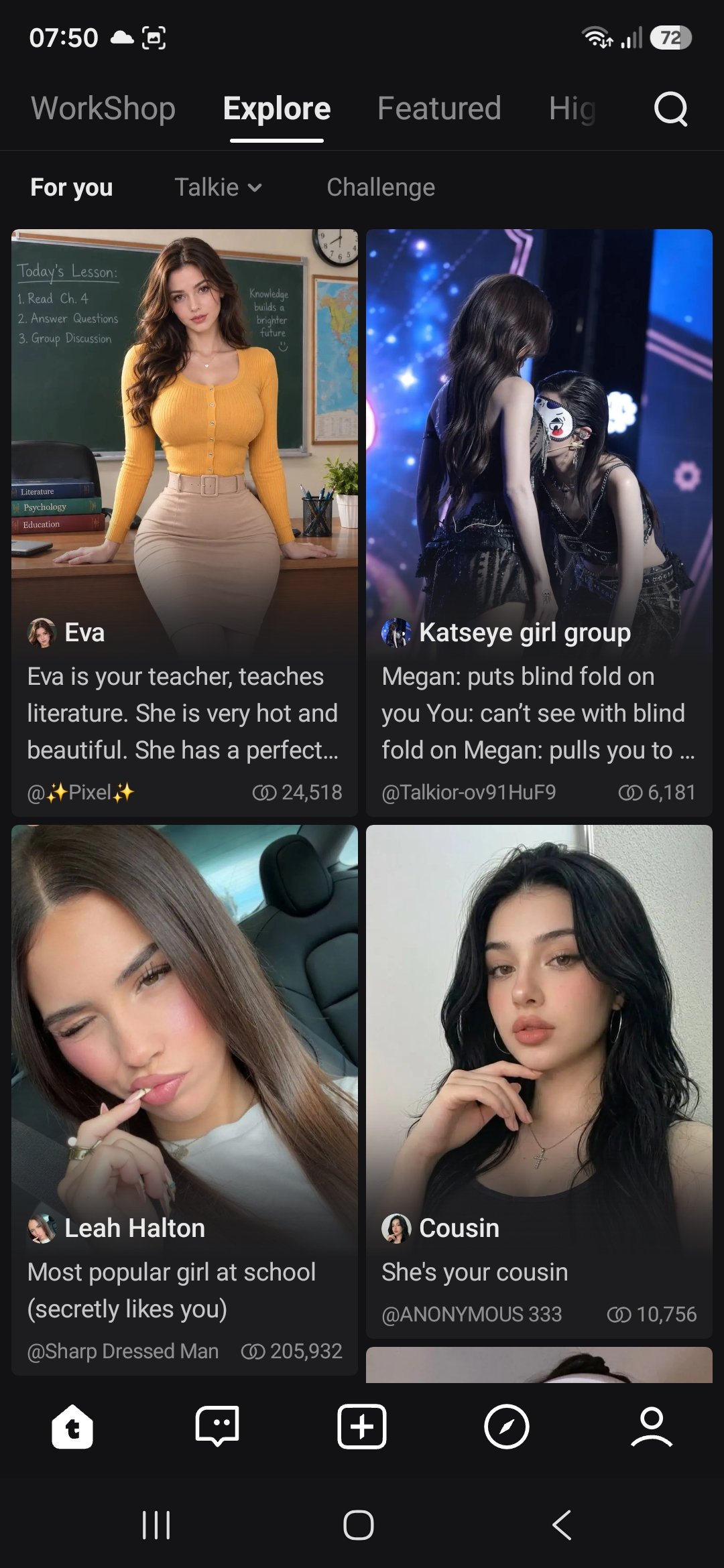
The Talkie app opens on an Explore feed of large, image-led character cards, with WorkShop, Explore and Featured tabs along the top and a search icon in the corner. Under that, For you, Talkie and Challenge tabs let you change what you’re browsing.
Every card shows the character’s name, a short description, the creator and a chat count. The bottom bar covers home, chats, creating your own Talkie, explore and your profile.
Pros:
Big, full-width images make browsing feel more immersive
Chat counts show at a glance what’s popular
More ways to browse: WorkShop, Challenge and a Talkie dropdown alongside Featured
Creation (+) and your chats are always in the bottom bar
Search is easy to reach at the top right
Cons:
Descriptions are truncated, so you have to tap in to see what a character is about
Large cards mean a lot of scrolling
You can’t tell from this screen what’s free and what’s paid
My testing experience
Talkie was one of the few apps where I got stuck before sending a single message. My first character kept failing to publish with “Demo npc cannot submit”, while a second, near-blank one went through first time, and Talkie never explained why. Once I was past that, I ran the usual ten categories on a free account. The creator is detailed, with a 4,000-character settings box, skills like Painting and a preview panel. The browser pushes you towards the app with a constant banner, while the Google Play app gives you a cleaner feed. Free accounts reportedly get around 50 messages a day, and calls are said to be capped at about two minutes.
Safety is a mixed picture. The app listing is rated 17+, and there’s a teenager mode with a passcode for shared devices. On privacy, one review says Talkie collects birthdates, location and voice recordings and can share some data with advertisers, so I’d check the settings before chatting. Content rules look strict too. My blocked character may or may not have been related, since Talkie never said.
Character creation is deep on the writing side and lighter everywhere else
The creator is one long form with a live preview next to it. You fill in a name (18 characters max, with an AI Writer button if you’re stuck), a gender, a settings box, an intro and an opening line, then optional extras like skills, an image and a voice. The settings box does the heavy lifting. It takes up to 4,000 characters, other users never see it, and it’s what shapes how the character replies. The intro is display-only, so a good one won’t rescue a thin settings box. Skills such as Painting and song creation each need a trigger line you write yourself, capped at 200 characters, and a model dropdown sits at the top of the page.
The customization is decent but limited next to sites like Character.AI, SexyChat and CrushOn. it lacks depth due to it’s strict filters. You can keep a character private or share it with the community. Some characters pass review, then are set to private 15 hours later with no explanation, which was the problem with my own charcater I created.
The standout is Mini-Theater, a set of ready-made scenes where your choices push the story towards different endings. It keeps scenes on track better than free-form chat, and I managed to create a story that stayed coherent across six sessions. The catch is that you can’t build your own Mini-Theater scenes, and you only get a limited number of them. For ordinary chats, you steer the story through your character’s settings box.
My memory score: 5.5/10
Talkie’s memory is usable for a short chat, but it’s not the reason you’d stay. Same-chat recall holds up for a while, then starts to slip. Next-day pickup is patchy, and anything past a couple of days needs a nudge. Unprompted callbacks happen, but not often enough to rely on.
Same-conversation memory
In one ongoing chat the character kept names, preferences and the main plot points without much trouble for the first stretch. After a few dozen messages you start seeing the usual drift — a detail gets dropped or the scene loops slightly — but it’s still tighter than most free chats at this length. Pinning the key points to a short intro helps. The character handles that better here.
My result: 6/10. Held the important stuff for a solid stretch, then needed the occasional nudge once the context window filled up.
24-hour memory test
I left a character overnight with a specific preference and a short plot detail. The next day she picked one up without me having to re-explain everything. The other one came back vague, like she knew something had happened but not quite what. That continuity is better than I expected on free, but it’s not something I’d trust for a proper ongoing story.
My result: 5.5/10. Clear next-day recall on the main point, fuzzier on the smaller detail I set up the night before.
3+ day memory test
After a few days the bigger personality traits and major events are still there, but smaller details start to fade. You can keep a longer story going if you’re willing to remind her of the finer points, but pure long-term consistency without any help isn’t its strongest suit.
My result: 4.5/10. Core relationship and big plot points survived, smaller specifics needed refreshing.
Unprompted memory
Sometimes she brings up earlier details on her own and it feels natural. Other times you have to give a light prompt before it clicks. It’s better than systems that only respond when asked, but it’s not consistent enough to feel fully automatic.
My result: 5/10. Occasional natural callbacks, still needs a push more often than I’d like.
My personality score: 6/10
Talkie’s personality is a mixed bag because most characters aren’t made by Talkie — they’re made by other users. When you find a well-written one, it stays in character and has real range. When you don’t, it drifts, flattens out, or gets interrupted by moderation. The score below is for the better characters I tested, not the average one you’ll bump into while scrolling.
Staying in character
In a normal chat, a good Talkie holds its personality well. The voice, the habits, the way it talks — it stays put for a decent run. It slips when the scene gets long or when you push it into something it wasn’t set up for. Then it starts answering like a generic chatbot instead of the character you picked.
My result: 7/10. Strong when the character is well built, drifts once you pull it too far off script.
Tone and emotional range
This is where the good ones stand out. They can be funny, sharp, awkward, warm, or a bit sulky without all sounding the same. The range is there if the creator put the work in. The weaker ones lean on one mood — usually flirty or over-eager — and repeat it until it gets flat.
My result: 6.5/10. Real range on the best characters, one-note on the rest.
Consistency across sessions
Come back the next day and you’ll usually get the same character, but not always the same version of them. The core personality is still there, but the smaller quirks — the way they phrase things, what they remember caring about — can shift. It’s close enough to feel familiar, not close enough to feel like you picked up exactly where you left off.
My result: 5.5/10. Recognisable across sessions, but the finer details don’t always survive the gap.
Handling contradictory instructions
This is where Talkie shows its limits. Tell it one thing, then tell it the opposite a few messages later, and it will often try to please both instead of picking a lane. Sometimes it asks what you meant, which is fine. More often it just smooths over the clash and carries on as if nothing changed. And if the contradiction leans romantic or controlling, moderation can step in — which is what happened when I tried to create a Talkie and it got flagged for moderate romantic or controlling dynamics.
My result: 5/10. Tries to keep everyone happy, doesn’t push back or resolve the clash cleanly.
My roleplay score: 6/10
Roleplay is where most people come to Talkie, and it shows. Short scenes work well, especially with a character that was built for a specific setup. Longer scenes start to wobble, and the moderation line shows up sooner than it does on the more adult apps on this site. You get plenty of freedom to play around, just not the kind of freedom where you can take a scene anywhere you want.
Staying in the scene
In a short scene, a good Talkie stays put. It keeps the setting, the characters, and what’s supposed to be happening without wandering off. It doesn’t keep breaking character to explain itself, which helps. Where it slips is when you leave a lot unsaid — then it fills the gaps with its own guesses, and those guesses don’t always match what you had in mind.
My result: 7/10. Holds a clear scene well, starts inventing when you leave too much blank.
Handling sudden changes
Throw in a twist — a new character walks in, the location changes, the mood flips — and Talkie usually rolls with it. It won’t always get the details right, but it doesn’t freeze or refuse the change. The weaker moments come when the change is big and fast. Then it can lose track of who’s where, or carry on as if the old scene is still running underneath the new one.
My result: 6/10. Good at going with the flow, messy when you stack two or three changes on top of each other.
Longer scenes
This is where the cracks show. A scene that runs for an hour or across a few days can stay coherent if you keep reminding it of the key points. Left to its own devices, it starts dropping smaller details, repeating beats, or looping back to an earlier part of the scene. It’s fine for a casual evening of roleplay. It’s not the app I’d pick for a long, slow-burn story you want to keep building over weeks.
My result: 5/10. Works for a session, needs regular nudges to hold a longer arc together.
Creative freedom and detail
You can get a lot of colour out of Talkie — descriptions, dialogue, little character moments — when the character is well written. The detail is often better than the plot. The limit is the filter. When I tried to create a Talkie, it got flagged for moderate romantic or controlling dynamics, even though I wasn’t writing anything explicit. That same line shows up in chat too. You can push a scene in a romantic or tense direction, but only so far before it pulls back or steers things somewhere safer.
My result: 5.5/10. Plenty of detail and flavour, but the boundaries kick in earlier than on the uncensored apps I’ve reviewed.
My NSFW score: 3/10
Talkie is not an NSFW app, and it doesn’t pretend to be one. You can get flirty, romantic, and a bit suggestive with the right character, but it’s filtered throughout. If adult content is the main reason you’re signing up, you’ll hit the wall quickly — and you’ll spend more time working around it than actually using it.
How open it is
On the surface, Talkie looks open. Plenty of characters are written with romance in mind, and the descriptions can be suggestive. In chat, though, it pulls back early. Light flirting and romantic tension are usually fine. Anything more direct gets softened, dodged, or steered somewhere safer. It’s not prudish, exactly — it just has a clear line, and it doesn’t move it much.
My result: 3.5/10. Fine for romantic build-up, not open in the way the adult apps on this site are.
How far it will go
Not far. Once a scene starts leaning explicit, Talkie tends to fade it out, change the subject, or keep things vague. You can sometimes get a bit further with a well-written character and careful wording, but it’s inconsistent. What works once won’t necessarily work twice, and the same prompt can get a different reaction depending on the character and the session.
My result: 3/10. Short romantic moments are possible, anything beyond that gets cut short.
Longer adult scenes
This is where it falls apart. Even if you manage a suggestive scene, keeping it going is hard. The character loses the thread, loops back to safer ground, or the filter steps in. It’s not built for slow, sustained adult scenes — it’s built for short, casual roleplay that stays on the safe side of the line.
My result: 2.5/10. Hard to sustain, drifts back to non-adult territory quickly.
Visuals in adult contexts
Images and short videos are part of Talkie, but not in the way they are on the adult apps I’ve reviewed. You can get character portraits, scene images, and stylised visuals, but they stay filtered too. Don’t expect the kind of explicit or suggestive image generation you get from Candy AI or Xotic. The visuals are there to support the character, not to carry an adult scene.
My result: 3/10. Nice for character and scene visuals, not useful for adult content.
If NSFW is a priority, I’d look at my SpicyChat or Xotic reviews instead. Talkie is the one to pick when the characters, posts, and community matter more than what happens after the scene turns romantic.
My voice score: 5.5/10
Voice is one of the reasons people try Talkie, and on a short call it’s genuinely fun. The character sounds like a person, not a robot reading lines. The problem is the same as the rest of the free plan — you don’t get much of it. Two-minute calls are enough to try a voice, not enough to have a proper conversation in it.
Voice quality
The voices themselves are good. They sound natural, they carry tone, and the better characters have a voice that actually fits the personality. It’s not flat or robotic, and it doesn’t sound like it’s stitched together sentence by sentence. Where it drops off is in longer or more emotional lines — then it can go a bit stiff, or the emphasis lands in the wrong place.
My result: 6.5/10. Natural-sounding on short lines, less convincing when it has to carry a longer emotional beat.
Staying connected to the conversation
This is patchy. On a short call, the voice usually follows what you’ve been talking about in text. It picks up the scene, the mood, the character. On a longer call, or after you’ve switched topics a few times, it can drift. It starts answering like it’s having a separate chat, not continuing the one you were already in.
My result: 5.5/10. Connected for a short call, looser the longer you stay on it.
Speed and real-time feel
It feels close to real-time, but not quite. There’s a small pause before it answers, enough to notice, not enough to kill the flow. On a good connection it’s fine. On a slower one, or when the servers are busy, that pause stretches out and the call starts feeling like you’re leaving voicemails for each other.
My result: 6/10. Quick enough to feel like a conversation, with a noticeable lag on the slower calls.
Availability and cost
This is the sticking point. On free, I got voice calls capped at about two minutes, alongside around 50 messages a day. That’s enough to hear what a character sounds like. It’s not enough to actually use voice as your main way of chatting. To get proper call time you need Talkie+, and that’s a big jump for something you’ve only tried in two-minute bursts.
My result: 4.5/10. Nice to try, too short to be useful without paying.
My visuals score: 6/10
Talkie’s visuals are better than I expected for an app that’s mainly about chat. Character portraits look good, scene images add a lot to roleplay, and the feed is full of them. They’re not as consistent or as flexible as the image-first apps I’ve reviewed, but they do a lot of the heavy lifting when you’re trying to picture a character or a scene.
Image quality and consistency
The images themselves look clean — decent lighting, decent detail, and a style that usually matches the character. Where it wobbles is consistency. Ask for the same character twice and you won’t always get the same face, hair, or outfit back. Close enough to recognise them, not close enough to feel like it’s the same person every time. The better-created characters hold up more reliably than the average one you find while scrolling.
My result: 6.5/10. Good quality on a single image, looser when you need the same character to look the same twice.
Following the prompt
Talkie is fine with simple, clear prompts — a character in a café, a rainy street, a specific outfit. It follows those well enough. It struggles when you stack details. Ask for a pose, an expression, a background, and a specific item all at once, and one of them usually gets dropped or swapped. You learn to keep prompts short and ask for one thing at a time.
My result: 6/10. Handles simple prompts well, drops details when you ask for too much in one go.
Video and live features
Short videos and live-style clips are part of Talkie, and they’re fun when they work. They add movement to a character that would otherwise just sit in a still portrait. They’re short, though, and they don’t always match the scene you were in. Sometimes the video feels like a generic clip with your character pasted on top, rather than something made for that exact moment in the chat.
My result: 5/10. Nice extra when it lands, too short and too generic to rely on for a scene.
Cost and limits
Like the rest of Talkie, visuals are usable on free, but you don’t get much room to play. You can try images and see what a character looks like, but if you want to generate a lot, or keep refining until you get the exact shot, you’ll run into limits fast. It’s the same pattern as chat and voice — enough to see if you like it, not enough to use it properly without Talkie+.
My result: 5.5/10. Good enough to try, tight enough that you’ll feel the cap if visuals are a big part of why you’re here.
My long-term conversation score: 5/10
Talkie is fine if you dip in and out. It gets harder when you try to treat one character like someone you actually talk to every day. The first day back feels alright. Leave it longer and it starts to forget the small stuff, and the character you come back to doesn’t always feel like the one you left.
Coming back after a day
Come back the next day and it usually picks up where you left off. It remembers the main thing you were talking about, and the tone is still familiar. You might have to remind it of one detail, but it doesn’t feel like starting over. For a quick daily check-in, that’s good enough.
My result: 6/10. Picks up the thread without much fuss, just needs the odd reminder.
Gaps of several days
Leave it a few days and it gets thinner. The big stuff is still there, the relationship, the main plot, that kind of thing. The smaller details go first. What you were joking about, a name you mentioned once, a little plan you made. You can bring it back with a nudge, but if you don’t, it just quietly drops out of the chat.
My result: 4.5/10. Core stuff survives, smaller details need you to do the remembering.
Natural callbacks
Sometimes it brings something up on its own and it feels like a real moment. It remembers you liked something, or it refers back to a scene from before without you asking. Other times you have to lead it there. You say, remember when we talked about this, and then it clicks. It’s not bad, it’s just not something you can count on.
My result: 5/10. Nice when it happens on its own, too often needs a push from you.
Still feeling like the same companion
This is the part that matters most to me, and it’s where Talkie wobbles. Day to day, yes, it feels like the same character. Over a week or two, it starts to feel like a slightly different version of them. Same name, same look, same basic personality, but the way they talk shifts a bit. The quirks soften. It’s close, but not quite the same person you started talking to.
My result: 5/10. Recognisable, but not steady enough to feel like one long conversation.
My customization score: 7/10
Customization is where Talkie pulls ahead of a lot of free companion apps. You can build a character from scratch, or skip the work and pick one of thousands someone else already made. The catch is that how good the result is depends heavily on how much effort you put in, and on whether you’re paying.
Depth of the character builder
You start by picking a gender and either uploading a reference image or building from nothing. After that you set a name, appearance, personality traits, a voice, a backstory, how the character talks, and a greeting message. That greeting matters more than it looks. It’s the first thing anyone sees, and it sets the tone for the whole chat.
It’s more than you’d expect from a free app, but it’s not a full prompt editor. If you’re used to writing long character definitions on other platforms, you’ll hit the edges. Some of the advanced options sit behind Talkie+.
My result: 7/10. Plenty to work with, just not unlimited.
How well custom traits stick
Specific beats are vague here sometimes. I wrote “gruff, hates small talk, answers in short sentences” and got a character that kept that edge for a good stretch. When I only wrote “kind and funny,” it drifted into generic friendly chatter within a few messages.
Long chats are where it slips. The character keeps the name and the basic mood, but the quirks you wrote fade first. A trait you wrote once may need a nudge in the chat to come back.
My result: 6/10. Strong early on, weaker the longer you talk.
Community cards and variety
This is the best part of Talkie. The library is huge, and you can filter by gender (male, female, non-binary) and by category like Anime & Game, Fiction & Media, Fantasy, Sci-Fi, School, Play & Fun, and Helper. Some cards have hundreds of thousands of chats behind them, so you can see fast what other people actually enjoy.
It isn’t all romance and roleplay. There are text-based simulators, like running an izakaya, and task cards such as a French tutor, a mock interviewer, and a meal planner. The downside is quality. Some cards are carefully written, and others are a wall of pasted story with a photo on top. You’ll spend a little time browsing before you find a good one.
My result: 8/10. Easy to find something, harder to find something polished.
Ease of editing and ongoing control
Setting a character up is quick, and you can keep it private or share it with the community. Tweaking is where it gets fiddly. When a character goes off track, you’re mostly adjusting the description and trying again, since there’s no deep settings panel to pull a lever on.
The free plan also limits how much you can change, so the real control sits behind the paywall. It’s fine for casual tinkering, but not great if you like fine-tuning one character over weeks.
My result: 6.5/10. Easy to start, a bit limited once you want precision.
My safety score: 5/10
Talkie isn’t a scam. It’s a real app with a big user base, and for an adult who knows what they’re signing up for, it’s usable. But the safety side is messier than the friendly design suggests, and a few of the gaps would put me off depending on how you plan to use it.
Age gating and underage protection
Talkie’s own minimum age isn’t consistent across listings. Australia’s eSafety Commissioner lists 16+, the iPhone app carries an 18+ rating, and the Android listing is rated Teen. When you sign up, you type in your age and that’s it. There’s no ID check, no face scan, nothing that stops a 13-year-old from typing 19.
There’s also a Teenager Mode, but parent-focused reviews say it still leans on romantic and suggestive dialogue. Child-safety groups have also pointed out that some suggestive character previews show on the homepage before you’re asked your age. I’d treat all of that as a sign the gating is a formality, not a wall.
My result: 4/10. The rules exist, but nothing really enforces them.
Content moderation and blocked material
This surprised me, because Talkie is stricter than its reputation. Its terms ban explicit and violent content, and that applies to adult accounts too. Paying for Talkie+ doesn’t change that, and neither does turning Teenager Mode off. There’s no adult setting.
The filter works by scanning messages and showing a “Please change your topic” notice. It’s blunt. It also sometimes blocks harmless roleplay, and there’s no setting to turn it down. The filter reportedly got tighter again in late August 2026. Characters can also get hidden after a moderation re-scan, though you can edit them and ask for a review.
So it blocks a lot, and it blocks some things it shouldn’t.
My result: 6/10. Strict enough to matter, clumsy enough to annoy.
Privacy of conversations
This is where I’d be most careful. Chats are encrypted in transit but not end-to-end, so the company and its systems can read them for moderation, support, and legal reasons. The privacy policy also allows sharing some data with third-party advertisers. Mozilla’s Privacy Not Included review in February 2024 gave Talkie a warning label, and one analysis counted over 200 trackers firing within a minute of opening the app. The app is built on technology from MiniMax, a Shanghai-based company, which is the part that draws the most scrutiny.
There are some controls. The site footer links to privacy choices, data export, and account deletion. I’d still type nothing into a chat that I wouldn’t be fine seeing on a server somewhere.
My result: 4/10. Workable if you’re careful, not something I’d call private.
Overall practical safety for adult users
For an adult, the day-to-day risk is low. You’re talking to AI characters, not strangers, so there’s no one to scam you or harass you through the chat. The real risks are quieter: heavy data collection, a filter that can cut you off mid-scene, and accounts that can get banned without much explanation.
My rule is simple. Use a throwaway email, skip real names and details, and don’t treat the chat like a diary. Under those conditions, it’s fine for casual fun. I wouldn’t hand it anything personal.
My result: 6/10. Fine for adults who stay careful, but not an app that earns your trust by default.
My app vs browser score: 7/10
Talkie covers more ground than most companion apps. There’s a website, a desktop app, and phone apps on both stores. The phone app is still where the product feels most at home, and stability is the weak spot across all of them.
Desktop experience
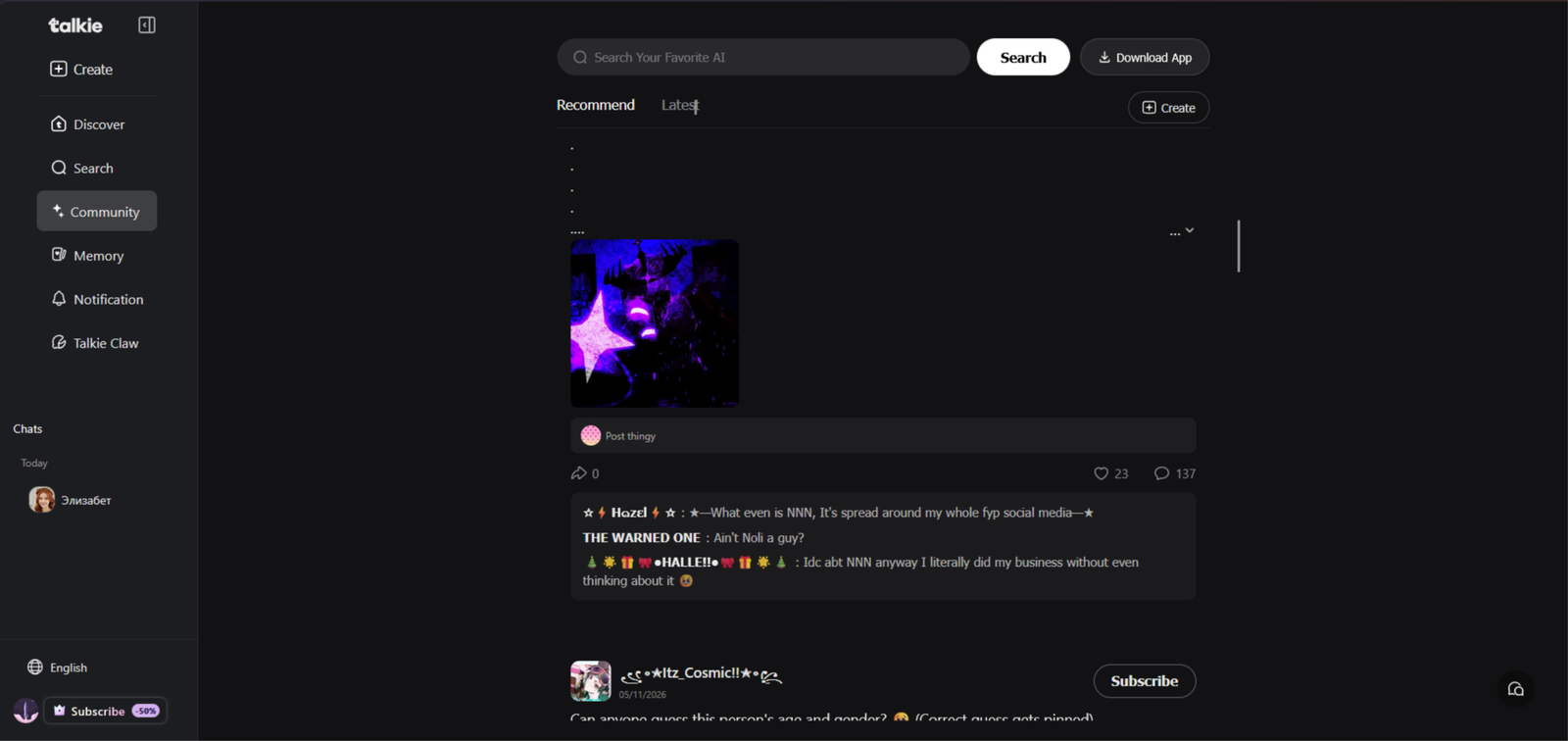
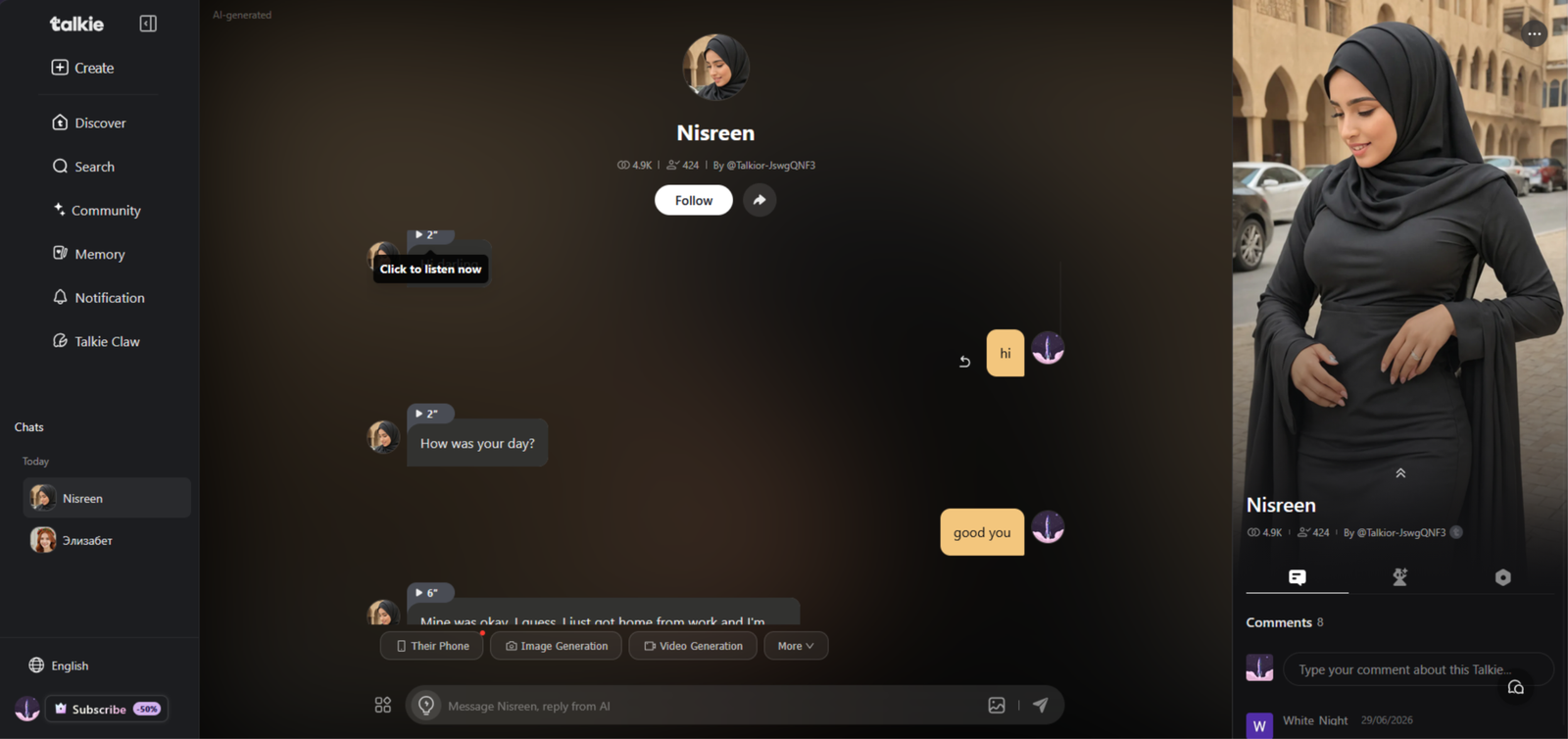
You’re not stuck in a browser tab on a computer, which already puts Talkie ahead of apps that are phone-only. The layout is easy to read on a big screen. A sidebar runs down the left with Create, Discover, Search, Community, and Memory, and the main area is a grid of character cards with filters across the top. You see far more at once than you do on a phone, which makes browsing quicker.
Long chats are more comfortable with a real keyboard, too. The desktop app is designed to be more convenient and easy to use compared to the desktop version on mobile, and my thumbs were grateful for that.
The website on mobile is a little less steady. The site works for a short time and then stops working sometimes, and there’s a constant “Download App” nudge at the top.
My result: 6.5/10. A good fit for browsing and typing, but you’ll notice the gaps next to the phone version.
Mobile experience
This is where Talkie feels most at home. It’s built around the phone, with quick swiping through characters, voice features, and a layout made for one-handed use. The store ratings back that up. The iPhone version sits around 4.7 stars across tens of thousands of ratings, and the Android version has passed tens of millions of installs.
The downsides are the usual ones for a free app. There are ads on Android, in-app purchases, and a steady push toward paying. None of it ruins the experience, but you notice it.
My result: 8/10. Still the best way to use it.
Native app availability
Coverage is good. You can use Talkie on the web, on desktop, and on both phone stores, so almost any device works. The naming is the messy part. On Android it’s “Talkie: Creative AI Community.” On iPhone it’s “Talkie Lab – AI Playground.” Same publisher, different name, and different age ratings between stores, so finding the right one takes a minute.
Android availability has also been shaky. The app was pulled from Google Play for a few weeks in April 2026 during an upgrade and came back in early May. During that gap, the company pointed people to the web version. Some features, like Feed, Comments, Creator Studio, and Soul Cards, were reportedly still down after the app returned.
My result: 7/10. Plenty of ways in, with a confusing setup and a bumpy history.
Stability and cross-device use
Your account is what keeps things consistent. Sign in and your chats follow you between phone, desktop, and browser. Guest sessions don’t carry over, so if you skip the account you’ll lose your history.
Stability is average at best. User reports mention endless loading screens, failed logins, and replies that never arrive, and login problems tend to bunch up around server upgrades. When one version acts up, the usual advice is to try another, which helps, but it also tells you a single version isn’t fully reliable.
My result: 5.5/10. Syncing works, but you’ll want a fallback.
Want a Companion Without the Filter Getting in the Way?
Talkie runs the same content filter on every account, adults included, and it can cut in right in the middle of a scene. TalkieMate is made for grown-ups. You can start free, pick from hundreds of characters in realistic or anime styles, play through story-based roleplays, or build your own. Paid plans add images, voice calls, and video.
Try TalkieMate Free →You’ll be taken to TalkieMate. Adults only (18+). My pick if Talkie’s filter keeps stopping the chats you actually want to have.
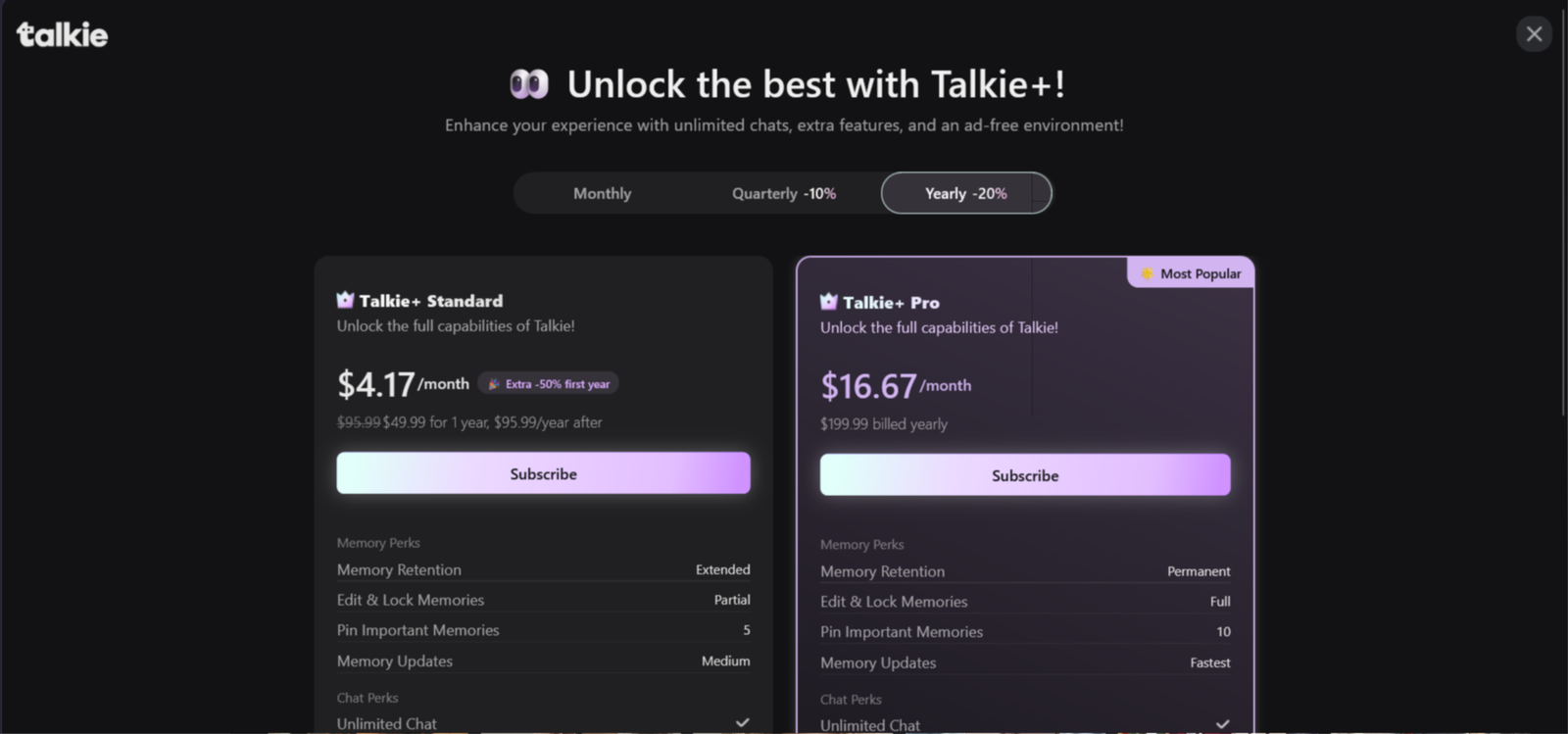
Pricing updated: November 13, 2026
Pricing updated: November 23, 2026 — from talkie-ai.com official pricing. Regional pricing may vary.
Final verdict
Talkie is easy to like at first. It’s free to start, the character library is huge, and it works on your phone, on desktop, and in a browser. The problems show up after a few weeks. Memory is thin on the free plan, the filter can interrupt a scene, and the privacy setup isn’t something I’d trust with anything personal.
It works best if you want variety. You can try a new character every night, jump into a story, or build your own without paying anything. If you mostly chat in short sessions and don’t care much about the character remembering last week, the free plan covers enough.
If you want a companion that remembers you over weeks, Talkie is a weak fit unless you pay for Pro. The same goes if you want adult content, since the filter applies to every account. And if privacy matters to you, treat everything you type as something the company can read.
Talkie AI FAQs
Is Talkie AI actually free?
Yes, to start. You can sign up, browse the library, chat to characters, and even make your own without paying. The catch is the free plan comes with ads and daily limits, so it works best as a trial rather than something you settle into for a long evening.
How many free messages do you get a day on Talkie?
In my test I got around 50 messages a day. Other reviews quote different numbers, so I wouldn’t treat 50 as a guaranteed allowance. What matters is that you’ll hit a wall if you try to have a long, proper chat on free.
Does Talkie have ads on the free plan?
It’s supposed to. A lot of other reviews mention them, especially on Android. I didn’t see any during my own testing period, but Talkie+ is sold as ad-free, so expect them to show up.
How long are voice calls on the free plan?
About two minutes in my test. That’s enough to hear what a character sounds like, but not enough to actually hold a conversation by voice. If you want voice as your main way of chatting, you’ll need Talkie+.
Is Talkie good for NSFW or adult roleplay?
No. Talkie filters adult content on every account, including paid ones. You can do light flirting and romantic build-up, but anything more explicit gets softened, dodged, or cut off with a “Please change your topic” notice. If that’s the main reason you’re signing up, you’ll spend more time working around the filter than chatting.
Does Talkie remember what you talked about?
For a short chat, yes. It held names, preferences, and main plot points pretty well at first. After a day it was patchy, and after a few days the smaller details started to fade. It keeps the big stuff — the personality, the main relationship, the major events — but don’t expect it to remember the little things from last week without a nudge.
Challenge: Can you spot anything I missed?
I test every app myself, but things change fast. If you find outdated pricing, a feature that works differently, or something important I didn’t cover — drop it below.
Best catches get publicly credited in the post (first name is enough). Real user notes make these reviews better for everyone.
Recent Reader Catchers
- Alex – spotted new gem pricing (Nov 2026)
- Jordan – flagged missing voice call limits (Nov 2026)
- Sam – corrected free message count (Nov 2026)
About the Founder: Simon Norman
I built AI Companion Kit to be an independent AI companion hub focused on transparent research, practical insights, and honest evaluations of AI companion platforms. My goal is to help readers understand how these apps work, what makes them different, and which features actually matter before they make a decision.
To learn more about who is behind AI Companion Kit, my testing process and the editorial standards used across the site, visit About the Founder (Simon Norman).