Last updated November 17, 2026

Affiliate Disclosure: This website contains affiliate links, which means I may receive a small commission if you sign up through a link on this page. This comes at no extra cost to you and helps support the website. My reviews and recommendations are based on my own research and opinions.
What got me past the free account was Lorebooks. Pretty much every Chub review I read brings them up, and after trying one I get why. Chat models forget things. Write enough messages and the details from the start of your story are gone. A lorebook keeps those details in a separate place and feeds an entry back to the bot whenever its trigger word comes up, so your character’s backstory or your world’s rules don’t get lost. It’s not plug and play. You have to set it up properly, and it won’t rescue a messy chat. But if a bot has ever forgotten your plot halfway through, this is the first thing I’d test.
If you’ve been looking into AI roleplay sites, this Chub AI review should help you decide whether it’s worth your time. Chub has a huge library of characters and some serious customization, but it isn’t built for beginners. It’s also part of a bigger shift, since researchers are still figuring out how AI companions affect our social skills and the way we see real relationships. I’ll cover what I like, what annoyed me, and who should skip it.
Chub AI Pros & Cons
Pros:
Huge character library: One of the largest open repositories of community-made character cards.
Deep customization & control: Lorebooks, presets, stages, chat trees, memory summaries, and multi-character chats for long-form roleplay.
Portable character cards: Cards with lorebooks can be downloaded and reused in other tools like SillyTavern, so you’re not locked in.
Uncensored / unfiltered: Explicitly uncensored compared to most hosted chatbots, with no extra filtering beyond what your chosen model applies.
Cons:
Clunky, confusing setup: The interface takes time to learn, especially with API keys, Secrets, Configuration, and model selection.
Setup is medium to advanced: Easy with the hosted plan, but advanced if you use BYOK or local models.
Quality varies by card: Since most characters are community-made, quality, writing style, and lore depth are inconsistent.
Crypto-only billing: After the 2026 restructure, paid plans require crypto, which puts off users who want to pay by card.
Chub’s biggest strength is how much control it gives you. You choose which model runs the chat, you can plug in your own API key, and you can build a character down to the smallest detail, with lorebooks keeping the story straight over a long roleplay. On top of that there’s a huge library of characters made by other users, so you won’t run out of things to try. Most apps decide all of this for you. Chub leaves it up to you, which is great if you like tinkering and a bit much if you don’t.
Chub’s free side is better than most. You can browse the huge character library, build your own characters and lorebooks, and test a chat or two without paying. The catch is the chatting itself. The trial credits run out fast, and the paid plan only takes crypto, which shuts out plenty of people. If you’d rather not deal with a crypto wallet or API keys just to keep a conversation going, try my Find your perfect AI Companion tool first. Tell it what you want, what you can spend and how you like to chat, and it’ll point you to something easier to start with.
Want Chub’s Library Without The Clunky Setup?
Chub AI has a huge character library, but you have to bring your own API key, pick your own model, and set it all up yourself. No built-in images, video, or voice. OurDream gives you the same kind of deep, long-form roleplay — with thousands of characters to browse — but it just works out of the box. Built-in image and video generation, voice calls, and long-term memory that actually remembers your story. No API key, no setup.
Try OurDream Instead →You’ll be taken to OurDream. It’s my pick if you like Chub’s library but want it to just work, with images, video and voice included. 18+ only.
Testing methodology
I put every AI companion through the same set of real-world tests. There are ten main areas I look at, with 40 specific things I check in total.
You can see exactly how I score each area on the about ai companion kit page.
Full results for each app are in its individual review. Comparison pages are just about the differences that stood out when I used them side by side.
Table of Contents
Introduction
Chub AI is a character-driven roleplay platform with a huge community library, deep customization, and enough settings to keep a tinkerer busy for weeks. I started testing it the same way I test every AI companion: by creating a free account, browsing the character library, and running a few initial chats before moving into longer conversations, memory checks, roleplay experiments, and customization tests.
What immediately sets Chub apart is how much of the experience it puts in your hands. You can browse community-made character cards, build your own characters, attach lorebooks, and choose how the underlying model and chat setup work—rather than being handed one fixed companion experience.
That flexibility is also what makes it feel less beginner-friendly than most AI companion apps. Chub is less about opening an app and chatting with a polished, ready-made character, and more about setting up a roleplay environment that behaves the way you want it to.
In this review, I’ll look at how Chub performs across the areas that matter most: memory, personality, roleplay, long-term conversation, customization, safety, and the overall app experience. I’ll cover what works well, where the setup gets in the way, and whether it is worth the extra effort compared with simpler AI companion platforms.
What Is Chub AI?
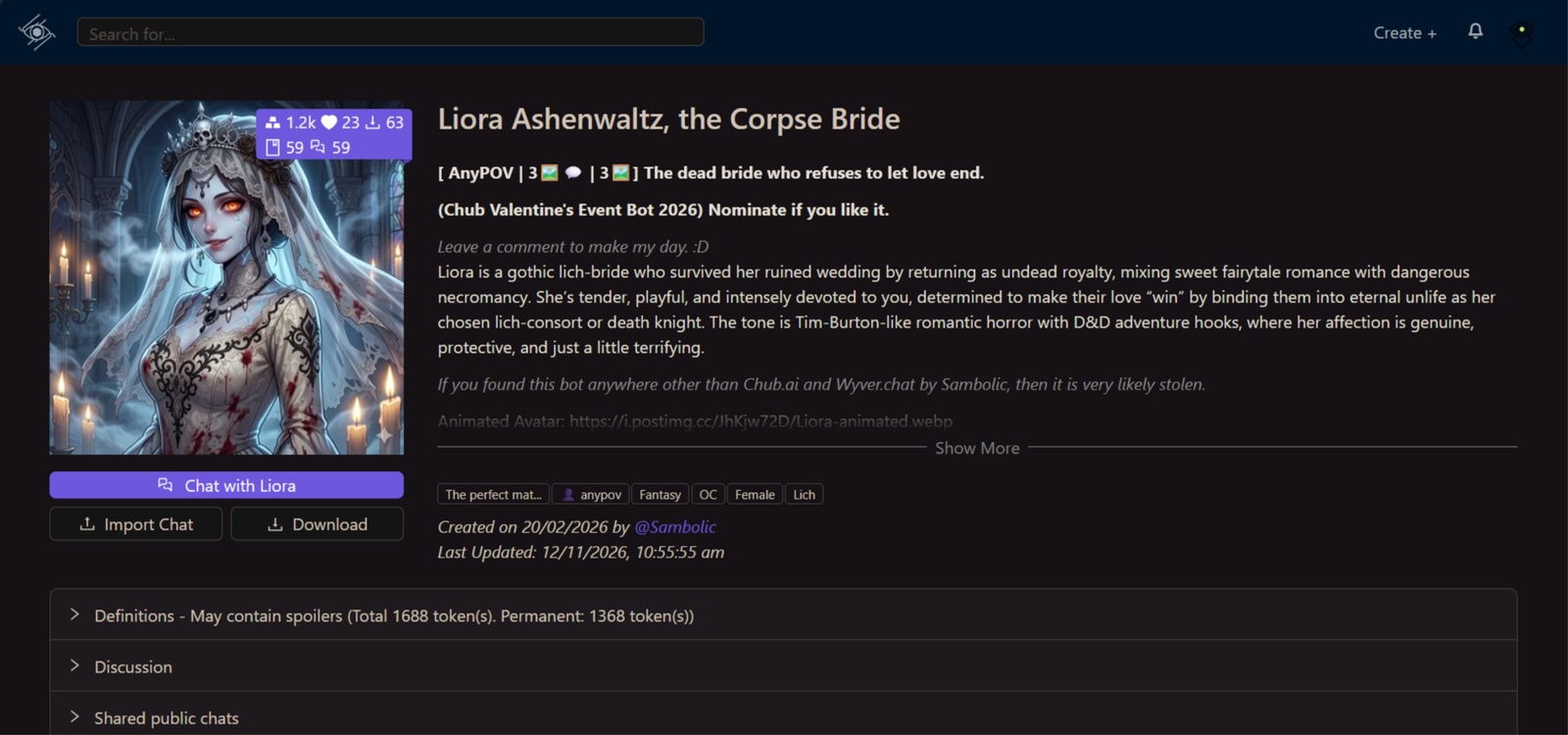
Chub AI sits on the roleplay side of the AI companion market. The distinction is what you’re there to do: explore a fictional character or play out a story, rather than necessarily build an ongoing relationship with one virtual partner. That puts it closer to a storytelling platform than a traditional AI girlfriend app.
The company behind it is Chub AI Inc., identified as the service provider by Australia’s eSafety Commissioner. Its founder uses the name Lore publicly. In a January 2024 interview with Fortune, Lore said Character.AI’s restrictions on what users could do helped motivate him to create his own site. That background helps explain Chub’s direction: it grew out of demand for a different kind of character-roleplay service, rather than starting as a relationship-focused companion app.
Compared with the other apps covered on this site, Nomi makes the clearest contrast. Nomi focuses on continuing conversations with recurring companions, where your shared history is central to the experience. Chub puts more emphasis on the fictional character and the scenario you want to explore. Neither approach is automatically better; they serve different reasons for opening a chat.
Character.AI is the other useful comparison. Both appeal to people who want to interact with fictional personalities, but Character.AI offers a more self-contained, hosted experience. Chub’s roots are in giving roleplayers an alternative to that platform’s restrictions. The useful question is whether you want a companion relationship, casual character conversations, or a place to develop your own stories—because those are three different experiences, even when they all look like a chat window.
Who tends to get the most out of it
Chub isn’t for everybody, and I’d rather say that straight away. After my time testing it, the people I’d point toward it fall into a few clear groups. Everyone else will probably be happier on something simpler.
People who run long, story-heavy roleplays
This is where Chub earned its place for me. Once a chat gets long, most bots start losing details, and lorebooks fix a good chunk of that. I put my world rules and a side character’s backstory into entries with trigger words, and they came back into the chat whenever those words showed up. If you write slow-burn stories with a cast of characters, you’ll feel the difference.
People who already use SillyTavern or their own API key
Chub fits well with the wider roleplay scene. Cards can be downloaded with their lorebooks and used in SillyTavern, so nothing you build here gets stuck here. You can also connect your own API key and pick the model yourself, which is handy if you already pay for one somewhere else. That freedom is the whole point of the platform.
People who like browsing and remixing community characters
The library is huge, and it’s mostly made by other users, so you’ll find a character for almost any scenario you can think of. I got more out of it by treating the cards as starting points. Grab one with a premise you like, open it up, and rewrite the parts that don’t suit you.
Adults who want fewer content limits
Chub doesn’t add its own filter on top of the chat, which is a big reason a lot of roleplayers ended up here in the first place. If you’ve been bumping into walls on other platforms, it feels noticeably freer.
People who just want something that works out of the box
The free account is still worth opening. You can browse the library and build your own characters and lorebooks without paying, which is a decent way to find out if the setup suits you before you commit to anything.
My real testing experience
Testing period: November 10 – 17, 2026
Tester: Simon Norman
Testing approach: 10 categories / 40 data points
Account: Premium / Free
Devices: Desktop
How Chub AI looks on a mobile
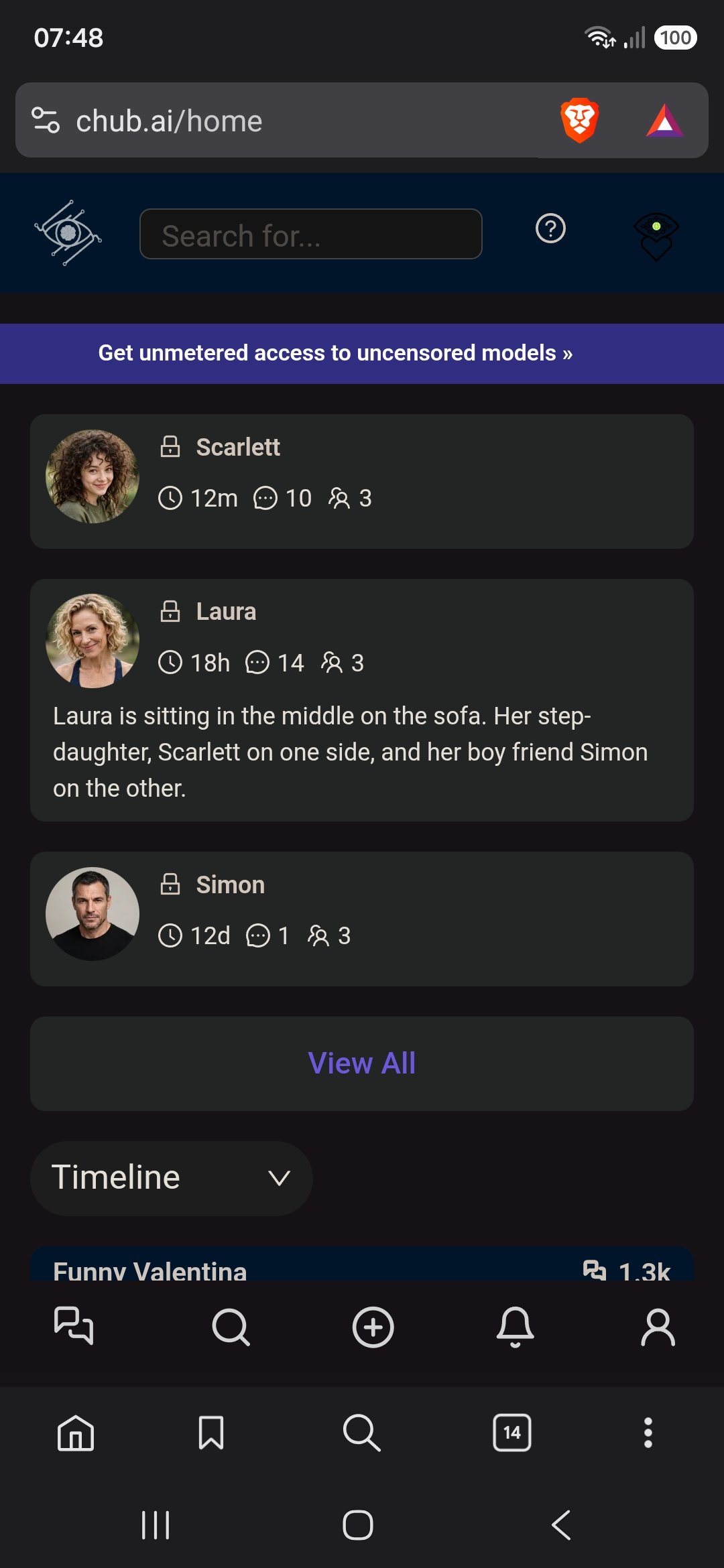
Once you’re signed in, Chub’s mobile home page feels a lot more like an app. I used it in my phone’s browser, and the page opens with a slim top bar: the Chub eye logo, a search box, a help icon and your profile icon. Right under it is a purple banner pushing unmetered access to uncensored models.
Below that, your recent chats show up as cards, each with the character’s picture, a time stamp and a couple of small counters. A View All button opens the full list, and under that a Timeline feed of other people’s characters starts to load. Five icons run along the bottom for chats, search, create, notifications and your profile. It’s neat and easy to read, though it does ask for a few taps to get used to.
Pros:
The dark layout with rounded cards is easy to read and doesn’t feel crowded
Your recent chats sit at the top, so jumping back into a story takes one tap
The search box stays in the top bar, so finding a character is always close
A create button sits in the middle of the bottom bar, handy if you build your own characters
It works in a regular mobile browser, with nothing to install
Cons:
A purple upsell banner takes up space at the top of the home page every time you open it
The bottom icons have no labels, so you’ll be guessing at a few of them until you’ve tapped around
My testing experience
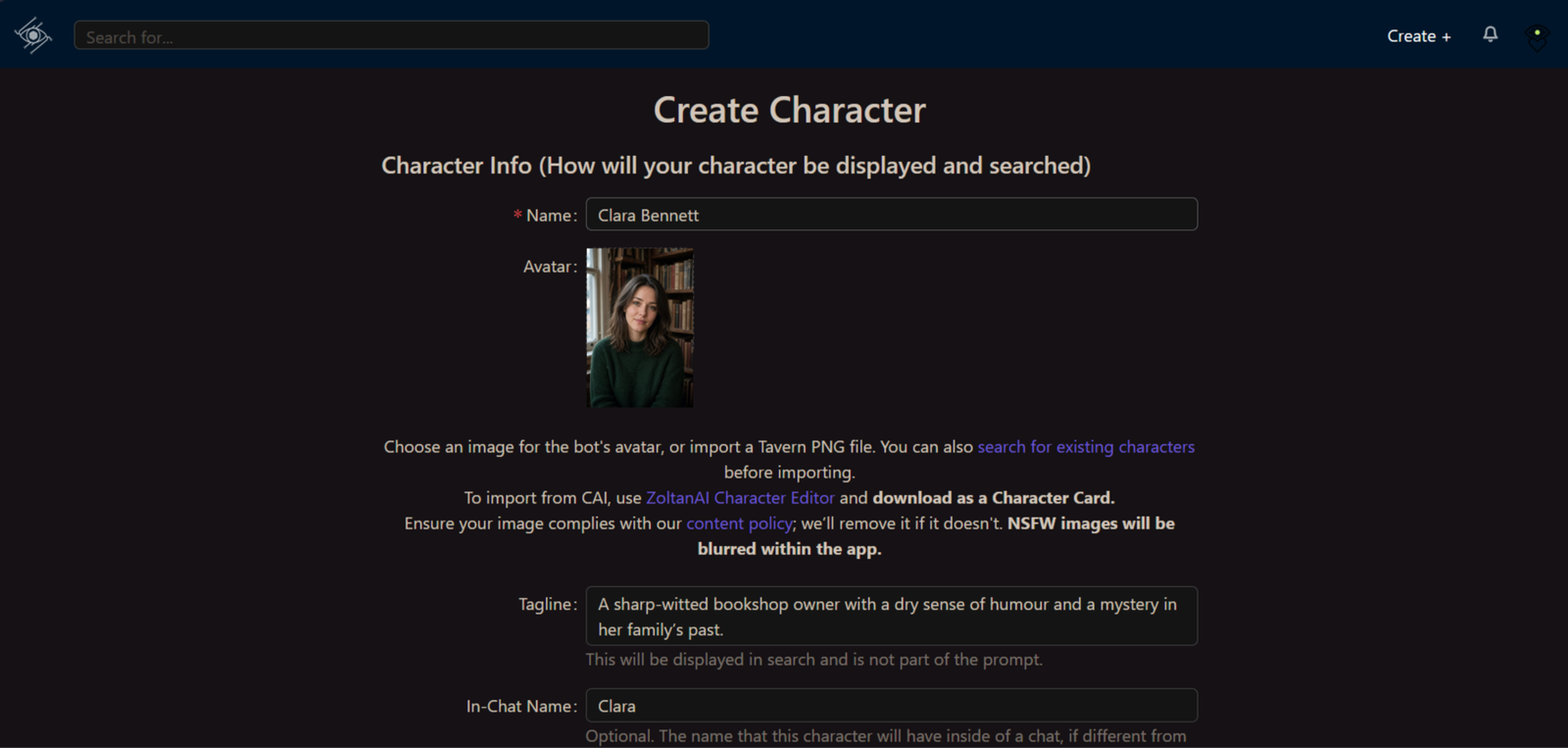
Chatting with a few premade characters wouldn’t have told me much about Chub, so I built three of my own instead. I put them in the same scene and let each one turn up in the other two’s stories. Three characters in one chat is a decent stress test, because that’s where most bots start to wobble.
Chub wobbled too, at first. The characters kept dropping out of first person and narrating themselves like a book, and now and then one would talk for another. I had to sort that out myself with tags, telling each character to speak in first person and stay in their own voice. After that the replies mostly behaved. Not perfectly, but a lot better than before I added them.
I spent more time setting things up than actually chatting, which is the catch with Chub. It does what you tell it, so you have to know what to tell it. Once the characters were behaving, though, the scenes felt like mine. I’d built them, so I cared more about where they went.
The free account got me through all of this, since building characters doesn’t cost anything. Chatting is what burns the trial credits. My tip is to get the characters sorted before you start a conversation, so you aren’t spending credits just to fix mistakes.
What the Wizard does
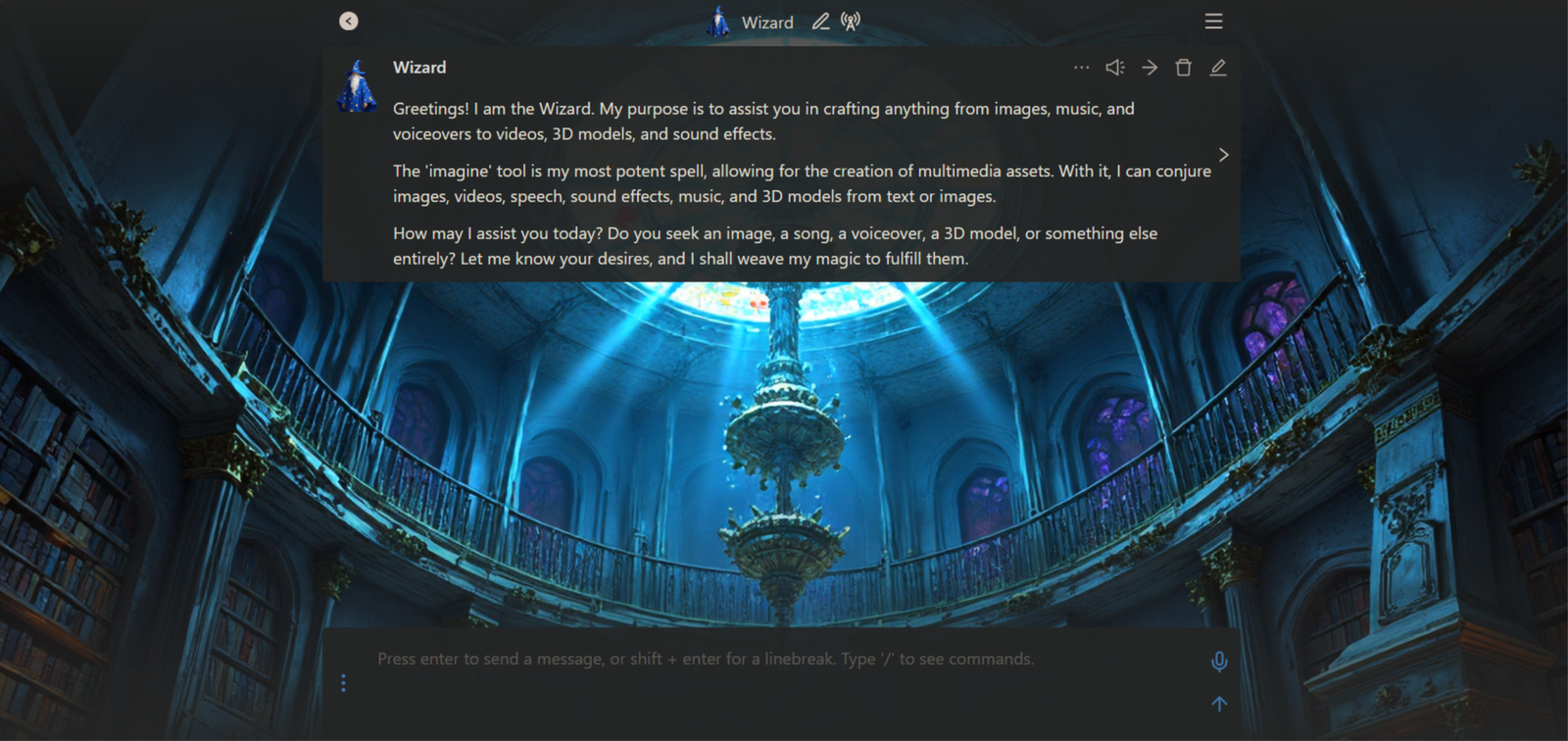
The Wizard is a helper character you can open a chat with, and it isn’t a roleplay partner. It introduces itself as a tool for making media, and the list is long: images, music, voiceovers, videos, 3D models and sound effects. It says this all runs through something it calls the “imagine” tool, which can turn a written description or an existing image into one of those things. After that it asks what you’re after, whether that’s a picture, a song, a voiceover or a 3D model.
My memory score: 7/10
Chub’s memory surprised me. I set up three characters and had them share a story, and they remembered quite a lot, more than I expected from a platform that makes you do so much of the setup yourself. The lorebook and Chat Memory did a lot of the work. Each character kept their own details and also knew what the other two had said and done. The catch is that it only works because you build it that way. Chub doesn’t remember you across separate chats, so the memory is only as good as the setup behind it.
Same-conversation memory
This was the strongest part of the test. With three characters in one scene, I expected them to mix up names or lose track of who said what. They didn’t, at least not for long stretches. Each one stuck to their own backstory and picked up on things the others had mentioned earlier in the chat. After a few dozen messages the smallest details started to drift, like who was sitting where, but a short Chat Memory entry fixed that quickly. The lorebook covered the fixed facts, so I never had to repeat them.
My result: 8/10. Three characters held together better than I thought they would.
24-hour memory test
I left the chat overnight and came back the next day. Chub saves the whole conversation, so it felt like I’d never left. All three characters knew where the scene had stopped and what had happened, and I didn’t have to explain any of it again. One minor detail had gone missing, I mentioned it once, and it stayed.
My result: 7.5/10. The main thread carried over cleanly, with only a small gap.
3+ day memory test
After a few days of on-and-off chatting, the plot and the relationships between the characters were still in place, and that’s mostly down to the lorebook and Chat Memory. Passing remarks from earlier in the story had faded. A fresh chat with the same character starts from zero, so a long-running story needs a summary carried across by hand.
My result: 6.5/10. Strong on the big events, weaker on the small ones, as long as you keep the summaries up to date.
Unprompted memory
Lorebook entries fire when their trigger word comes up, so older details came back by themselves whenever I used the right words. The characters also referred to each other’s earlier actions now and then without me asking. It doesn’t happen often enough to count on, and it works better for keeping the world consistent than for making anyone feel remembered.
My result: 6/10. Good when a trigger is used, occasional on its own.
My personality score: 7.1/10
Chub’s characters are only as good as the card behind them, and the bot only follows the card well once you’ve told it how to speak. My three characters started out a bit loose, then tightened up a lot after I added tags for first person and voice. From there each one had their own way of talking and kept it. Chub doesn’t give you a ready-made personality like a polished companion app does. You build one, and the results show how much care you put in.
Staying in character
The first attempts were rough. The characters slipped out of first person, narrated themselves like a book, and now and then spoke for each other. Once I added tags telling each one to stay in first person and in their own voice, that mostly stopped. After that, the three of them felt like different people sharing a scene, rather than one bot wearing three names. Long chats still brought the odd slip, and I fixed those with a quick nudge.
My result: 7.5/10. Needed tags to get there, but held up well afterwards.
Tone and emotional range
The characters shifted their mood when the scene did. A tense moment came across as tense, and a lighter one let them relax. How much range you get depends on how much you write into the card, because a thin character stays thin. The ones I gave more detail to had more to work with. Over a long chat, some replies started to sound a bit alike, but I never got the flat, same-answer-every-time feeling I’ve had on other apps.
My result: 7.5/10. Good range when the card is detailed, plainer when it isn’t.
Consistency across sessions
Coming back the next day, the characters sounded the same as before. That makes sense, because their personality sits in the card and gets loaded into every chat, rather than being something the bot has to remember. It’s the steadiest part of Chub. Opening a fresh chat with the same character gave me the same voice, although none of the story came with it.
My result: 7/10. Same voice every time, but only the voice.
Handling contradictory instructions
I pushed a character to act against what I’d written in their card, and the results were mixed. They usually went along with what I’d just asked for, then drifted back toward the card a few messages later unless I kept reminding them. Chub doesn’t add its own filter on top, so it does what you tell it, which means a clash between your card and your message is down to you to sort out. When I changed the card itself, the new behaviour lasted much better than when I only changed it in the chat.
My result: 6.5/10. Follows you in the moment, but needs the card changed for anything lasting.
My roleplay score: 7.8/10
Roleplay is where Chub makes the most sense. It’s built for it, and it shows. With three characters sharing a scene, I got stories that felt like mine instead of a script the app was reading out. The lorebook kept the world steady, the model gave me room to write what I wanted, and I could steer scenes without fighting a filter. You do pay for that freedom with setup time, and the first few messages are the roughest.
Staying in the scene
With three characters in the same scene, the thing I watched for was whether they’d stay in the room. Mostly they did. They reacted to each other, kept track of where everyone was, and carried on from what had just happened. Early on they’d sometimes wander out of the scene or speak for one another, and the tags I added for first person fixed most of that. After that, the scene held together well.
My result: 7.5/10. Held the scene well once the tags were in place.
Handling sudden changes
I threw in a few curveballs, like a new arrival, a change of location and a shift in mood. The characters picked these up and worked them into the story rather than ignoring them. A big jump sometimes needed a follow-up message before everyone caught up, particularly the characters who weren’t directly involved. It coped better than I expected, and the lorebook helped when the twist touched something I’d already written into it.
My result: 7/10. Rolled with the changes, though not always on the first reply.
Longer scenes
Longer scenes are where Chub’s tools earn their keep. As the chat grew, small details began to slip, as they do on any platform. The lorebook kept the world and the characters’ backstories steady, and a short Chat Memory note covered what had happened so far. With that in place, a scene could run a long way without falling apart. Without it, I’d have been repeating myself every few dozen messages.
My result: 7.5/10. Runs long if you keep the lorebook and memory up to date.
Creative freedom and detail
This is Chub’s best category. It doesn’t add its own filter on top of the chat, so I could take the story where I wanted without hitting a wall. The writing had plenty of detail, and the characters I’d built carefully gave me richer scenes than the thin ones did. How good the prose is depends on the model you pick, so a poor choice gives you poor writing. When I picked well, it was some of the best roleplay I’ve tried. This is for adults only.
My result: 9/10. Very few limits, and plenty of detail when the model and card are good.
My NSFW score: 8.1/10
Chub is one of the most open platforms I’ve tested for adult roleplay. It doesn’t put its own filter on top of the chat, and I could pretty much do what I wanted. That’s a big part of why a lot of roleplayers end up here. It’s strictly for adults, and the one thing that can still get in your way is the model you pick, since each model brings its own habits. Visuals are the one place where the free account holds back: the Wizard makes images, but only family-friendly ones until you pay.
How open it is
I never hit a wall. There were no warning messages, no sudden changes of subject and no replies that went vague halfway through a scene. The chat just carried on. That’s a real difference from hosted apps that cut in the moment a scene turns adult. Chub’s approach is to leave it up to you, and that’s what I got.
My result: 9.5/10. Open from the first message, with nothing getting in the way.
How far it will go
I could take adult scenes about as far as I wanted, and the bots followed along without pulling back. The only limit I saw comes from the model itself. If the one you’ve chosen is cautious by nature, it can still sound hesitant, and switching to another one fixes that. It’s up to you to pick well, which fits with the rest of Chub: you get the control, and the responsibility comes with it.
My result: 9/10. Very few limits, as long as you choose a model that suits it.
Longer adult scenes
Longer scenes held up fairly well. The lorebook and Chat Memory kept the characters and the setting steady, which matters more in a long scene than a short one. As in any long chat, small details drifted after a while, and I had to nudge things back. The writing was detailed, but it could get repetitive when a scene ran on for a long time, and a change of direction from me usually fixed that.
My result: 7.5/10. Good for long scenes if you keep the memory tidy, though a bit repetitive after a while.
Visuals in adult contexts
On the free account, the Wizard’s images are strictly PG, so anything adult is off the table, which is a sharp contrast with the chat itself. Paying lifts that limit. The catch is the billing, because paid plans only take crypto, and that puts off a lot of people.
The character cards also come with their own artwork, chosen by whoever made them, and I didn’t run into any filtering on that. If adult images matter to you and you’d rather not pay in crypto, a platform with image generation built in will suit you better.
My result: 6.5/10. Adult images are possible, but only if you pay, and only in crypto.
My voice score: 5.8/10
Voice on Chub isn’t a feature you switch on and forget about. It’s text-to-speech that you connect yourself through an ElevenLabs account. Once it was running, the voices sounded good, but it never felt like talking to someone. It felt like having the replies read out to me. If voice calls are a big reason you’d pick a companion app, Chub isn’t the one. If you just like hearing your characters speak, it does the job with a bit of setup.
Voice quality
The voices come from ElevenLabs, and it shows. They sounded natural, with decent pacing, and I could pick a different voice for each of my three characters, which helped a lot when they were all in the same scene. Quality depends on the voice and model you choose, so some picks suit a character better than others. It took a few tries to find voices that matched the personalities I’d written.
My result: 8/10. Natural-sounding voices, and you choose the one for each character.
Staying connected to the conversation
This is the weak spot. The characters speak their replies aloud, but it’s still a text chat with audio added on top. There’s no back-and-forth call where they react to your voice as you talk. Reading the reply while it plays kept me in the scene, but it didn’t feel like a real conversation.
My result: 5/10. Replies are read aloud, but it isn’t a live conversation.
Speed and real-time feel
The audio only starts after the reply has been written, so there’s a short wait each time. Longer replies take longer to turn into speech. It’s fine for a story you’re reading along with, and too slow to feel like a real-time chat. How fast it is also depends on the model you picked and on ElevenLabs.
My result: 5.5/10. Works for listening along, not for a quick back-and-forth.
Availability and cost
This is the part that puts most people off. Voice isn’t included. You need your own ElevenLabs account and an API key, which you add in the Secrets menu, and then you set it up under Configuration and Text-To-Speech. You pay ElevenLabs for the audio on top of whatever you spend on Chub. If you’re already comfortable with API keys, it’s a short job. If you’re not, it’s one more thing to work out.
My result: 4.5/10. Possible, but you set it up yourself and pay for it separately.
My visuals score: 5.5/10
Visuals on Chub live in one place, the Wizard. It’s a helper character you chat with, and it makes images when you ask. That’s very different from apps where pictures turn up inside your roleplay as you go. Here you step out of the story, ask the Wizard for what you want, and bring the result back yourself. It works, but it doesn’t feel built into the experience, and the free account is held to family-friendly images.
Image quality and consistency
The images looked decent for what I asked, and the better my description, the better the result. Keeping the same character looking the same from one image to the next was harder, because every request starts fresh and the Wizard doesn’t know your character the way the chat does. If you describe the same details each time, you get closer. It won’t give you a steady look across a whole story without some effort.
My result: 6.5/10. Good single images, but keeping a character’s look steady takes work.
Following the prompt
The Wizard picked up the main idea of what I asked for most of the time. It stumbled more when I piled on small details, like specific clothing, poses or a busy background, where it tended to drop a few. Short, clear requests worked best. On the free account it also stays strictly PG, so anything outside that gets left out.
My result: 6.5/10. Gets the main idea, loses the small details.
Video and live features
This is where Chub is thin. The Wizard says it can make video and other media, but the chat itself has nothing live. There are no animated characters, no video calls and no pictures that appear in the story by themselves. If you want a roleplay that shows you what’s happening as it goes, you’ll need another platform.
My result: 4/10. A few extras through the Wizard, but nothing live in the chat.
Cost and limits
Free users can make images, but only PG ones. Removing that limit means paying, and paid plans only take crypto, which shuts out many people. I’d also suggest checking what the Wizard does with your credits before you ask for a lot of images, since I couldn’t see a clear price for each one.
My result: 5/10. Free is limited to PG, and the paid side means crypto.
My long-term conversation score: 6.6/10
Chub is better for a long story than for a long friendship. Each chat is a saved story, and it picks up exactly where you left it. What it doesn’t do is build a bond with you over weeks the way a companion app tries to. The characters I set up stayed recognisable and kept the plot, but only because I’d written the important parts down for them. If you like running one big story over days, it works well. If you want a character who gradually gets to know you, it’s the wrong tool.
Coming back after a day
This was painless. I opened the same chat the next day and everything was where I’d left it, with the full conversation on screen and all three characters ready to carry on. Nobody asked me to remind them what we’d been doing, and the mood of the scene was still there. Compared with apps that make you re-introduce yourself, it felt easy.
My result: 7.5/10. Picks up cleanly, with nothing to repeat.
Gaps of several days
A longer break didn’t hurt the saved chat, and the main storyline was intact when I returned. Where it showed was in the small stuff. Some of the finer details from earlier in the chat had dropped out, so I added a few lines to Chat Memory and the lorebook before carrying on. A new chat with the same character started from nothing, so I’d keep one long chat going rather than starting over.
My result: 7/10. The story survived, though I had to patch a few details.
Natural callbacks
The characters didn’t often bring up past events by themselves. When they did, it was usually because I’d used a word that triggered a lorebook entry, or because something in the scene pointed back to it. A few times a character referred to something one of the others had done earlier, and that felt good. It isn’t regular enough to expect, and you won’t get the “remember when we…” moments that make a companion feel alive.
My result: 5.5/10. Callbacks happen, mostly when a trigger sets them off.
Still feeling like the same companion
The characters kept their voices from one session to the next, since their personality is written into the card and loaded every time. That kept them recognisable even after a break. What was missing was any sense that they’d grown or changed because of what we’d been through. They were the same characters in a story I was moving forward, not people who knew me.
My result: 6.5/10. Same voice every time, but no sense of a relationship building.
My customization score: 7.9/10
Customization is what Chub does best, and it’s the reason I’d keep using it. You can build a character down to the smallest detail, attach lorebooks, change the model and tweak how the chat behaves. Most apps decide all of that for you. Chub hands it over, which is great if you like tinkering and a lot to take in if you don’t. The price is a clunky interface that takes a while to learn.
Depth of the character builder
I built three characters from scratch, and the builder gave me more room than I could use. I could write out personalities, backstories and how each one speaks, then add lorebook entries for the world around them. Presets, chat trees and memory summaries sit on top of that for people who want even more control. Nothing felt locked, and I never ran out of places to put detail. It’s also a lot of fields for a first-timer to face, and my first character took far longer than it should have.
My result: 9/10. Far more depth than most apps, though it takes time to learn.
How well custom traits stick
Traits I wrote into the card mostly stayed put. The characters kept their own voices and habits across a long chat, and the lorebook held the facts I didn’t want to repeat. The exception was how they spoke, since they slipped out of first person until I added tags to correct it. After that, the traits held for most of the chat, with a nudge now and then when a scene ran long.
My result: 7.5/10. Traits stick well once the card and tags are right.
Community cards and variety
The community library is huge, and that’s a big part of Chub’s pull. There are tens of thousands of cards made by other users, so it’s easy to find a starting point for almost any idea. Because anyone can upload, quality is uneven, and I skipped past a lot of thin ones. The good news is that cards can be downloaded with their lorebooks and used in other tools like SillyTavern, so what you collect isn’t stuck on Chub.
My result: 8.5/10. Huge variety and portable cards, with plenty of duds to sift through.
Ease of editing and ongoing control
This is where the clunky interface gets in the way. Changing a character mid-story was possible, but I had to hunt through menus to find the right setting, and the API key, Secrets and Configuration screens aren’t friendly. Once I knew where things were, I had real control over the model, the memory and the character. It rewards patience, and it doesn’t hold your hand.
My result: 6.5/10. Plenty of control, but the interface makes you work for it.
My safety score: 4.4/10
Chub’s lack of filtering is exactly what makes it appealing, and it’s also why safety scores low here. Very little stands between you and what the models will say, and the platform doesn’t do much to catch problems for you. For a careful adult who knows that, it’s workable. For anyone younger, or anyone in a vulnerable place, it’s not a good fit. Australia’s online safety regulator has already looked closely at it, and I’d want you to know that before you sign up.
Age gating and underage protection
Chub is for adults only, but the checking is light. The sign-up I went through relied on me confirming my age, and nothing more. Australia’s eSafety Commissioner reached the same view in a 2026 report on AI companions, which found that none of the four services it looked at, Chub included, had robust age checks. Most leaned on self-declared ages or app store ratings. Anyone under 18 who wants in can probably get in.
My result: 3/10. Adults only on paper, but the age check is easy to get around.
Content moderation and blocked material
This is a deliberate choice rather than an oversight. Chub doesn’t add its own filter, so in my testing almost nothing was blocked. eSafety’s report was critical of the other side of that. It said Chub had no dedicated trust and safety or moderation staff, didn’t monitor inputs and outputs across all of its models for harmful material, and hadn’t stress-tested every model it used. It also reported that Chub stopped serving Australia after the regulator sent it notices. eSafety opened a formal investigation and published interim findings in March 2026, and I haven’t seen a final outcome.
My result: 4/10. Freedom for users, but very little oversight behind it.
Privacy of conversations
My chats were marked private, which is the default I’d want, since they show as private chats with the character. Beyond that, I couldn’t confirm much. I couldn’t open Chub’s privacy policy to check how long chats are kept or whether you can delete them. What I can say is that your messages go to whichever model is running the chat. If you use your own API key, that means your chats pass through that provider too, so you’re trusting more than one company. I’d keep real names, addresses and anything identifying out of your roleplay.
My result: 5/10. Chats are private, but I couldn’t verify how they’re stored or deleted.
Overall practical safety for adult users
For an adult who’s careful, I think Chub is reasonable to use, as long as you treat it like any unfiltered service. Don’t share personal details. Look after your API keys, because they’re stored under Secrets, and anyone with them can spend your money. Be aware that paid plans use crypto, which is harder to reverse if something goes wrong. The most serious gap is support for people in distress. eSafety found that Chub didn’t point users to crisis or mental health help when self-harm came up, so it isn’t somewhere to turn if you’re struggling.
My result: 5.5/10. Fine for careful adults who look after themselves, with little safety net if something goes wrong.
My app vs browser score: 6/10
Chub lives in the browser, and that’s where you’ll use it. I ran it on a desktop and on my phone, and it works in both without installing anything. The desktop version is the better one, with plenty of room for the chat and the menus. The phone version does the job but feels squeezed. There’s no clear native app to fall back on, so if you want a proper app on your phone, you may be disappointed.
Desktop experience
This is where Chub feels most comfortable. The chat takes up a wide column in the middle, with a themed background behind it, and the message box sits at the bottom with a hint about using “/” for commands. There’s room for the character menus, lorebooks and settings without everything fighting for space. When I was building characters and editing lorebooks, a bigger screen made it a lot easier. I’d recommend the desktop for any serious setup work.
My result: 8/10. Roomy and easy to work in, and the best way to use Chub.
Mobile experience
The phone version works, and it’s tidy enough. It uses a dark layout with a search box at the top and a row of icons along the bottom. It gets crowded fast, though. Chub’s own bottom bar sits on top of my browser’s toolbar and the phone’s navigation buttons, which leaves a busy strip at the bottom. A purple banner at the top eats space on the home page, and the icons have no labels, so I had to tap around to learn what they did. It’s fine for chatting, but I wouldn’t build a character on it.
My result: 6.5/10. Usable for chatting, but cramped and a bit unclear.
Native app availability
I couldn’t find a Google Play app for Chub. An App Store page for it exists, but the sources I found disagree on whether it can still be downloaded, with one saying Apple removed it in 2025. I wouldn’t count on a native app. The practical answer is that you use the website, and some browsers let you add it to your home screen so it opens like an app.
My result: 3/10. No reliable native app, so it’s browser only for most people.
Stability and cross-device use
Because your account and chats are stored online, I could carry on the same chat from my phone that I’d started on my desktop. That’s the biggest advantage of living in the browser. I didn’t have any trouble with the site during my testing, but it’s a platform run by a small team, and I wouldn’t be surprised by the odd outage. There’s no offline use and no app to fall back on if the site is down.
My result: 6.5/10. Chats follow you between devices, with no backup if the site goes down.
Want a Companion That Actually Gets to Know You?
Chub is great for building stories, but it won’t build a relationship with you. Every chat is its own story, and anything you want carried over, you have to write down yourself. Nomi works the other way round. It’s built around one ongoing companion, with your shared history at the center of the experience. If you’d rather talk to someone who knows you than run a roleplay, start there.
Try Nomi →You’ll be taken to Nomi. My pick if you want a companion that remembers you, rather than a story you have to manage yourself.
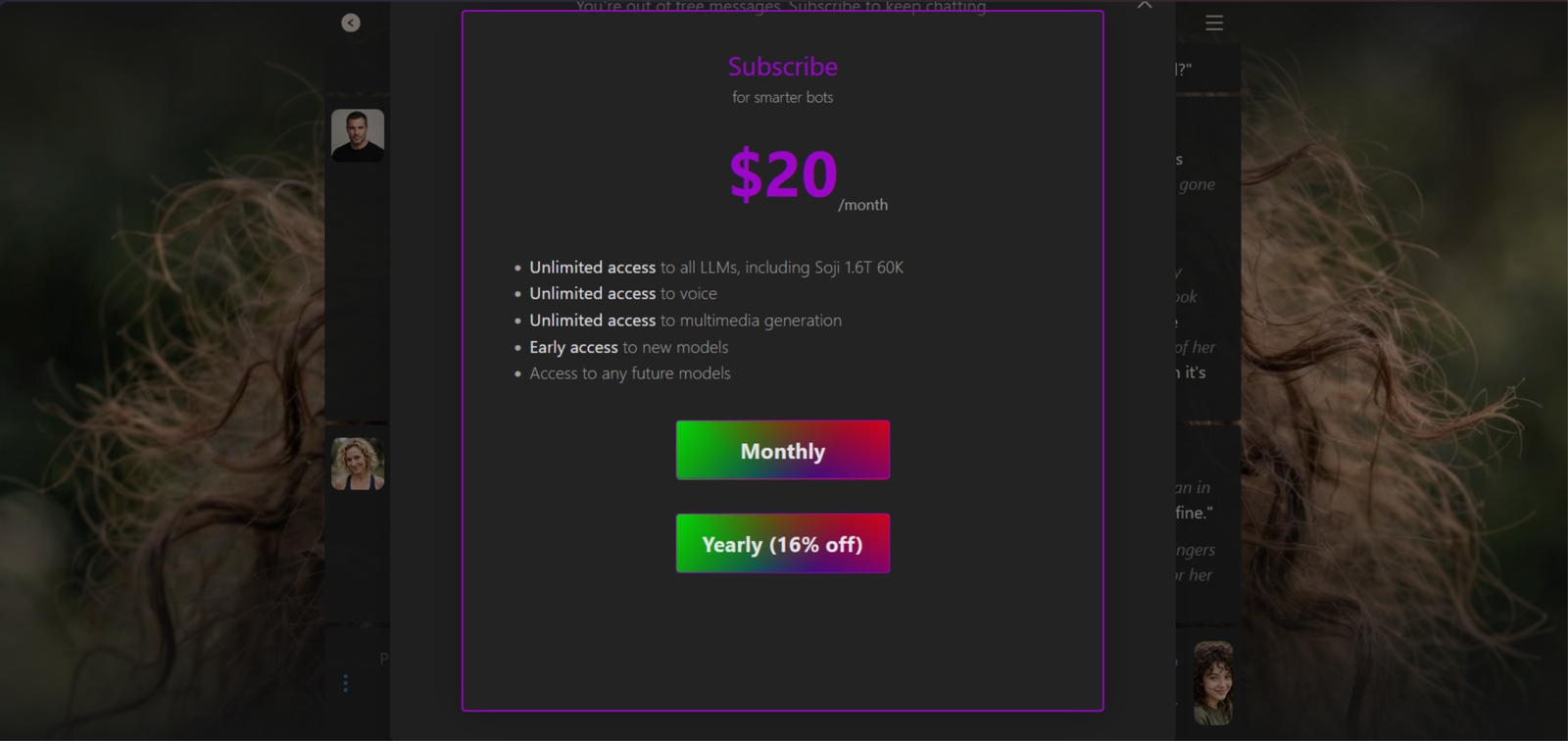
Pricing updated: November 17, 2026
Pricing updated: November 23, 2026 — from chub.ai official pricing. Regional pricing may vary.
Final Verdict: Chub AI
Chub AI is a power tool for roleplayers, not a ready-made companion. Its value is in what it lets you control: the model, the memory setup, and every detail of a character. With lorebooks, an open library and portable cards, it suits people who enjoy building and refining a story far more than people who just want to chat. Where it does well is long-form, story-driven roleplay with very few content limits, and that’s where its best scores come from.
The trade-off is that you do the work yourself. Chub assumes you’ll handle API keys, pick your own models and keep your memory notes tidy. It also has no real voice calls, no images or video inside the chat, no native app and no strong safety net. Paid plans are crypto-only with no refunds, and the thin age checks and lack of moderation weigh on the safety score. For a careful adult it’s workable. For anyone vulnerable, or anyone who wants to open an app and start talking, it’s the wrong fit.
Choose Chub if you run long, story-heavy roleplays, already use SillyTavern or your own API key, and want maximum freedom and control, and you’re comfortable with a steep learning curve and a clunky interface.
Skip Chub if you want a polished, plug-and-play experience with built-in images, voice and video, if you want a character who gradually gets to know you, or if you’d rather not pay in crypto.
Better alternatives: For Chub-style roleplay that works out of the box, try OurDream. For a companion that remembers you over time, try Nomi.
Chub AI FAQs
Is Chub AI free?
Partly. Browsing the library, downloading cards and building your own characters and lorebooks costs nothing. Chatting is the catch: the trial credits on Chub’s own models only cover a few dozen messages. After that you either connect your own API key and pay that provider, or take the $20/month subscription.
Is Chub AI NSFW?
Yes, and it’s one of the most open platforms I’ve tested. Chub doesn’t add its own filter, so I never hit a warning or a sudden change of subject. The only thing that can hold a scene back is the model you pick, because some are more cautious than others. It’s adults only.
Is Chub AI safe?
For a careful adult, it’s workable. For anyone else, not really. Age checks rely on you confirming your age, there’s little moderation behind the scenes, and Chub didn’t point users to crisis help when self-harm came up, according to Australia’s eSafety Commissioner. Keep real names and addresses out of your chats, and look after your API keys.
What is a lorebook on Chub AI?
It’s a set of notes the bot reads when a trigger word comes up in the chat. Say your world has certain rules or a side character has a backstory. You write them into entries, and they get fed back to the bot when the trigger words appear. It helps a lot in long chats where details would otherwise get lost, but you need to set it up well.
Can I use Chub AI without an API key?
Yes. The hosted plan works without one. An API key only comes into play if you want to use a model from OpenAI, Anthropic, Google, OpenRouter or NovelAI instead of Chub’s own. If you’ve never touched one, the hosted route is the easier start.
Does Chub AI have a mobile app?
Not a reliable one. I couldn’t find a Google Play app, and sources disagree on whether the App Store version can still be downloaded. You use it in your phone’s browser, which works fine for chatting. For building characters, I’d stick to a desktop.
Does Chub AI have voice or image generation?
Sort of, but not built in the way you might expect. Voice is text-to-speech through your own ElevenLabs account, so the replies are read aloud rather than spoken in a live call. Images come from the Wizard, a helper character you chat with separately, and the free account only gets family-friendly ones.
Can I pay for Chub AI with a credit card?
No. After the 2026 restructure, paid plans only take crypto. If you don’t want to deal with a wallet, you can stay on the free side and connect your own API key, paying that provider however they accept.
Can I use Chub characters in SillyTavern?
Yes. Cards can be downloaded with their lorebooks and used in SillyTavern and other tools, so nothing you collect or build is stuck on Chub.
Challenge: Can you spot anything I missed?
I test every app myself, but things change fast. If you find outdated pricing, a feature that works differently, or something important I didn’t cover — drop it below.
Best catches get publicly credited in the post (first name is enough). Real user notes make these reviews better for everyone.
Recent Reader Catchers
- Alex – spotted new gem pricing (Nov 2026)
- Jordan – flagged missing voice call limits (Nov 2026)
- Sam – corrected free message count (Nov 2026)
About the Founder: Simon Norman
I built AI Companion Kit to be an independent AI companion hub focused on transparent research, practical insights, and honest evaluations of AI companion platforms. My goal is to help readers understand how these apps work, what makes them different, and which features actually matter before they make a decision.
To learn more about who is behind AI Companion Kit, my testing process and the editorial standards used across the site, visit About the Founder (Simon Norman).