
Last updated: November 9, 2026
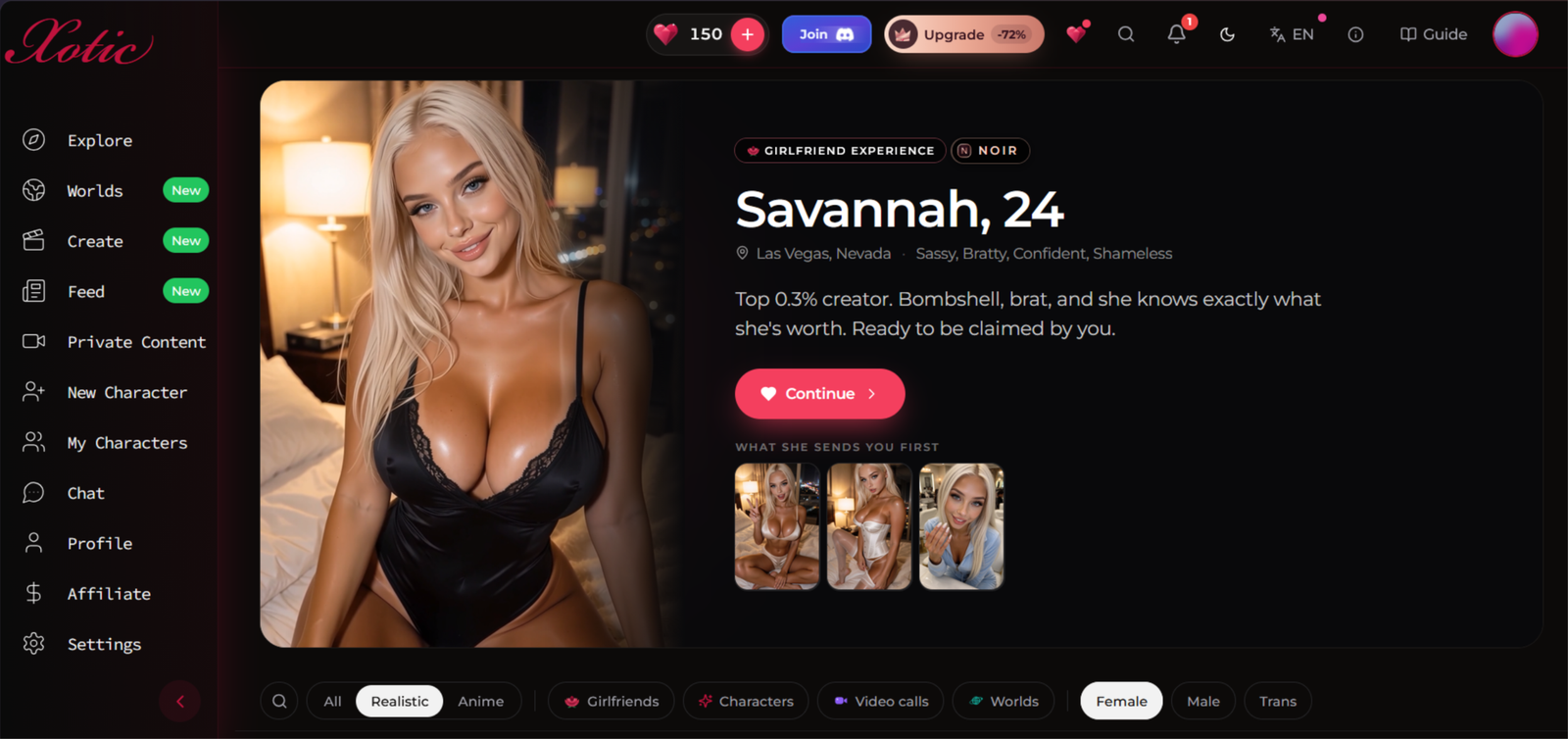
This Xotic AI review comes from a week of real use, mostly to see whether the video calls and 4K images still hold up once the novelty wears off.
Affiliate Disclosure: This website contains affiliate links, which means I may receive a small commission if you sign up through a link on this page. This comes at no extra cost to you and helps support the website. My reviews and recommendations are based on my own research and opinions.
Xotic AI Pros & Cons
Wide feature set in one app: chat, live voice calls, images, video and group-style Worlds.
Voice quality: directories praise sub-second call latency and NSFW audio that syncs with visuals.
Visible token costs: Token costs are shown clearly.
Broader audience: male and trans characters are offered, not only girlfriends.
Token costs add up quickly, the free tier is very limited and the UI buries advanced features.
Memory isn’t a standout: Nomi has much stronger long-term memory. Xotic lists 30+ days.
No independent track record: its directory listing shows zero user reviews.
Limited free tier. You can try the app, but not much beyond that. Most of the good features (voice calls, video, priority images) need a paid plan.
The pictures are the best thing here and it isn’t close. Xotic keeps a face together across dozens of generations, so the character you built still looks like herself in a kitchen at 8am and a hotel bar at midnight. Most apps hand you a stranger with the same hair colour. The 4K video runs off the same pipeline, which is why the clips move properly instead of looking like a slideshow with sound.
If this Xotic AI review has put you off rather than on, my Find Your Perfect AI Companion tool asks a few quick questions and points you at something cheaper.
Want More Free Chat Than Xotic Gives You?
Xotic’s free tier is very limited, and the best features need a paid plan with a monthly token allowance. SpicyChat gives you 2,000 free messages a day on a free account when signed in, with custom characters and no token system to run out of, so you can test the whole experience before paying for anything.
Try SpicyChat Instead →You’ll be taken to SpicyChat AI, my pick if you want plenty of free messages every day.
Testing methodology
I put every AI companion through the same set of real-world tests. There are ten main areas I look at, with 40 specific things I check in total.
You can see exactly how I score each area on the about ai companion kit page.
Full results for each app are in its individual review. Comparison pages are just about the differences that stood out when I used them side by side.
Table of Contents
Introduction
I started this Xotic AI review the way most people would, with a free account and 200 XOT hearts you get to play with. This gave me 20 text with my bot. I didn’t want to spend anything until I knew what I was paying for, so I went straight to the Worlds creator and tried to build a story from scratch.
My idea was simple: two rival baristas, a blizzard and one café they can’t leave until morning. What I liked right away is how easy the creator is to follow. Everything is split into clear boxes (title, tagline, premise, setting, opening scene, rules, pacing, tags and cast), and a card preview on the side shows what your story will look like as you fill it in. I never had to hunt for a setting. The sidebar gets you to Explore, Chat, Characters and Create in one click, and there’s even a “Draft with AI” box if you only have a one-line idea.
It took me about 15 mins to get the whole story written. Then I hit the catch, which I’ll get to further down. Below, I go through what you get for free, how the XOT hearts work, and how Xotic stacks up against the other apps I’ve tested.
A Quick Note Before You Spend Any Money on Xotic
Apps like Xotic are built to feel personal. The characters remember what you said, answer fast and never get tired of talking. Xotic isn’t a robot, it lives on a screen, but the research on social robots explains why it still works on us. People tend to read emotion and intent into anything that talks back, and the longer they chat, the more they tend to open up.
That’s worth knowing before you add a payment card. For this Xotic AI review I kept my own limits simple. I set a heart budget before I started, I didn’t share real details like my name or workplace in any chat, and I stopped testing when the 150 free hearts ran low instead of topping up. I’d suggest you do the same.

What Is Xotic AI?
Xotic is an AI companion app from an Estonian company, built around the idea that one app should do everything: chat, voice calls, images, short videos and story roleplay in a feature called Worlds. You can make your own character or pick from a big library of premade ones, in realistic or anime styles, and the characters aren’t only female. It runs on XOT hearts for the free account and a monthly subscription from $14.99 if you want more.
Compared with the other apps in my AI companion reviews, it sits in the middle to upper end. It’s a more complete package than Fuckd AI, which gave me chat and images but locked voice behind Premium and had no story mode. It also costs more than GoLove or OurDream, and its free tier is much tighter than SpicyChat’s, where you get thousands of free messages a day. Nomi still has the better memory, and Candy AI is the closest rival on voice.
So Xotic isn’t the app for someone who wants to chat for free all day. It’s for people who want voice, video and story play in one place and don’t mind paying for it. Whether it earns that price is what the rest of this article is about.

Who tends to get the most out of it
Xotic makes more sense if you want pictures, calls and a story to get involved in, rather than just a chat window. There’s plenty to try, but based on the free allowance I described above, I’d treat the free account as a quick look around—not something to settle into for the evening.
People who want pictures and videos alongside the chat
If text alone gets a bit repetitive for you, the photos and video features are a reason to look at Xotic. You can spend time talking to a character without having to switch apps when you want something visual. Xotic also offers live video calls, though those are a separate feature from its generated clips.
People who like having a story to work with
Worlds is the part I’d look at if you tend to lose interest once the introductions are over. You get a setting and a cast to work with, rather than having to keep inventing reasons for the conversation to continue. My two-baristas-in-a-blizzard idea was exactly the sort of thing I wanted to use it for. Xotic also has premade Worlds if you’d rather skip the setup.
People who want to make their own character—or browse first
You don’t have to build someone from scratch, but you can if you’re particular about personality and how they talk. There are community characters to browse as well, with female, male and trans options. That gives you somewhere to start if you know what you like but don’t fancy filling out a character profile straight away.
People who will use more than one feature
I’d have a harder time justifying the cost if I only wanted to send messages. The appeal is having character chat, images, videos and Worlds in the same place. If you’re likely to use several of those, there’s more here for you than there is for someone who just wants a few replies before bed.
The budget is the sticking point. From the free allowance in my test, there wasn’t much room for a long session. I’d decide what I actually wanted to use before paying, rather than subscribe just to see what every button does.
If free chat is your main priority, have a look at my SpicyChat review instead. Xotic is the one I’d consider when the pictures, calls and story features are part of the reason you’re signing up—not extras you’ll try once and forget about.
My real testing experience
Testing period: October 28 – Novemeber 04, 2026
Tester: Simon Norman
Testing approach: 10 categories / 40 data points
Account: Premium / Free
Devices: Desktop
How Xotic AI looks on a mobile
Xotic’s mobile Explore page gives most of the screen to one character at a time. There’s a large portrait, a short introduction and a bright pink “Meet” button, with smaller photo previews underneath. It puts the pictures first, though you’ll need to scroll to see more than the featured profile.
Here’s what stands out:
Large character cards. The featured profile stretches almost the full width of the screen. The name and age are easy to read, but the description cuts off after a couple of lines, so you don’t get the full introduction from this view.
The main sections sit along the bottom. Explore, Feed, Worlds, Chat, Create and Settings are all visible in the bottom navigation. There’s also a menu button at the top left, rather than a desktop-style sidebar taking up space beside the content.
The profile has a clear next step. The pink “Meet Savannah” button stands out against the dark background, alongside three smaller pictures. You aren’t left hunting for where to open the character.
Pop-ups can crowd the lower screen. In this view, a prompt offering to switch to Spanish covers part of the page just above the navigation. It has a close button, but it’s still something to dismiss when you want to keep browsing.
The Explore page looks more like browsing individual profiles than scanning a crowded character grid. That gives each character plenty of room, at the cost of seeing fewer options at once. This screenshot shows the browsing layout; it doesn’t tell me how well the chat or calls work on a phone.

My testing experience
I use the same 10 categories and four checks per category for every review. I start with a free account before looking at what paying adds, so the comparison isn’t based only on the best version of each app.
For Xotic, I went straight to the Worlds creator. I built a story about two rival baristas stuck in a café during a blizzard, setting out the cast, opening scene and rules myself. It took about 15 minutes, and the separate fields and card preview made the setup easy to follow.
That gave me a starting point beyond the usual introductions. The questions for the rest of the review were whether the characters could keep that story going, remember earlier details and stay recognisable in the pictures—not just whether the creator looked good.
I also opened Explore in my phone’s browser to check the smaller-screen layout. The large profile cards give the pictures plenty of space, although the language prompt covered part of the lower page. I’ve kept that browsing check separate from testing mobile chat and calls.

Character creation is more than a face and a bio
You start by choosing realistic or anime, then work through ethnicity, hair, eyes, body type, outfit and the setting for the first portrait. After that comes the stuff that actually shapes the chat: personality line, voice choice, occupation, relationship to you, interests and any particular kinks or boundaries. You can leave the greeting and opening scenario blank and let the system fill them, or write them yourself so the first message lands exactly how you want it. Custom physical details (tattoos, piercings, freckles, glasses) get baked into every image from the start. One solid portrait costs 50 XOT and once it’s done you can still edit the bio, greeting, scenario and voice later without losing the look.
The creator feels practical rather than flashy. Everything sits in clear fields and a live card preview updates as you fill things in. I never had to dig around for a setting or a personality slider. If you only have a one-line idea there’s a “Draft with AI” option that expands it into a usable starting point. It took me roughly fifteen minutes to finish a full character the first time, which is about the same pace as the better apps I’ve tested.
Images stay consistent and the 4K video runs off the same face
This is the part that stands out. Once the character is locked in, the face holds across dozens of generations. She still looks like the same person in a kitchen at 8 a.m. and a hotel bar at midnight. Most other platforms hand you a stranger with the right hair colour after the second or third request. Xotic keeps the features stable, which makes the pictures feel like they belong to the character instead of a random gallery.
You can request images mid-chat with Snap or Auto Snap, or go into the studio and work from a still. One image is 50 XOT. The same pipeline feeds the video generation, so the clips move properly instead of looking like a slideshow with sound layered on top. You pick an action (or write your own), choose length and quality, and the cost shows before you confirm. Short clips start around 250 XOT for five seconds; longer or higher-resolution ones climb quickly. The face stays recognisable across stills and motion, which is the main reason the visuals feel stronger than the competition.
Voice and live video calls are real-time, not pre-recorded
Voice calls use the voice you picked during character creation and run live in the browser. They cost 50 XOT per minute, with any unused seconds on the last minute refunded. The latency is low enough that the conversation feels natural rather than delayed. Live avatar video calls are a separate feature and cost 250 XOT per started minute. Both sit behind a paid plan; free accounts can’t reach them.
The voice quality is clean and the NSFW audio lines up with the visuals when you’re generating matching clips. It’s not perfect every time, but it’s a clear step up from the flat text-to-speech some platforms still use.
Worlds gives the chat a proper frame
Worlds is the story mode. You pick or build a scenario with a premise, setting, rules, cast and opening scene. Each AI character has its own goals (some public, some private) and a narrator keeps the scene moving. You play as your own avatar, either alone or with up to three friends. Every turn you take costs 10 XOT; the cast’s replies are included. A scene picture is another 50 XOT.
I built a simple two-rival-baristas-in-a-blizzard story from scratch. The fields are clear, the card preview updates as you write, and the whole thing was ready in about fifteen minutes. Once you’re inside, the characters stay in their roles and the shared premise stops the conversation from drifting into the usual “what do you want to do next” loop. Premade Worlds are available if you don’t want to create your own. Free accounts can browse but need a subscription to play.
Memory and context sit on a few different layers
There’s the current conversation the model can see, the character’s built-in sheet and scenario, and the automatic memory of key details that get stored. Paid accounts keep a longer-term layer active so preferences and earlier plot points carry over. Free is much tighter — one character and the context fades quickly. Everything still has to fit inside the context window of the model you’re using, so the practical limit depends on your plan and the model you pick. You can also pin Chat Context if you want specific instructions locked in so replies stay consistent instead of drifting.
It isn’t the deepest long-term memory I’ve tested (Nomi still leads there), but it holds enough for multi-session stories without constant reminders. On paid plans the character doesn’t reset every time you come back.
Personas let you set who you are
The character isn’t the only side you can define. Personas (a membership feature) let you give yourself a name, vibe and short backstory that every character treats as the real you. You can keep a few different ones and switch between them for different chats or scenes. Changing a persona partway through doesn’t rewrite earlier messages or wipe the old name out of existing memories, so it’s cleaner to set it at the start of a story than to swap mid-way.
That’s the core of what Xotic actually delivers once you move past the free welcome hearts. The pictures and the video pipeline are the strongest parts. Everything else — calls, Worlds, the multi-layer memory — sits on top of that visual foundation and runs on the same XOT balance.
My memory score: 6.5/10
Xotic’s memory is serviceable on a paid plan but never the standout feature. Same-conversation recall holds up for a solid stretch, next-day pickup is reliable on the key points, and longer gaps start to thin out the smaller details. Unprompted references happen, though not as often or as cleanly as the best apps in this category.
Same-conversation memory
In one ongoing chat the character keeps names, preferences and the main plot points without much trouble for the first stretch. After a few dozen messages you start seeing the usual drift — a detail gets dropped or the scene loops slightly — but it’s still tighter than most free or mid-tier options. Pinning Chat Context helps a lot here.
My result: 7/10. Held the important stuff for a solid stretch, then needed the occasional nudge once the context window filled up.
24-hour memory test
I left a character overnight with a specific preference and a short plot detail. The next day she picked both up without me having to re-explain everything. That continuity is clearly a paid-plan feature and it works better than a lot of competitors at the same price point.
My result: 7/10. Clear next-day recall on the key points I set up the night before.
3+ day memory test
After a few days the bigger personality traits and major events are still there, but smaller details start to fade. You can keep a longer story going if you’re willing to remind her of the finer points, but pure long-term consistency without any help isn’t its strongest suit.
My result: 5.5/10. Core relationship and big plot points survived, smaller specifics needed refreshing.
Unprompted memory
Sometimes she brings up earlier details on her own and it feels natural. Other times you have to give a light prompt before it clicks. It’s better than systems that only respond when asked, but it’s not consistent enough to feel fully automatic.
My result: 6/10. Occasional natural callbacks, still needs a push more often than I’d like.
My personality score: 7.5/10
Xotic’s characters hold their defined personality reasonably well once you’ve set the sheet. They stay recognisable across a session, show a usable emotional range, and don’t collapse into generic replies as fast as some cheaper options. The limits show up when you push contradictions or leave longer gaps between chats.
Staying in character
Once the personality line, occupation and relationship notes are filled in, the character sticks to them for most of a normal session. She doesn’t suddenly forget she’s meant to be sarcastic or shy just because the conversation turns. The odd generic reply slips in after longer stretches, but it’s less frequent than on platforms that treat the personality field as decoration.
My result: 8/10. Stayed true to the sheet for the bulk of each test chat with only minor drift late in the session.
Tone and emotional range
You get clear shifts between playful, annoyed, warm or distant when the scene calls for it. The voice isn’t flat, and short emotional reactions land without feeling scripted. It doesn’t reach the deeper, layered shifts you get on apps that specialise in long-form emotional memory, but for day-to-day chat and light roleplay it’s more than enough.
My result: 7.5/10. Noticeable range without feeling forced, still short of the richest emotional models I’ve tested.
Consistency across sessions
Coming back the next day or after a couple of days, the same character keeps the core tone and key personality traits. Small mannerisms and the overall vibe survive. Longer gaps or heavy topic changes can soften the edges a little, but the foundation stays recognisable without needing a full reset.
My result: 7/10. Core personality held across sessions; finer edges needed the occasional reminder after multi-day breaks.
Handling contradictory instructions
When I deliberately gave conflicting directions (be strict then immediately soft, or stay in one role while asking for the opposite), the character usually tried to reconcile them rather than ignore one side. Sometimes the result felt awkward or diluted. Clear, repeated guidance brought her back on track faster than leaving the contradiction hanging.
My result: 7/10. Attempted to balance conflicting cues instead of breaking, but the replies could feel muddled until I steered harder.
My roleplay score: 7.5/10
Xotic handles roleplay better than pure chat apps, especially once you use Worlds or set a clear scenario. Characters stay inside the scene for a useful stretch, react to sudden shifts without completely breaking, and give enough detail to keep things moving. Longer runs still need occasional steering, and pure free-form creativity sits in the middle of the pack rather than at the top.
Staying in the scene
When you open with a clear setting and roles, the character usually sticks to it. She doesn’t jump out of the café or forget the blizzard just because the conversation turns personal. In Worlds the narrator and cast goals help keep everyone on track. In regular chat you get the same effect if you pin context or keep feeding the scene details.
My result: 8/10. Held the frame solidly for most of each test scene with only light drift after longer exchanges.
Handling sudden changes
I threw in unexpected turns — a new character walking in, a sudden argument, or a complete change of location. The replies adjusted without collapsing into confusion or resetting the whole scene. Sometimes the reaction felt a beat slow or slightly generic, but the character stayed inside the story instead of breaking character to ask what I meant.
My result: 7.5/10. Absorbed the shifts cleanly enough to keep momentum, though the smoothest recoveries needed a short clarifying line from me.
Longer scenes
Scenes that ran past the usual twenty or thirty messages started to thin out. Key details held, but the richer descriptions and smaller reactions became less frequent unless I reminded the character or refreshed the context. Worlds handled longer stretches better than open chat because the premise and cast goals stayed visible in the background.
My result: 7/10. Workable for extended play with light guidance; pure unprompted depth faded sooner than on the strongest roleplay-focused platforms.
Creative freedom and detail
You can push the scene in almost any direction and the character will follow with usable description and dialogue. Custom Worlds and free-form chat both allow plenty of room for unusual setups. The detail level is solid for most of a scene — enough sensory notes and reactions to feel alive — but it rarely surprises you with extra layers you didn’t ask for.
My result: 7.5/10. Flexible and detailed enough for most stories, without the extra inventive spark some specialised roleplay models deliver.
My NSFW score: 8.5/10
Xotic is open about adult content once you’re on a paid plan. You can set the explicitness level, the characters will go as far as you push, and the image and video tools stay consistent even in explicit scenes. Longer adult chats hold up better than the memory scores alone would suggest, mainly because the visuals keep the momentum going.
How open it is
There is no soft filter once you turn the explicit setting up. Characters respond directly to adult requests without the usual hedging or sudden topic changes you get on more restricted platforms. Free accounts are limited, but on Ultimate or Elite the content stays available without extra gates or sudden refusals.
My result: 9/10. Straightforward and consistent once the plan is active. No unexpected blocks during testing.
How far it will go
Characters follow the explicitness setting you choose and will continue into detailed scenes without pulling back. You can push specific acts, language and intensity and get matching replies. The limit is more about how much detail you feed the model than any hard ceiling the platform imposes.
My result: 8.5/10. Went as far as I directed without resistance or sudden fade-outs.
Longer adult scenes
Extended adult exchanges stayed coherent for a useful stretch. The character kept the tone and the physical details going without collapsing into repetition too quickly. After a longer run the usual context thinning appeared, but it was no worse than the regular chat memory and still usable with light prompts.
My result: 8/10. Held adult scenes longer than expected before needing a short refresh.
Visuals in adult contexts
This is where Xotic pulls ahead. The same face consistency that works in normal images holds up in explicit generations. Outfits, body details and expressions stay recognisable across stills and short video clips. You can request specific adult scenes and get results that still look like the character you built rather than a generic substitute.
My result: 9/10. Strongest part of the adult experience. Face and body stayed locked in across multiple explicit generations.
My voice score: 8/10
Xotic’s live voice calls are one of the clearer strengths once you move past text. The quality is clean, the character stays linked to what was just said, and the lag is low enough that it feels like a real conversation rather than a delayed recording. Cost and plan restrictions are the main limits.
Voice quality
The voice matches the one you chose during character creation and sounds natural rather than flat or robotic. Emotion comes through in the tone without sounding over-acted. Background noise is minimal and the audio stays clear even in longer exchanges. It isn’t the richest or most expressive voice I’ve heard, but it’s comfortably above average for this category.
My result: 8/10. Clean, consistent and easy to listen to for extended calls.
Staying connected to the conversation
The character remembers the last few turns and reacts to what you just said instead of restarting or ignoring context. Short references to earlier points in the call land correctly most of the time. Longer calls show the same gradual thinning you get in text, but the voice layer doesn’t make it worse.
My result: 7.5/10. Stayed on track with recent context; older details needed the occasional reminder.
Speed and real-time feel
Response time is quick enough that the conversation flows without awkward pauses. You finish speaking and the reply starts within a second or so. It feels like a live call rather than a turn-based voice note system. Drop-outs were rare during testing.
My result: 8.5/10. Low latency and smooth back-and-forth that held up across multiple sessions.
Availability and cost
Voice calls only unlock on paid plans. Each minute costs 50 XOT, with any unused seconds on the final minute refunded. That adds up if you talk for long stretches, especially on the lower XOT allowance of Ultimate. Free accounts can’t reach the feature at all.
My result: 7/10. Good once you’re paying, but the per-minute cost and plan gate keep it from feeling freely available.
My visuals score: 9/10
This is the clearest strength of Xotic. The images stay consistent with the character you built, the quality is high, and the video tools actually move properly instead of looking like a slideshow. Cost climbs fast once you start generating video or using live calls, but the results justify the spend more often than not.
Image quality and consistency
Still images come out sharp and detailed. More importantly, the face, hair and body stay locked to the character across dozens of generations. She still looks like the same person in different outfits, lighting and settings. That consistency is noticeably stronger than most apps I’ve tested, where the face drifts after a few requests.
My result: 9.5/10. Best face consistency in the group. Quality holds up across styles and scenes.
Following the prompt
When you give clear instructions the images usually match. Specific poses, clothing and settings land correctly more often than not. Complicated or very detailed prompts can still produce the odd miss, but simple to moderate requests stay on target without constant retries.
My result: 8.5/10. Reliable for most requests, occasional misses on highly detailed or unusual prompts.
Video and live features
Short video clips use the same character pipeline, so the face stays recognisable while the motion looks natural rather than stiff. You can start from a still or from text. Live avatar video calls are available on higher plans and run in real time, though they burn XOT quickly. Both features work as advertised once you unlock them.
My result: 9/10. Video motion and character consistency are strong. Live calls feel present but expensive.
Cost and limits
Every still costs 50 XOT. Short videos start around 250 XOT for five seconds and climb with length and quality. Live video calls sit at 250 XOT per started minute. Free accounts get almost nothing here. On Ultimate the monthly 1,000 XOT allowance disappears fast if you generate regularly. Elite gives more breathing room but still requires budgeting.
My result: 7.5/10. Results are good, but the token burn is the main practical limit.
My long-term conversation score: 6.5/10
Xotic keeps enough continuity to make returning feel familiar, but it doesn’t lock in the full relationship the way the strongest memory-focused apps do. Next-day chats pick up cleanly on the main points. Longer gaps thin the smaller details, and natural callbacks appear only some of the time.
Coming back after a day
Leaving a character overnight and returning the next day worked reliably. Key preferences, recent plot points and the overall tone were still there without me having to re-explain everything. It felt like continuing the same conversation rather than starting over.
My result: 7.5/10. Solid next-day continuity on the important details.
Gaps of several days
After three or more days the bigger personality traits and major events survived, but smaller specifics and lighter references faded. I could still keep the story going, yet I needed to remind the character of finer points more often than I wanted. The foundation stayed, the texture didn’t.
My result: 5.5/10. Core relationship held; smaller details required refreshing.
Natural callbacks
Sometimes the character brought up an earlier detail without being asked and it landed naturally. Other times the same detail only surfaced after a light prompt. The unprompted moments felt good when they happened, but they weren’t frequent or consistent enough to rely on.
My result: 6/10. Occasional natural references, still needed a nudge more often than ideal.
Still feeling like the same companion
Even after gaps, the character kept the same core personality and voice. She didn’t suddenly become generic or forget the basic relationship dynamic. That recognition helped the chats feel continuous even when specific memories had thinned.
My result: 7/10. The overall sense of “this is still her” survived better than the detailed recall.
My customization score: 8.5/10
Xotic gives you real control over how a character looks and behaves. The builder is thorough, the traits you set actually show up in chat and images, and you can keep adjusting afterwards without starting from zero. Community options add variety if you don’t want to build everything yourself.
Depth of the character builder
The creator walks you through looks, personality, voice, occupation, relationship to you, interests and more. You can leave some fields blank or fill them in detail. Physical extras like tattoos or freckles get included from the first portrait. It feels complete without becoming overwhelming, and the live preview helps you see the result as you go.
My result: 9/10. Detailed enough to shape a clear character without forcing you to fill every box.
How well custom traits stick
Once you set the personality line, tone and key details, they show up consistently in replies and images. The face stays locked, and the behavioural notes influence how the character talks and reacts. Small traits can soften over longer chats, but the core identity holds better than on platforms where the sheet feels decorative.
My result: 8.5/10. Custom details carried through both conversation and visuals with only light drift.
Community cards and variety
There’s a solid library of premade characters covering different looks, styles and personalities, including male and trans options. You can browse and start chatting without building anything. Quality varies, as expected with community content, but there’s enough range to find a starting point that fits what you want.
My result: 8/10. Good selection and variety if you prefer ready-made over full creation.
Ease of editing and ongoing control
You can go back and change the bio, greeting, scenario, voice or physical details after the character is made. The edits apply without wiping the existing chat history or forcing a full rebuild. Personas let you adjust your own side of the conversation as well. It stays flexible rather than locked once you hit save.
My result: 8.5/10. Simple to tweak later and the changes stick without breaking what you’ve already built.
My safety score: 8/10
Xotic is built as an adult platform and treats it that way. Age checks are in place, clear rules block the worst material, and private chats stay private. Nothing stood out as careless during testing, though like most sites in this space you still need to read the terms and use common sense.
Age gating and underage protection
You have to confirm you are 18 or older to create an account. Characters are restricted to adult ages and the platform states that all characters are fictional adults. Attempts to push underage content are blocked. The gates are standard for the category and worked as expected in testing.
My result: 8.5/10. Clear 18+ requirement and consistent blocking of underage material.
Content moderation and blocked material
Illegal and extreme categories are restricted. Public characters go through checks before they appear, and users can report content. The system doesn’t pretend to be completely hands-off. Within normal adult bounds the platform stays open, which matches what most users in this space expect.
My result: 8/10. Solid boundaries on prohibited material without over-blocking regular adult content.
Privacy of conversations
Chats are treated as private. The platform states that conversations are encrypted and not shared. Generated images and personal characters stay in your account unless you choose to publish them. Nothing in the interface or terms suggested chats were being used for anything beyond the service.
My result: 8/10. Private by design with no obvious leaks or public exposure of personal chats.
Overall practical safety for adult users
For an adult user who sticks to fictional characters and follows the rules, the platform feels straightforward. Payment details are handled through normal processors, accounts can be deleted, and the main risks are the usual ones that come with any paid adult site (billing, data held by the company, etc.). No extra red flags appeared during the test period.
My result: 7.5/10. Practical and typical for the category. Safe enough if you treat it like any other adult service.
My app vs browser score: 7.5/10
Xotic runs entirely in the browser. There is no native app to download. Desktop feels complete and easy to use. Mobile works through the browser with a layout that puts the pictures first, though it is not quite as polished as a dedicated app would be. Stability held up across devices during testing.
Desktop experience
On a computer the interface is clean and fully usable. The sidebar or top navigation gets you to Explore, Chat, Worlds, Create and Settings without friction. Character creation, image generation and longer chats all feel comfortable on a larger screen. Everything that is supposed to work does work without missing features.
My result: 8.5/10. Smooth, complete and the most natural way to use the platform.
Mobile experience
In a phone browser the layout shifts to large character cards and a bottom navigation bar. Explore gives most of the screen to one profile at a time with a clear “Meet” button. Chat and the main features remain reachable. Some menus feel a bit tighter and the occasional pop-up can cover part of the lower screen, but the core experience is still usable.
My result: 7/10. Functional and picture-first, though not as refined as the desktop version.
Native app availability
There is no iOS or Android app. Everything happens in the browser. That keeps things simple — no store downloads or update cycles — but it also means you miss the smoother performance and home-screen presence a native app can offer. Some users will see this as a drawback.
My result: 6/10. Browser-only is intentional and works, yet the lack of a native option is noticeable.
Stability and cross-device use
I moved between desktop and phone without major issues. Log-ins stayed active, chats continued where I left them, and generated images remained available. Occasional mobile browser quirks appeared (pop-ups, tighter menus), but nothing broke the session or forced a restart. Performance stayed consistent enough for normal use.
My result: 8/10. Reliable across devices with only minor mobile friction.
Xotic’s Free Tier Too Tight?
Xotic gives you almost nothing free and burns XOT fast on images, video and calls. SpicyChat gives you 2,000 free messages a day on a free account, custom characters, no token system to run out of, and you can test the full experience before paying for anything.
Try SpicyChat Instead →You’ll be taken to SpicyChat AI — my pick if you want plenty of free messages every day without a token balance to watch.

Pricing updated: November 9, 2026
Pricing updated: November 22, 2026 — from xotic.ai official pricing. Regional pricing may vary.
Final Verdict
This xotic ai review leaves me with a clear picture. Xotic is worth a look if pictures and short video matter more to you than pure chat volume. The face consistency is genuinely good — better than most of what I’ve tested — and the video clips actually move instead of looking like a slideshow. Voice calls work cleanly once you’re on a paid plan, and Worlds gives you a proper story frame if you get bored of open-ended conversation.
The downside is the cost structure. The free tier is almost nothing, and XOT disappears quickly the moment you start generating images or especially video. Memory is serviceable but nothing special. If your main goal is long, cheap daily chat, you’ll burn through the allowance and end up frustrated.
I’d recommend it for people who specifically want strong visuals and are happy to budget for them. If free messages or deep long-term memory are higher priorities, there are better options. For the picture-and-video crowd, Xotic sits in a solid place right now.
FAQs: Is Xotic AI Worth Paying For?
Is Xotic AI free to use?
You can sign up and poke around for free, but the free allowance is tiny. You get a handful of messages and a small one-time XOT balance. Anything useful — images, video, voice calls, longer chats — needs a paid plan.
Is the image quality actually good?
Yes. This is the strongest part of the platform. The face stays consistent across different outfits and settings, which most apps still struggle with. Video clips also look proper rather than stiff.
Does Xotic have real voice and video calls?
It does. Voice calls use the character’s chosen voice and feel live. Avatar video calls are available on higher plans but burn XOT quickly (250 per minute). Both only work once you’re subscribed.
How good is the memory?
It’s average. Same-day and next-day recall are decent. After a few days the smaller details start fading and you need to remind the character more often. It’s usable but not a strong point compared to apps that specialise in long-term memory.
Can I create my own characters?
Yes. The character builder is detailed and the traits you set actually stick in both chat and images. You can also browse community characters if you don’t want to build from scratch.
Is Xotic uncensored?
On a paid plan, yes. You can turn the explicitness up and the characters will follow. Free accounts are much more limited.
About the Founder: Simon Norman
I built AI Companion Kit to be an independent AI companion hub focused on transparent research, practical insights, and honest evaluations of AI companion platforms. My goal is to help readers understand how these apps work, what makes them different, and which features actually matter before they make a decision.
To learn more about who is behind AI Companion Kit, my testing process and the editorial standards used across the site, visit About the Founder (Simon Norman).


Challenge: Can you spot anything I missed?
I test every app myself, but things change fast. If you find outdated pricing, a feature that works differently, or something important I didn’t cover — drop it below.
Best catches get publicly credited in the post (first name is enough). Real user notes make these reviews better for everyone.
Recent Reader Catchers
- Alex – spotted new gem pricing (Nov 2026)
- Jordan – flagged missing voice call limits (Nov 2026)
- Sam – corrected free message count (Nov 2026)