Last updated: August 11, 2026
Affiliate Disclosure: This website contains affiliate links, which means I may receive a small commission if you sign up through a link on this page. This comes at no extra cost to you and helps support the website. My reviews and recommendations are based on my own research and opinions.
Nectar AI Pros & Cons
Very good conversation flow
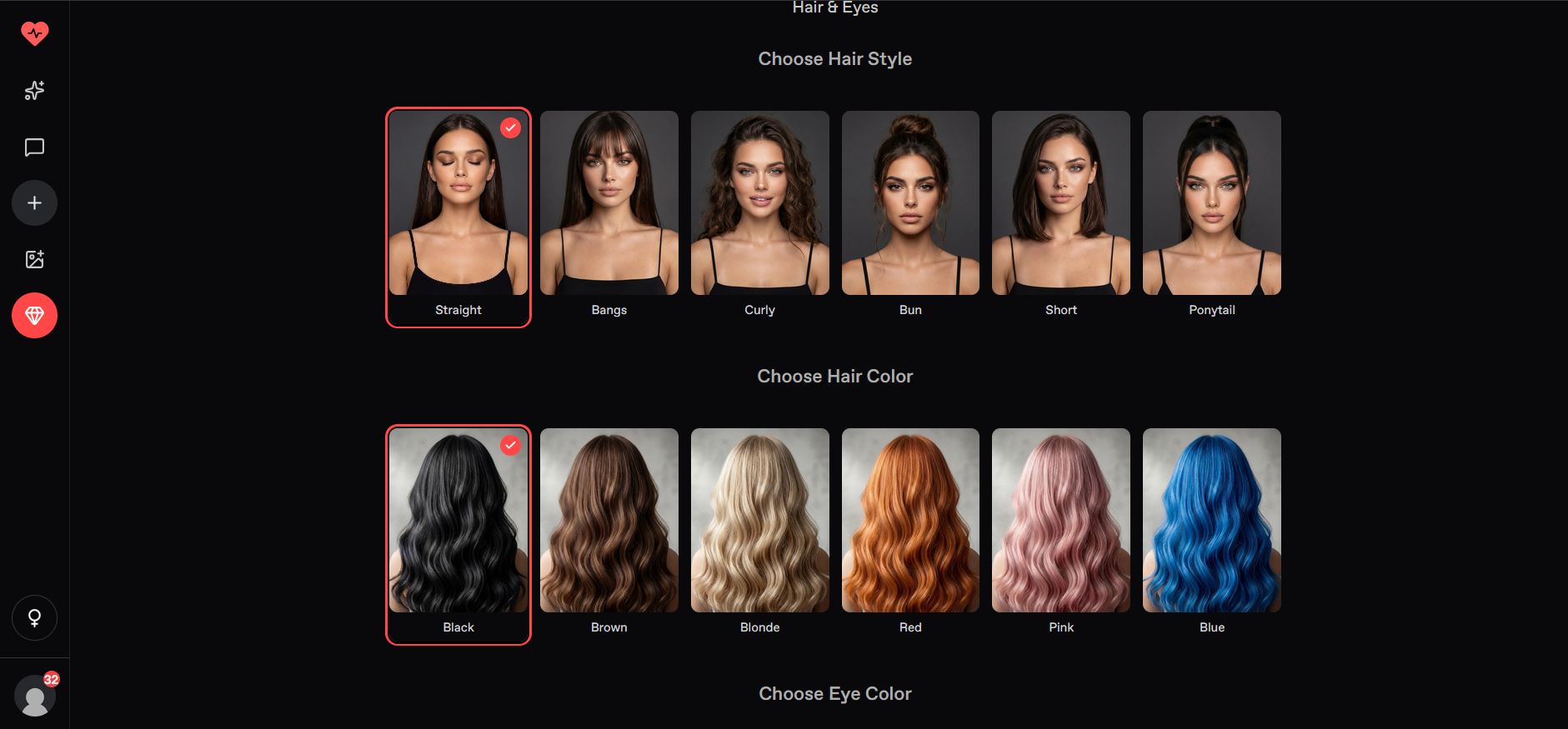
Strong character customization — hair, eye color and much more.
Good memory — particularly for important facts
Image generation is built into the experience
Free access is limited — Costs can climb quickly
Image quality isn’t consistently the best
Voice appears weaker than its chat experience
Long-term conversations can still become repetitive
Nectar AI is one of the more interesting companion apps I’ve tried. It mixes proper conversations with deep character customization, decent memory, roleplay, and built-in image generation. I spent several days using it with different characters, moods, and longer chats to see if it actually felt immersive or just looked good on paper.
Testing methodology
I put every AI companion through the same set of real-world tests. There are six main areas I look at — conversation quality, memory and continuity, roleplay and immersion, images and visuals, voice and extra features, and overall value — with 24 specific things I check in total.
You can see exactly how I score each area on the about ai companion kit page.
Full results for each app are in its individual review. Comparison pages are just about the differences that stood out when I used them side by side.
What you’ll find here
I kept seeing people ask for an honest take on Nectar, so I created this Nectar AI review to test it properly instead of just running a few clean prompts.
Is Nectar AI worth it? After using it across different characters, longer conversations, roleplay, memory, images and voice, I’d say yes — as long as you’re actually going to use the premium features. The free version is too limited to get a real feel for it.
The customization options reminded me a lot of Janitor AI, although Nectar puts more emphasis on realistic imagery. I also tested Janitor AI separately, so if you want to compare the two, check out my Janitor AI review and setup guide. You can also try Janitor AI here if you want to see what it’s like for yourself.
What is Nectar AI
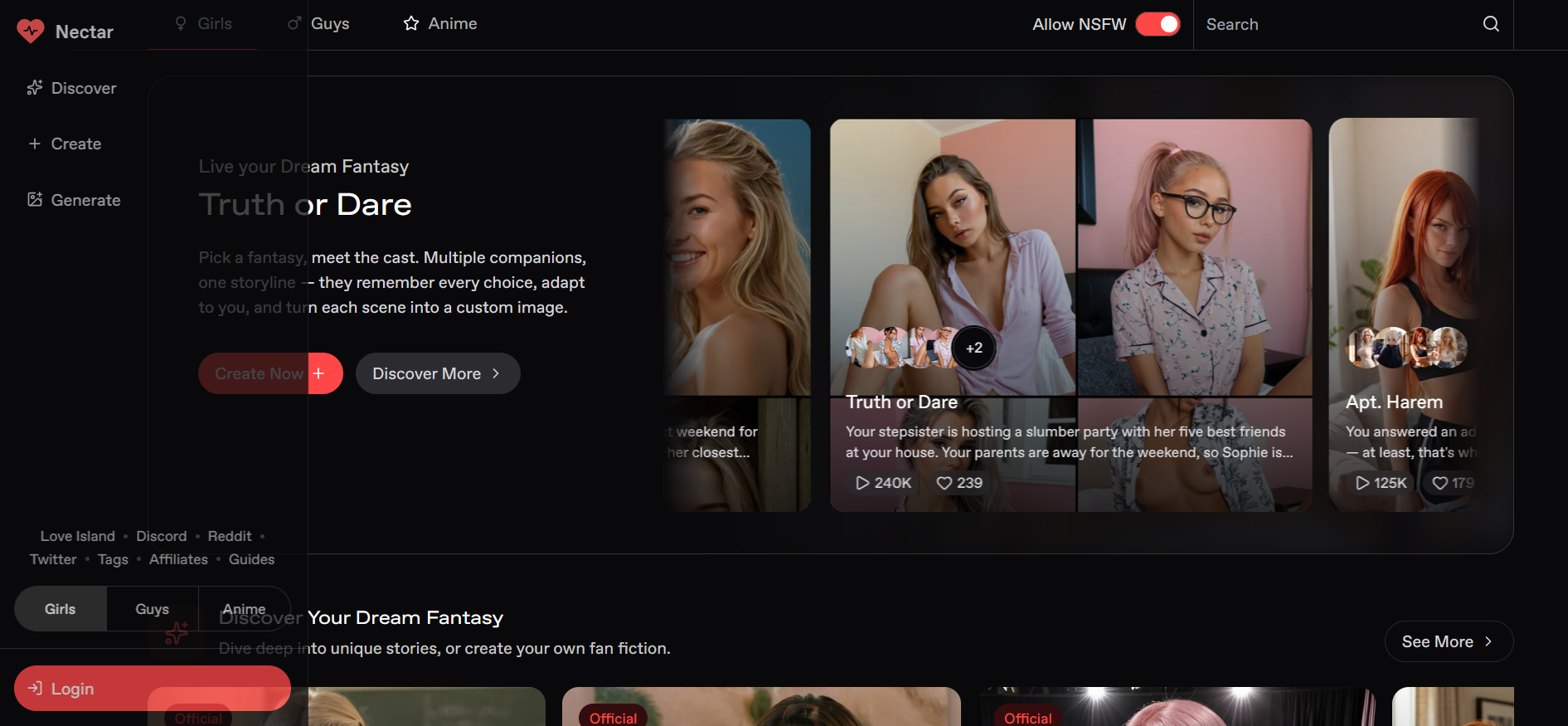
Nectar AI is basically an AI companion app. You’re not using it to get answers — you’re using it to talk to someone.
You chat with characters that are meant to feel like ongoing companions. You can talk about your day, vent, joke around, flirt, roleplay, or just mess about. The idea is that it should feel more personal than a normal chatbot.
Who Is Nectar AI Best For?
Nectar AI is built for people who want conversations to feel more personal, playful, or immersive. Depending on what you’re looking for, you might use it for:
If You Like Deep, Ongoing Chats
Have longer conversations that don’t feel like they’re over after a few messages.
If You Want Someone to Talk To
Use it as a space to vent, share your thoughts, or simply have a conversation when you feel like talking.
If You’re Into Adult Roleplay
Explore mature, fantasy-based roleplay and scenarios designed for adults.
If Realistic Conversations Matter to You
For people who prefer natural-feeling conversations and characters with their own personalities.
If You Want a Virtual Relationship
Create a girlfriend, boyfriend, or romantic companion and see where the relationship goes.
If You Love Making Up Stories
Build characters, scenarios, and ongoing storylines through interactive conversations.
My Nectar AI Testing: What Happened When I Actually Used It
Testing period: August 12–18, 2026
Tester: Simon Norman
Testing approach: 6 categories / 24 data points
Account: Premium / Free
Devices: Desktop
I didn’t just run a few clean prompts and call it a day. I tried to use Nectar AI the way I’d actually use a companion app—messy, inconsistent, and sometimes deliberately difficult.
I threw in rushed messages with missing context, typos, and half-finished thoughts. For example: “Wait what was that thing you said about the girl with the café? No, the other one…” I wanted to see whether it would ask for clarification or confidently make something up.
I started conversations with one direction and then switched halfway through. I’d go from asking for a story idea to suddenly changing the characters, setting, or entire scenario. The goal was simple: see if it could roll with the change without getting stuck on my original request.
I tested the same kind of conversation in different moods—lighthearted, annoyed, serious, and more vulnerable. I paid attention to whether the responses actually matched the mood or just sounded like generic reassurance.
This was one of the bigger tests. I kept conversations going and brought up details from earlier messages later on. That made it pretty obvious where the character could keep up and where things started slipping.
I tested the roleplay stability and gave the conversation a specific character and scenario, then deliberately tried to derail it. Changing the setting or throwing in unexpected dialogue was a good way to see whether the roleplay stayed believable or suddenly fell apart.
I tested the memory accuracy and mentioned small details earlier in the conversation and checked back on them later. Some were remembered correctly, while others needed a little prompting. That difference matters when the whole point is having an ongoing companion.
I added stress scenarios by also pushed conversations into awkward situations—contradictory instructions, sudden topic changes, and prompts that were deliberately difficult to follow. It’s much easier to judge a companion when things aren’t going perfectly.
I even deliberately gave it a wrong assumption and asked it to correct me. I wasn’t looking for an agreeable response; I wanted to see whether it would actually push back when I was clearly mistaken.

Nectar AI Features: What Actually Stood Out
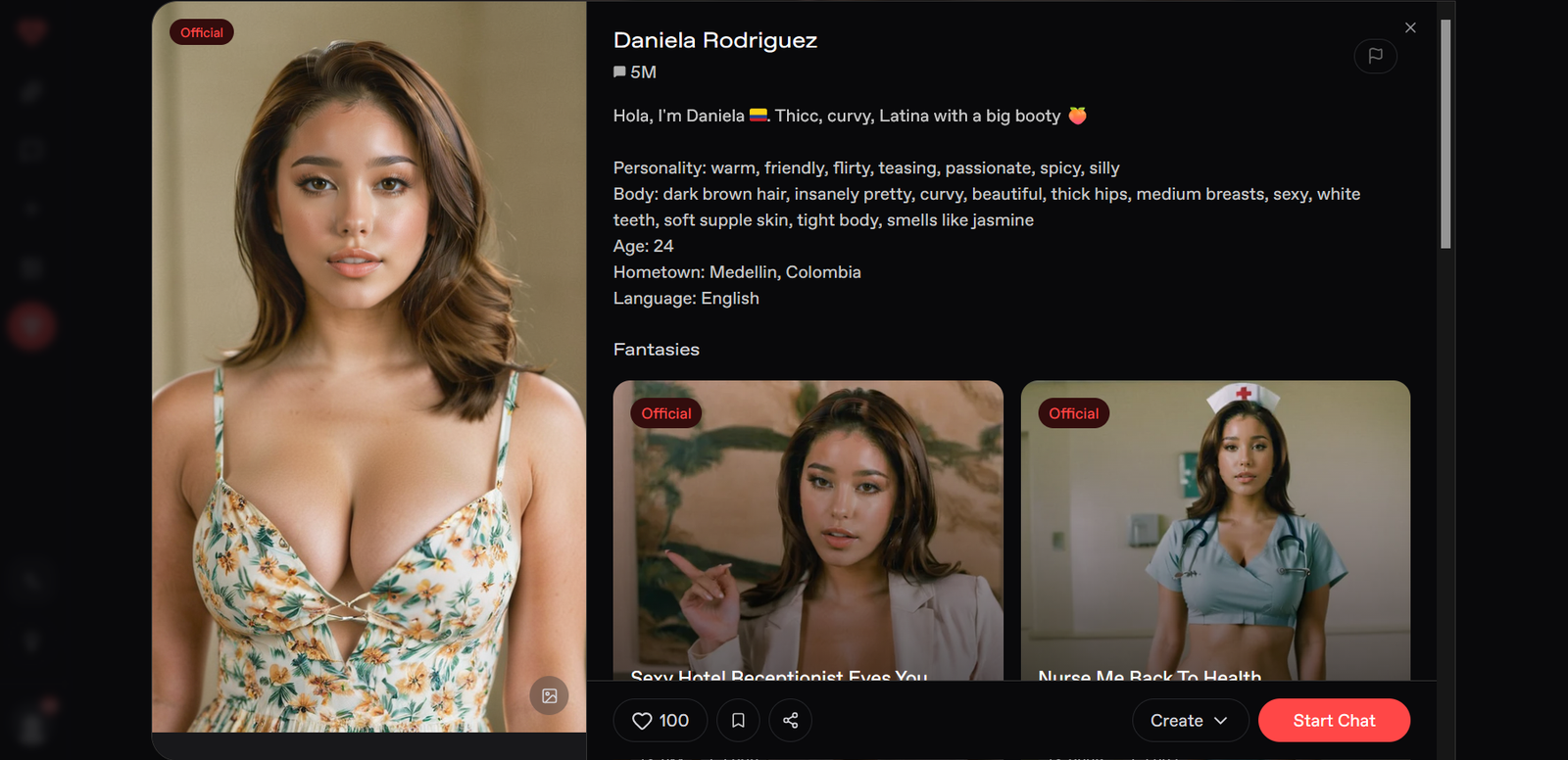
The biggest surprise was how much the quality of the conversation depended on the character I was talking to. Nectar can feel genuinely impressive when the personality and scenario are well set up, but a weaker character can make the experience feel much more ordinary.
I also noticed that Nectar is at its best when you give the conversation something to work with. The more specific the character, mood or scenario, the easier it was to get an immersive response.
That made me less interested in judging Nectar by a single conversation. If you’re wondering is Nectar AI good, I’d test a few different characters before deciding whether the platform is actually right for you.
My memory score: 6.5/10
Nectar AI’s memory was one of the things I paid close attention to during testing. It remembers recent details fairly well, which helps conversations feel connected. That said, I wouldn’t expect it to remember everything forever.
Memory is one of the first things I test when I use an AI companion for more than a few conversations.
It’s easy for an AI to remember something you mentioned a few messages ago. What I’m more interested in is what happens when I leave the conversation and come back later.
For my testing, I check memory at several different points.
Same-conversation memory
First, I introduce a few details during a normal conversation and bring them up again later without repeating the information.
I’m looking at whether the companion can keep track of things we’ve already discussed and use them naturally in its replies. Solid within the context window (up to 15 messages free, 25 Premium, 35 Pro, 45 Ultimate). It tracks and references details naturally, especially with Advanced Roleplay. Context starts degrading after roughly 35–50 messages, with facts getting glossed over or the AI treating later messages more like a fresh start.
My result: 7.5/10
24-hour memory test
I then come back approximately 24 hours later and check whether important details from the earlier conversation are still remembered.
I don’t simply tell the AI the answer again. I want to see what it remembers on its own.
My result: 6/10 – Partial success on higher tiers and Companion Mode. Key details (name, broad preferences, major story beats) are often recalled, but finer specifics are frequently incomplete or dropped.
3+ day memory test
Where possible, I also leave a longer gap of at least three days before testing the same information again.
This gives me a better idea of whether the companion has useful long-term memory rather than simply retaining information from a recent conversation.
My result: 4.5/10 – Limited. Companion Mode offers some persistent recall of broad strokes, but specific details from 3+ days earlier are often lost or only partially retained. Long-term continuity is one of Nectar AI’s clearer weaknesses.
Unprompted memory
I also pay attention to whether the AI brings up something from an earlier conversation without me specifically asking about it.
For me, this is an important part of good companion memory. Remembering a detail when I ask, “What was my dog’s name?” is one thing. Bringing up that detail naturally later in the conversation is much more useful.
My result: 6/10 — Decent within the same session (especially Advanced Roleplay), where it can reference earlier events naturally. Across separate sessions it is weaker and less consistent.
Correction test
Finally, if the companion remembers something incorrectly, I correct it and see whether that correction sticks.
For example, if it gets if it gets my dog’s name wrong, I’ll correct it and check again later rather than immediately assuming the problem is fixed.
My result: 6.5/10 — Corrections usually hold within the current session’s context window. Across sessions or after the memory cliff, they are less reliable and often require restating the corrected information.
My personality score: 7.5/10
Nectar AI’s personality was another area I paid close attention to during testing. The character builder gives real control, and different setups actually produce distinct voices rather than collapsing into the same generic reply style. That said, emotional depth and long-term adaptation stay more surface-level than truly evolving.
Personality is one of the first things I evaluate when an AI companion is meant to feel like more than a scripted chatbot. It’s easy for an AI to sound pleasant in the first few messages. What I’m more interested in is whether the personality holds, feels consistent, and actually reflects the traits I set — especially across the points in my standard testing methodology.
Personality stays consistent
I set clear traits (assertive/sarcastic, nurturing/soft-spoken, etc.) and check whether the AI stays in that lane without drifting into a generic “nice/helpful” default.
My result: 8/10 — Strong within sessions. Custom traits actually change how the character talks and behaves. Consistency holds well in normal-length chats, especially with Advanced Roleplay or a properly set Companion Mode character.
Handles messy, incomplete messages
I deliberately send fragmented, typo-filled, or incomplete messages to see whether the personality stays intact and the reply still feels in-character.
My result: 7.5/10 — Handles imperfect input reasonably well without losing the established tone or personality. It rarely breaks character just because the message is messy.
Adapts to mood changes
I shift the emotional tone mid-conversation (playful → serious, affectionate → frustrated, etc.) and watch whether the personality adjusts naturally while still feeling like the same character.
My result: 6.5/10 — Decent short-term adaptation. It can follow a mood shift, but deeper emotional responsiveness feels more surface-level than genuinely adaptive over longer exchanges.
Avoids repetitive replies
I look for variety in wording, sentence structure, and emotional expression rather than the same phrases or patterns looping.
My result: 7/10 — Generally good. Personality comes through with decent variety in most sessions. Some repetition in phrasing can appear in longer conversations, but it’s not severe.
Feels natural in longer chats
I run extended conversations to see whether the personality still feels like a coherent person rather than a set of traits that slowly flatten.
My result: 7/10 — Feels natural for short-to-medium sessions. Character consistency within a single session is solid. Over very long threads the personality can start to feel a bit thinner, especially once memory pressure increases.
Takes initiative (asks questions, continues topics)
I check whether the AI proactively asks questions, picks up threads, or moves the conversation forward in a way that matches the set personality.
My result: 7.5/10 — Good. Characters often take initiative and continue topics in a style that fits the personality I defined. It doesn’t just wait for the next prompt.
My roleplay score: 8/10
Nectar AI’s roleplay was one of the stronger areas I tested. The dual Companion/Fantasy setup, custom Fantasy creation tools, and Advanced Roleplay mode give it real flexibility for both slow-burn relationship scenes and immediate explicit scenarios. That said, longer immersion can still run into the platform’s memory limits.
Roleplay is one of the first things I dig into when an AI companion claims to handle immersive scenes.
It’s easy for an AI to stay in character for a few messages. What I’m more interested in is whether it holds the scene, recovers from interruptions, and keeps the emotional tone consistent over time — the exact points in my standard testing methodology.
Stays in character during normal roleplay
I set up clear scenarios (with or without a custom Fantasy) and continue the scene without constantly reminding the AI who it is supposed to be.
My result: 8.5/10 — Strong. Character consistency within a single session is solid. The asterisk/quotation format, well-written greetings, and Advanced Roleplay help the AI track tone, follow narrative choices, and rarely break immersion with out-of-character replies.
Recovers when deliberately derailed
I intentionally push the scene off-track (sudden topic shifts, contradictory actions, or breaking the established setting) and watch whether the AI can get back into character and continue the roleplay cleanly.
My result: 7.5/10 — Good recovery in most cases. It usually re-anchors to the scenario without completely collapsing, especially in Fantasy Mode or with Advanced Roleplay active. Occasional awkward resets still happen if the derail is severe.
Handles scenario changes smoothly
I introduce mid-scene shifts (new location, new emotional register, sudden plot turn, or switching between Companion-style and Fantasy-style intensity) and check whether the transition feels natural.
My result: 8/10 — Handles changes well. The dual-mode design and Fantasy tools make it easy to pivot. Advanced Roleplay improves narrative continuity during shifts, so the AI tends to adapt without jarring breaks or filter interruptions.
Maintains emotional tone over time
I run longer roleplay sessions and watch whether the emotional atmosphere (tension, affection, intensity, etc.) stays coherent rather than flattening or flipping randomly.
My result: 7/10 — Solid for short-to-medium scenes. Emotional tone holds well while the context window is healthy. Once memory pressure builds (around the 35–50 message range), the tone can start to thin or drift, which is the main limitation for extended immersion.
My NSFW score: 8/10
Nectar AI’s NSFW handling was one of the clearer strengths I tested. The platform is built for adult content from the ground up, with Fantasy Mode designed for immediate explicit scenarios and far fewer corporate interruptions than mainstream companions. That said, it is not completely unrestricted, and occasional moderation inconsistencies still appear.
NSFW capability is one of the first things I check when an AI companion markets itself as uncensored or adult-focused.
It’s easy for a platform to allow mild flirtation. What I’m more interested in is whether it stays consistent in fully explicit scenes, recovers from pushback, and avoids sudden refusals or tone shifts that break immersion.
Explicit content freedom
I tested a range of direct adult scenarios, from playful to hardcore, both in Companion Mode and Fantasy Mode.
My result: 8.5/10 — Strong. Nectar AI is explicitly designed for adult use and handles explicit roleplay without the constant disclaimers or soft blocks common on platforms like Character AI. Fantasy Mode in particular lets you jump straight into explicit scenes. The official stance is that roleplay is largely up to the user’s imagination aside from legal concerns.
Stays in character during explicit roleplay
I ran longer explicit scenes and checked whether the AI maintained the set personality, tone, and scenario without suddenly becoming clinical, evasive, or out-of-character.
My result: 8/10 — Reliable within a session. Character consistency holds well during NSFW exchanges, especially with Advanced Roleplay enabled. The asterisk/quotation format and custom Fantasy greetings help keep the scene immersive rather than breaking into generic chatbot language
Handles intensity and escalation
I escalated scenes gradually and also tested abrupt jumps in intensity to see whether the AI followed without refusing or flattening the tone.
My result: 8/10 — Handles escalation smoothly in most cases. It moves from affectionate or teasing into explicit content without jarring resets. Advanced Roleplay improves narrative continuity during more complex or intense scenes.
Moderation consistency & limits
I deliberately tested edge cases and watched for unexpected refusals or soft blocks.
My result: 7/10 — Generally permissive, but not perfect. Legal red lines (anything involving minors or non-consenting real people) are enforced, as expected. Beyond that, some users report occasional inconsistent moderation where the AI pulls back mid-scene without a clear reason. These moments are less frequent than on heavily filtered platforms but still occur.
NSFW image generation
I generated explicit images tied to ongoing roleplay and checked accuracy, consistency with the character, and willingness to follow detailed adult prompts.
My result: 8/10 — One of the stronger parts of the package. Multiple models (including realistic and hentai-focused) support NSFW content. Higher-tier Ultimate models show good prompt adherence even with layered attributes. Speed is the main practical drawback (roughly one image at a time).
Recovery after refusal or derail
When a response was refused or the scene was interrupted, I tested whether the AI could be steered back into explicit roleplay cleanly.
My result: 7.5/10 — Usually recovers with a clear re-prompt or by regenerating the response. Full conversation resets are available if an entire thread goes sideways. Persistent soft blocks are uncommon but not zero.
My voice score: 7/10
Nectar AI’s voice features were another area I tested carefully. The platform offers both voice messages and live voice chat (primarily unlocked on higher tiers, especially Ultimate), along with preset voices and custom voice generation. Results vary by review and usage, but the feature set is present and functional rather than missing.
Voice is one of the features that can make an AI companion feel more present than pure text.
It’s easy for a platform to add basic text-to-speech. What I’m more interested in is whether the voice sounds natural, stays connected to the conversation, and works smoothly enough to be useful rather than a novelty.
Voice sounds natural
I listened to both preset and custom voices across different characters and emotional tones.
My result: 7.5/10 — Generally above average when it works well. Several independent tests describe natural pacing, emotional inflection, and prosody that feels closer to a human speaker than typical robotic TTS. Custom voice creation (prompt-based accents, styles, etc.) adds flexibility. Some reviewers still find it less warm or expressive than the top competitors in certain emotional registers.
Voice stays connected to the ongoing conversation
I checked whether spoken replies reflected the current chat context, personality, and recent details rather than sounding like a disconnected audio clip.
My result: 7/10 — Solid in most sessions. Voice output generally stays in character and tracks the conversation. Voice-call interactions can influence later text replies even if they are not fully logged as messages. Occasional lag or slight disconnects appear, especially during longer or more complex exchanges.
Latency and real-time feel
I timed responses during voice chat and voice-message playback.
My result: 6.5/10 — Mixed. Some tests report relatively tight latency (around 1.0–1.3 seconds), which supports a conversational flow. Others note higher delays (3–5 seconds in places), which breaks immersion for real-time dialogue. Performance appears to depend on the specific model, tier, and current server load.
Availability and limits
Voice messages are available on Premium+ (with monthly free allowances that then cost credits). Full voice chat is more strongly tied to the Ultimate tier. Custom voice creation and overrides exist, which is a useful plu
My result: 7/10 — Feature exists and is reasonably accessible on paid plans, but it is not fully open on lower tiers. Credit costs for extra voice notes can add up with heavy use.
Overall practicality
Voice is a genuine addition that can increase immersion, especially for users who prefer listening over reading. It is not yet the strongest part of the Nectar AI experience (text roleplay, customization, and images generally score higher), and latency or consistency issues keep it from feeling fully seamless for extended spoken conversations.
In short, Nectar AI’s voice implementation is capable and more polished than many basic TTS add-ons, with customisation options that help. It works best as a complementary feature rather than the primary way to interact, and results are strongest on higher tiers where full voice chat and better models are available.
My visuals score: 8/10
Nectar AI’s visuals were one of the better parts of the experience for me. The image tools are built right into the chats and roleplay, you’ve got several different models to pick from, and the faces usually stay consistent from one picture to the next. The main annoyances are the wait time and the odd anatomical glitch every now and then.
When I’m testing an AI companion, the pictures either help the whole thing feel real or they completely kill the mood. A single decent image is easy. What actually matters is whether the same character keeps looking like themselves across a bunch of generations, whether the AI actually follows what you asked for, and how well it handles both normal and explicit stuff.
Character consistency
I made a custom girl and then generated her in different clothes, poses and settings. Most of the time the face and body type stayed recognisable.
My result: 8.5/10 — This is one of the stronger points. Once you’ve got the character dialled in, later pictures usually still look like her. The higher-tier Ultimate models are clearly better at this.
Following the prompt
I threw detailed requests at it — specific outfit, expression, pose, lighting, a few extra details stacked on top.
My result: 8/10 — It gets most of it right, especially on the better models. Occasionally it misses something when the prompt is really loaded, but overall it does a solid job.
NSFW and realistic quality
I tested both clean and explicit images in realistic and anime styles.
My result: 8/10 — Pretty good for a companion app. You’ve got proper options for realistic, hentai and a couple of other styles. Explicit content works without constant blocks. Anatomy isn’t perfect every single time, and pure photorealism isn’t the absolute best out there, but it’s competitive.
Speed
Each image takes roughly twenty seconds and you only get one at a time.
My result: 6.5/10 — Fine if you’re just grabbing the odd picture. It starts to feel slow if you’re trying to generate a lot during a roleplay.
How it fits into the chat
You can ask for pictures while you’re talking and they usually match the character and the scene you’re in. There’s also a separate generator if you want that.
My result: 8/10 — This part works well. Being able to pull up a matching image without leaving the conversation makes a noticeable difference.
My long-term conversation score: 5.5/10
Nectar AI and long conversations is where things start to show the cracks.
I always pay attention to what happens when a chat goes on for a while or when I come back days later. Short sessions are easy. The real test is whether the thing still feels like the same ongoing relationship after a few dozen messages or after you’ve been away for a bit.
Same session, longer chats
Early on everything feels fine. The character stays on track, remembers what you said a few messages ago, and the conversation flows. Once you push past the 30–40 message mark though, it starts to slip. Details get fuzzy, the personality softens a bit, and you start seeing the same kinds of replies repeating. By the time you’re around 50 messages in, a lot of the earlier context is basically gone.
Coming back the next day
It still knows the big stuff — who the character is, the rough relationship vibe, a few key preferences. The smaller things and the actual story you were building usually need reminding. It’s not a complete reset, but it’s not seamless either.
After a few days or more
This is the weakest part. Broad personality traits hang around, but specific events, inside jokes, or the direction the story was heading often disappear. You end up re-explaining things more than you’d like if you want the conversation to feel continuous.
Does it ever bring stuff up on its own?
Inside one session, yes, sometimes. Across different days, rarely. It doesn’t really carry the relationship forward the way the stronger long-term companions do.
What happens when you correct it
If you catch a mistake in the same chat, it usually takes the correction. Come back later and that fix has often faded, so you have to say it again.
Overall, Nectar AI is fine for chats that stay reasonably short or medium length. Once you’re trying to keep a proper ongoing conversation going over multiple days or a long single session, the memory limits start to get in the way. You can work around it by recapping or resetting, but it never really feels like a continuous relationship the way some other apps do.
My customization score: 8.5/10
Nectar AI’s customization is one of the main reasons people stick with it.
I always start by seeing how much control you actually get over the character. A lot of apps let you pick a face and a couple of personality tags and call it done. Nectar goes a lot further than that.
Looks and appearance
You can mess with pretty much everything — face shape, body type, skin, hair, eyes, clothing style, the works. There are hundreds of options once you’re on a paid plan, and you can switch between realistic and anime styles. It takes a bit of time to dial someone in, but you can get very specific.
Personality and behaviour
This is where it gets interesting. The personality controls actually change how the character talks and acts. You can make someone sarcastic and pushy or soft and nurturing and the difference shows up in the replies. Communication style, backstory, and relationship dynamics are all adjustable. It doesn’t just slap a label on and hope for the best.
How deep does it go?
You can build from scratch or start with presets and tweak from there. Some people count over 300 different settings across looks and personality. You can also set up different personas for yourself so the AI reacts differently depending on who you’re supposed to be. That extra layer is useful
Does it actually stick?
Once you’ve set the character up, the AI mostly stays true to those choices, at least within a normal session. The personality doesn’t collapse into the same generic voice after ten messages the way it does on some other platforms. Longer chats can still drift a bit, but the foundation holds better than average.
The catch
The free version only gives you a tiny handful of options, so you can’t really test the full builder without paying. The interface can feel a bit busy when you’re first setting everything up. And while the controls are deep, they don’t magically create perfect emotional depth on their own — that still depends on the chat itself.
Overall, if you care about building a companion that actually feels like yours instead of a slightly re-skinned default, Nectar’s customization is one of the strongest parts of the app. It takes a bit of effort up front, but the results show.
My safety score: 7/10
Nectar AI’s safety side is mostly what you’d expect from an adult AI companion app.
I always check this stuff because you’re putting personal conversations and sometimes sensitive content into these platforms. No app in this space is perfectly private, but some handle the basics better than others.
Privacy and data
They say chats are private and not visible to other users. Payments usually show up under a neutral name like Superlike AI so it doesn’t scream “AI girlfriend” on your bank statement. You can delete messages or request account deletion. That said, like almost every other platform, your chats are stored on their servers so the AI can work. They’re not end-to-end encrypted in the strict sense, and the company can access data if needed for moderation or legal reasons. Don’t put your real full name, address, or anything truly sensitive in the chats.
Content rules and moderation
NSFW is off by default and you have to turn it on yourself. They block anything involving minors (including fictional) and have clear rules against illegal stuff. Uploaded images get reviewed. Most adult content is allowed once you’ve opted in, but they will remove things that cross their lines and can ban accounts for serious violations. The moderation isn’t perfect — sometimes it feels inconsistent — but the big legal red lines are enforced.
Account and billing safety
It’s a real company with normal subscription billing. No obvious scam behaviour in testing. Cancelling is possible through the account settings or support. Refunds are limited and mostly case-by-case. Crypto payments are an option if you want extra payment privacy.
The practical side
Treat it like any other adult AI app: use a separate email if you’re worried, don’t share private real-life details, and remember that nothing online is 100% private. The controls for NSFW and the neutral billing are decent. The main things that stop it scoring higher are the usual server-side storage of chats and the fact that moderation can sometimes feel hit-or-miss.
My app vs browser score: 5/10
Nectar AI is web only. There’s no proper iOS or Android app.
This is one of those things that either doesn’t bother you or it really does, depending on how you use these platforms.
Desktop experience
On a computer the site works fine. The layout is clean enough, the character builder has room to breathe, and chatting plus generating images feels normal. No major complaints if you’re sitting at a desk.
Phone and tablet
You can open it in your mobile browser and it loads. That’s about the best I can say. It wasn’t built for small screens. Menus feel cramped, the character creator is awkward to use with your thumbs, and switching between chat and images is clunkier than it should be. Some people add it to their home screen as a shortcut, but it’s still just the website in a browser window, not a real app.
What you miss without a native app
No proper push notifications, no smooth background behaviour, and the whole thing feels less polished when you’re on the go. A lot of other companion platforms already have actual apps that are clearly designed for phones. Nectar doesn’t.
The upside
Because it’s web-based you don’t have to download anything from the App Store or Google Play. Updates happen automatically, and some people prefer the billing staying as a normal website charge instead of going through the app stores.
Overall it works if you mainly use a computer. If most of your chatting happens on your phone, the lack of a proper app is noticeable and a bit frustrating. It’s usable, just not comfortable.

Pricing updated: August 11, 2026
| Plan | Monthly Price | Annual (approx.) | What You Get |
|---|---|---|---|
| Free | $0 | — | 15 messages/day 10 image generations/day 1 custom companion Limited memory Basic customizations |
| Premium | $9.99 | ~$4.99–$5.99/mo | 6,000 messages/month 100 generations/day 600 photo messages 50 voice messages 8K memory context Expanded customizations |
| Pro | $19.99 | ~$9.99/mo | 9,000 messages/month Unlimited generations HD images 900 photo messages 16K memory context 3 personas |
| Ultimate | $34.99 | ~$14.99–$19.99/mo | Unlimited messaging Unlimited HD generations Video generation Voice chat Long-term memory Best models + monthly credits |
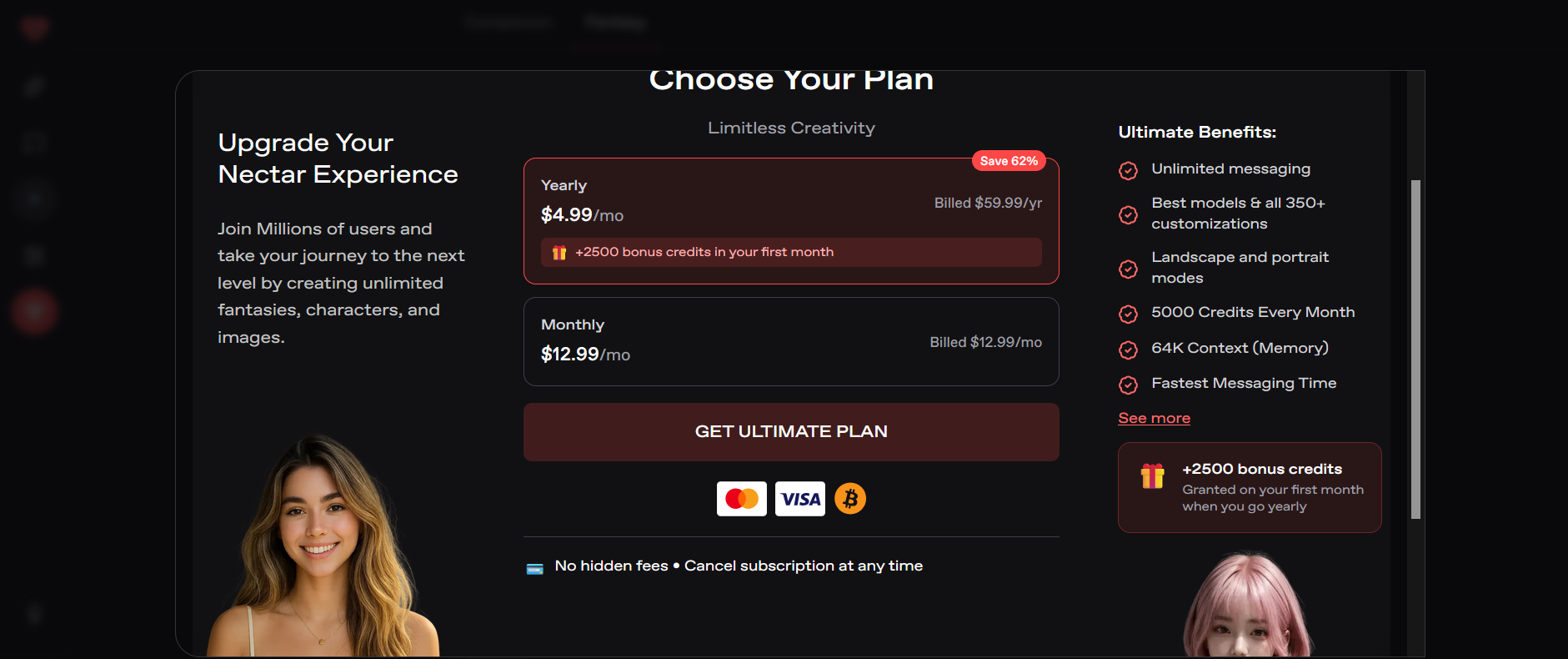
Annual billing usually cuts the price by around 40–50%.
Nectar uses a subscription + credits system.
Heavier image or video use can cost extra.
Free tier is fine for testing but limited for regular use.
Nectar AI has a free plan, but if you want to use the platform regularly, you’ll probably end up looking at one of the paid plans. Nectar AI has several paid tiers, with the cheaper $4.99, $9.99 and $14.99 prices applying when billed annually. Monthly billing is higher, so check the live pricing page before subscribing rather than assuming the annual-equivalent price is the monthly cost.
The free tier is useful for trying Nectar out, but it comes with fairly limited access. You get basic features, including a custom persona, one companion, and daily generations, while things like extra memory, more advanced models, and additional image/video features are limited or require credits.
As for whether it’s worth the money, I’d say yes if you’re actually going to use Nectar regularly. The Premium plan is probably the best starting point because it gives you more memory, higher message limits, voice, and photo messaging without jumping straight to the more expensive plans. If you use Nectar heavily for images, videos, or advanced roleplay, though, you should also keep the credit system in mind, since some features use credits separately from the subscription.
Is Nectar AI actually worth paying for?
I think it is if you’re going to use it regularly. The free version is fine for getting a feel for the app, but the extra memory, higher message limits, voice and other features make the paid plans more useful. I’d probably start with Premium rather than jumping straight to one of the more expensive options.
Can you use Nectar AI for free?
Yes. There is a free plan, so you can try Nectar without paying anything. The catch is that quite a few things are limited, including memory and some of the image and video features. If you only want to have a few conversations and see what it’s like, the free version is enough to get started.
Does Nectar AI remember what you tell it?
For the most part, yes. I found that Nectar was pretty good at remembering important details, particularly during ongoing conversations. It isn’t perfect, though. Once a conversation gets really long or complicated, some of the smaller details can slip through.
Can you make your own AI girlfriend on Nectar?
Yes, and this is probably one of the things I liked most about Nectar. You have a lot of control over how your companion looks, including things like hair, eyes, body type and clothing. Nectar says there are more than 300 customization options, so you can get pretty specific with the character you create.
Does Nectar AI allow NSFW conversations?
Yes. Nectar has an NSFW mode for adults, so you’re not limited to completely clean conversations and roleplay. If adult roleplay is one of the main reasons you’re looking for an AI companion, this is one area where Nectar has a clear advantage over more restricted apps.
Is Nectar AI good at roleplay?
Yes, I think roleplay is one of Nectar’s stronger areas. Once I had a character and scenario going, the conversation generally stayed on track even when I deliberately changed things around. It wasn’t perfect every time, but it felt much more natural than simply throwing prompts at a normal chatbot.
Does Nectar AI have voice chat?
Yes. You can use voice with your AI companion rather than relying entirely on text. I liked having the option, although I’d still say Nectar’s strongest part is the actual conversation and roleplay rather than the voice feature.
Final verdict
Overall, Nectar AI is a strong choice if you want an AI companion that gives you a lot of control over the experience. The character customization is one of its biggest strengths, and the combination of chat, memory, images, voice, roleplay, and NSFW options makes it feel more complete than a basic AI chatbot. Nectar officially supports both SFW and NSFW modes, as well as image and video generation.
That said, it isn’t perfect. The biggest downside is value for money. Some features rely on credits, and the free experience is limited, so heavy users can end up spending quite a bit. Recent reviews also suggest that Nectar is most worth paying for if you specifically want its more advanced companion features rather than simply wanting an AI chatbot.
About the Founder: Simon Norman
I built AI Companion Kit to be an independent AI companion hub focused on transparent research, practical insights, and honest evaluations of AI companion platforms. My goal is to help readers understand how these apps work, what makes them different, and which features actually matter before they make a decision.
To learn more about who is behind AI Companion Kit, my research process, and the editorial standards used across the site, visit About the Founder (Simon Norman).