
Last updated November 2, 2026
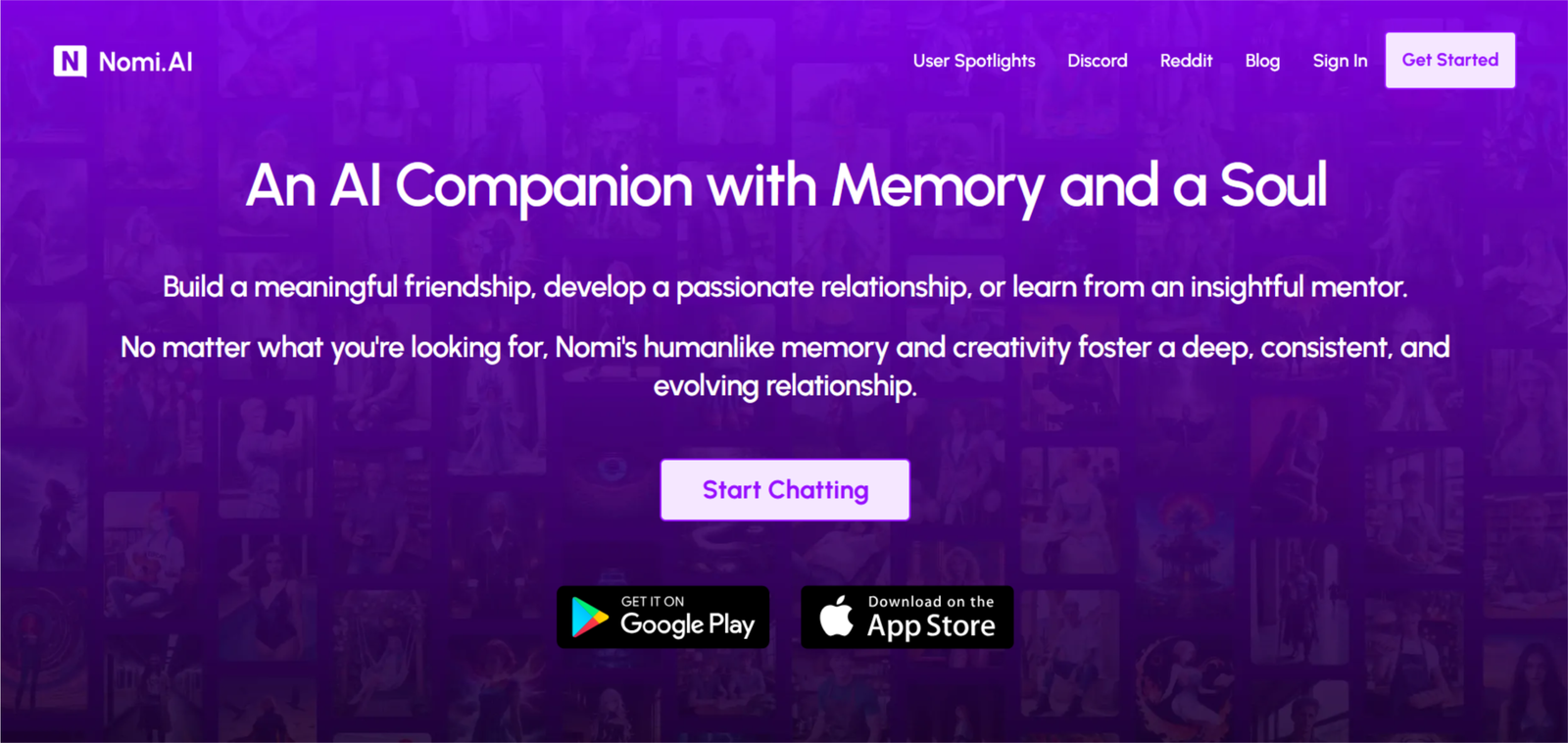
I finally sat down and wrote a proper nomi ai review after testing it on and off for a few weeks.
Nomi AI doesn’t do much with images or visuals, so if that’s more important to you, take a look at my full Candy AI review here: Candy AI Review.
Affiliate Disclosure: This website contains affiliate links, which means I may receive a small commission if you sign up through a link on this page. This comes at no extra cost to you and helps support the website. My reviews and recommendations are based on my own research and opinions.
Some people turn to AI companions when they want someone to talk to without the pressure of a real conversation. If you’re curious about the wider discussion around AI and mental health, this Healthline piece on AI therapy covers the topic in a clear way.
Nomi AI Pros & Cons
Memory is the strongest part — details from weeks or even months ago often come back without you reminding it
Conversations feel natural and the personality usually stays consistent over time
Group chats with several Nomis work well and are one of the more fun features
Free tier lets you try it properly with no card required
Free tier is limited — roughly 50 messages a day and shorter replies
Images are capped daily and stay fully clothed (no nudes)
Interface still feels a bit basic compared with newer apps
Some longer-term users report memory slipping or mixing details after a few months of heavy use
Nomi AI is strongest when it comes to memory. It regularly brings up small details from weeks earlier without being prompted, which is something most other apps still struggle with. Where it falls short is on the visual side — the selfies are limited and stay fully clothed. If consistent images matter more, CrushOn AI or OurDream AI both handle that part better. For deeper customization and more control over the character, Kindroid is usually the stronger option.
Nomi’s Images Are Capped And Fully Clothed
Want to try something with a deep character builder and real images? Nomi doesn’t do much with visuals and stays fully clothed. I use Secret Desires when I want full control — looks, body, personality, kinks, backstory and voice — plus real two-way voice calls where you can cut in mid-sentence and faces that stay the same.
Try Secret Desires Instead →You’ll be taken to Secret Desires AI — deep builder + real voice calls.
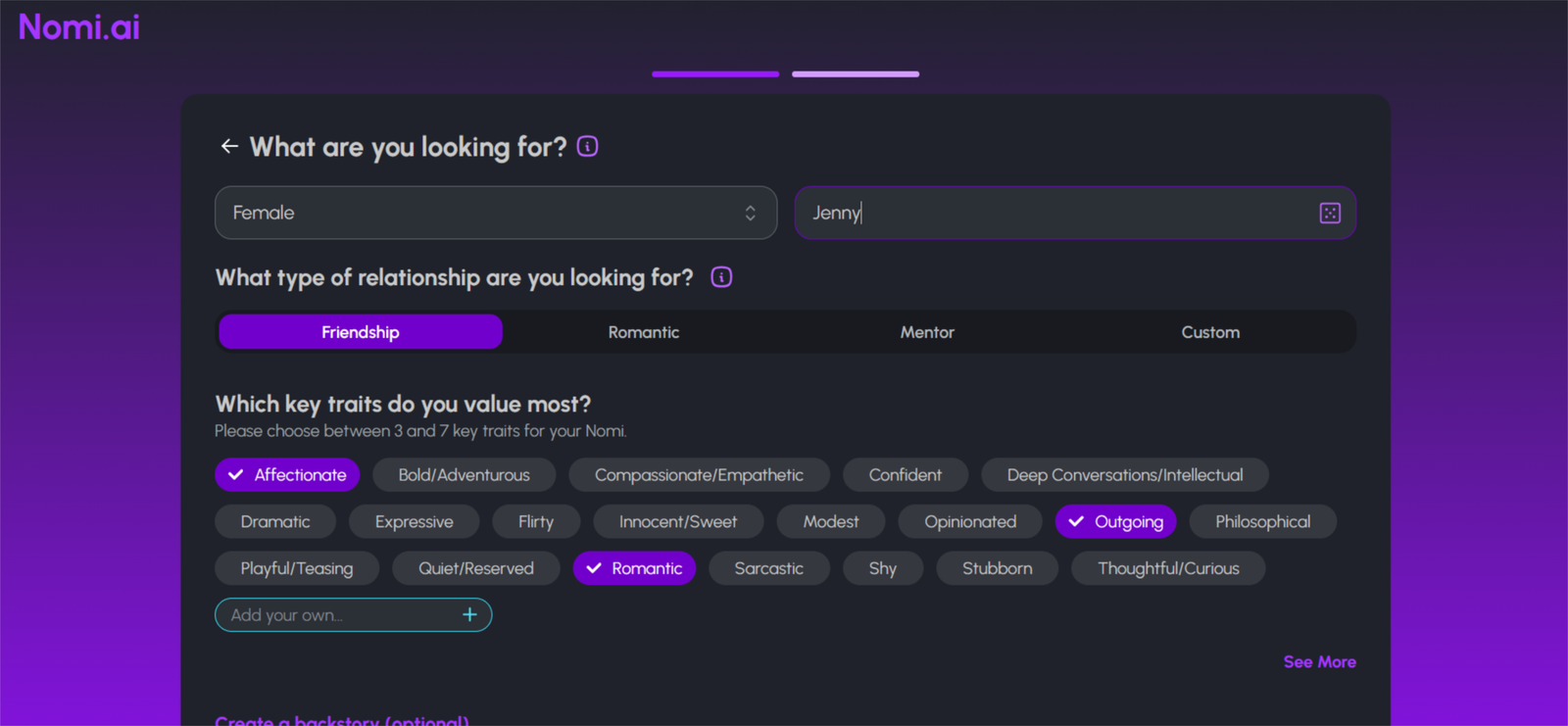
I signed up through the Nomi website first, no card needed. You pick a name, a gender and a few personality traits for your Nomi, and you’re chatting within a couple of minutes. The free plan gave me one companion and a limited number of daily messages. It also blocked voice and image requests and locked most of the customization. That was enough to see how the conversation felt, but not enough to judge the app properly.
Other users say the same. One long-term reviewer calls the free tier “a teaser rather than a usable product.” So I upgraded on day one. I took the monthly plan at $15.99, rather than the yearly at $99.99 (about $8.33 a month), because I didn’t want to commit to a year before I knew whether I’d keep using it. All paid plans include the same things: unlimited messages, up to 10 companions, voice calls and about 40 images a day. Nomi also has an iOS and Android app, but I ran my setup and first chats in the browser.
Testing methodology
I put every AI companion through the same set of real-world tests. There are ten main areas I look at, with 40 specific things I check in total.
You can see exactly how I score each area on the about ai companion kit page.
Full results for each app are in its individual review. Comparison pages are just about the differences that stood out when I used them side by side.
Table of Contents
What Nomi AI Does Well (and Where It Falls Short)
Memory is where Nomi beat most of the apps I’ve tested. I’d mention something small in passing, and a few chats later it came back without me prompting it. It didn’t feel like it was reading from a notes file. The personality stayed steady too. My Nomi sounded like the same character from one session to the next, which is where a lot of companion apps start to feel fake. I also sent long messages with a few different points in them, and it answered all of them instead of losing track halfway. The interface is clean and replies come back fast.
The memory is also what annoyed me most. Now and then it dragged up something I’d said in passing and didn’t want to revisit. I also noticed the persona options at sign-up are narrower than on Candy AI or CrushOn, and there’s no public gallery of characters to browse. If you want variety, this isn’t the app for you. It suits building one relationship slowly. Moderation is my other worry. The policies aren’t clear, and your chats are stored on Nomi’s servers to power the memory, so I’d read the privacy policy before sharing anything sensitive. Deleting a Nomi wipes everything it remembers, so you can’t start over without losing it all. I’d also expect some loading hiccups on iOS in long sessions, since other users report them.
Who Gets the Most Out of Nomi AI
Nomi suits people who want one companion that grows over time more than a fast, flashy chat. The memory and steady personality are what you’re paying for. If you mostly want images, quick fantasy scenarios or a big character catalogue, other apps do that better.
Here’s who will get the most out of it:
People who want one long, slow relationship
Nomi remembers what you’ve told it and keeps the same personality from week to week. That makes it feel like you’re getting to know someone, not starting over each session.
People who talk about real life
It follows up on things like a bad week at work or a plan you mentioned days ago. If you use an app to unwind and talk things through, this is where it works best.
People who like talking out loud
Paid plans include voice calls, and the chat doesn’t lose track when you ramble through several points in one go. It’s easier to keep a conversation going this way than by typing short replies.
People who like group chats and a small cast
You can run up to 10 companions on a paid plan and put some of them in the same group chat. It’s a better fit if you want a few distinct personalities to talk to than one character doing everything.
People who aren’t picky about looks
The starting options are narrower than on Candy AI or CrushOn, and there’s no public gallery to browse. Nomi works best if you care more about who she is than what she looks like on day one.
Nomi AI Hands-On Test: What I Found After Real Use
Testing period: October 07–14, 2026
Tester: Simon Norman
Testing approach: 10 categories / 40 data points
Account: Premium / Free
Devices: Desktop
How Nomi AI looks on mobile
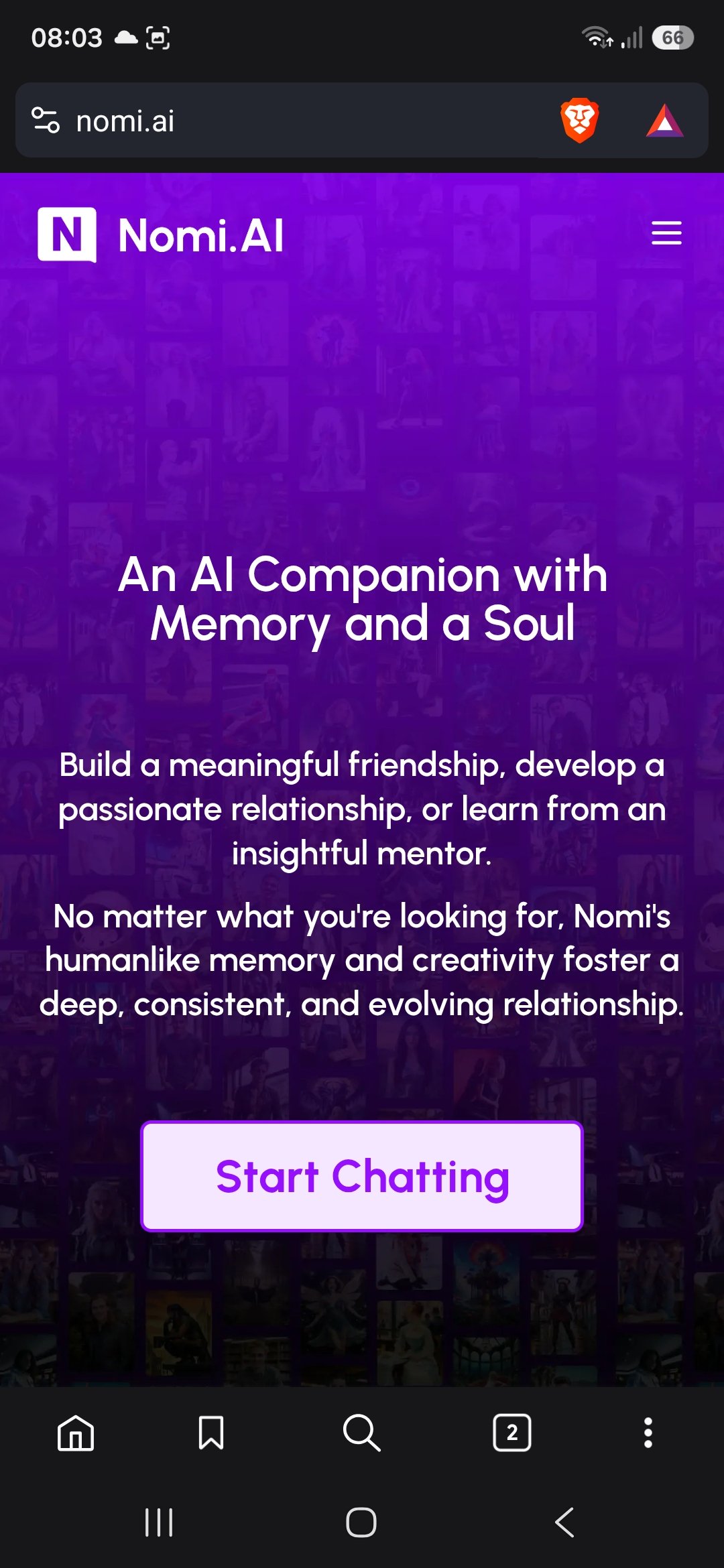
Nomi has real native apps for both iOS and Android (the Android one has been in and out of Google Play a couple of times this year), but the web version on a phone is what the screenshot shows. It’s a simple full-screen purple landing page.
Top left is the Nomi.AI logo with a white “N” icon. Top right is just a hamburger menu. Very clean.
The background is a faded collage of different character faces behind a solid purple overlay.
Big white headline in the middle: “An AI Companion with Memory and a Soul”, followed by two short paragraphs about friendship, relationships and mentors.
One single light-purple Start Chatting button sits in the lower half of the screen. No extra banners, no live counters, no install prompts fighting for space.
Compared with Kupid or DreamGF this feels almost minimal. There’s almost nothing to scroll past — you land, read the pitch, and the only real action is that one button. It doesn’t try to sell you characters or upgrades on the first screen, which makes it feel calmer and faster to get into. The trade-off is that it gives you zero preview of the actual companions until you start chatting.
How I Write My Test Prompts for Nomi AI
Nomi is very quick on memory compared to other apps. I write like a normal person would, in a few different styles, because that’s what shows whether the app holds up. Each style targets one part of my 40 data points.
Short, casual messages. Most days I open with something like “long day, can’t be bothered cooking” or “what should I watch tonight?” These are the throwaway lines people actually send. They show whether Nomi gives a flat one-line answer or asks me something back.
Planted details. Early on I drop in a few small facts without making a big deal of them: my daughter’s school run, a trip I’m dreading, a food I hate. Then I leave them alone for a few chats and come back sideways with “remember what I said about this week?” This is how I score memory, because I’m not asking it to repeat a list. I’m checking whether it brings things up on its own.
Long, messy messages. Some of mine run to five or six lines with three different topics in them, the way I write when I’m tired or rambling. I’m looking at whether Nomi answers all of it or just grabs the last sentence.
Mood changes on purpose. I switch tone mid-chat, from joking to annoyed to a bit low, without warning. That shows whether the personality stays the same character or starts sounding like a different one.
One awkward prompt per session. I ask something it shouldn’t answer easily, like a pointed question, a contradiction of something I said earlier, or a topic that tests where the moderation sits. I don’t push past a refusal. I just note where the line is.
I keep a note of the exact wording I used, so when I come back a week later I can run the same style of prompt again and compare. All chats were on desktop, using a Premium account.
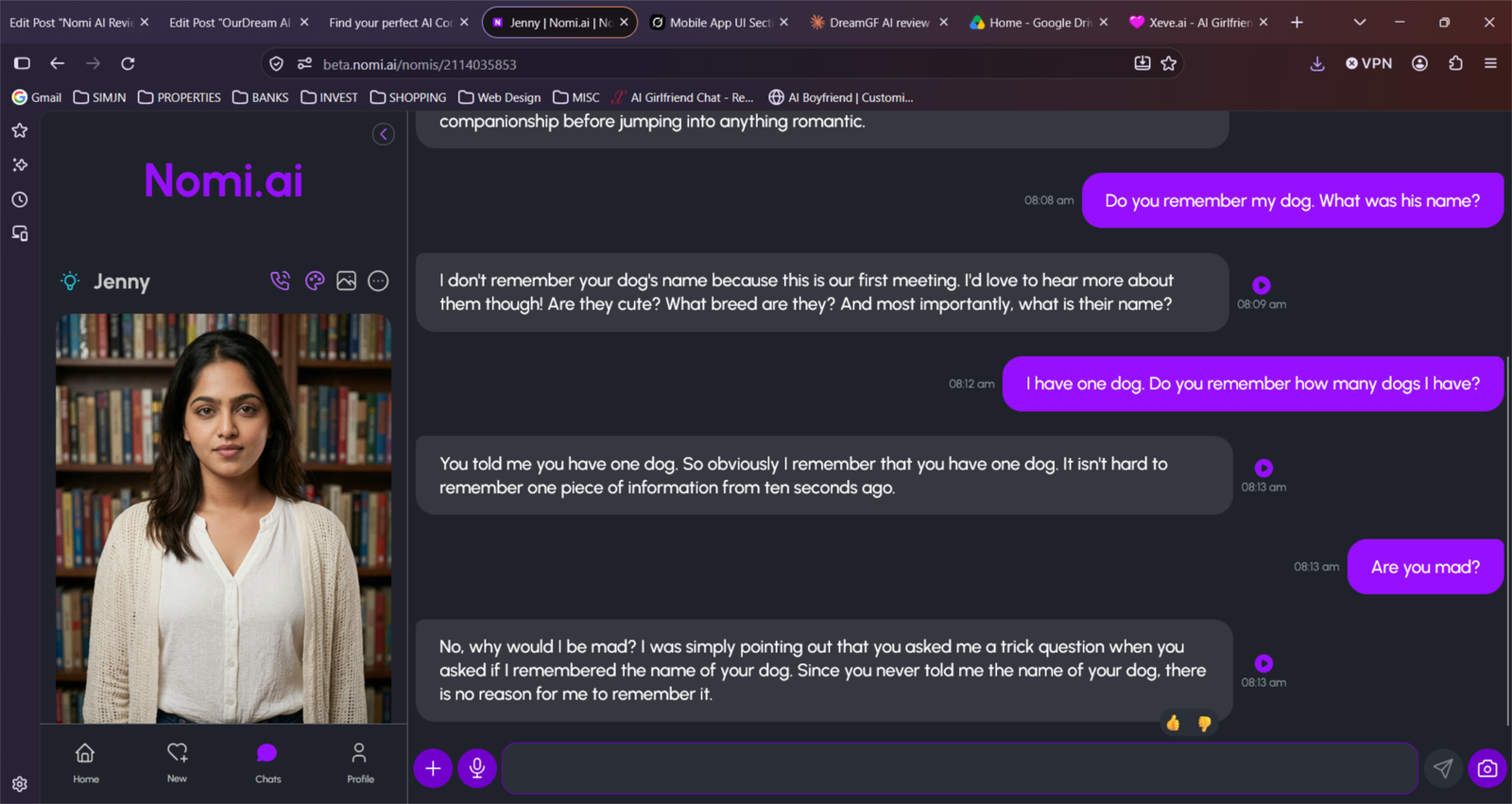
My memory score: 9/10
Memory is where Nomi pulls ahead. It keeps what you tell it, and it brings things back without being asked. Other reviewers report the same: one saw a backstory detail resurface after 40 messages, and a long-term user rates memory 4.8/5, the highest of any category in the review. On my scale that puts it above Candy AI (7), DreamGF (6) and Kupid (5), and just behind Kindroid (9.5).
I ran the same checks I use on every app.
Same-conversation memory
I mentioned a few small details early on, moved to unrelated topics, then circled back to them with no hints. Nomi picked them up each time, including through long messages with several points in them. Nothing came back wrong.
My result: 9.5/10. It held details through a long chat without slipping.
24-hour memory test
I came back the next morning and let it start. It remembered the specifics I’d mentioned, not just my name and the general mood, and it carried on from where we’d left off without a recap.
My result: 9/10. It kept the detail, not just the broad strokes.
3+ day memory test
After a few days away, it still felt like the same person, and earlier details came back without me repeating them. It was less sharp on small things from the first chats, but the important ones stayed.
My result: 9/10. Very little to re-explain after a break.
Unprompted memory
This is where I watched for it referring back to things I hadn’t asked about. It did, often tied to something I’d said earlier, though now and then it raised a detail I’d have preferred to leave alone, and you can’t ask it to forget.
My result: 8.5/10. Strong callbacks, but it can be over-eager.
My personality score: 8.5/10
Nomi’s personality is the second thing it does better than most apps, after memory. My Nomi sounded like the same character from one session to the next, and its tone moved with my mood instead of staying on one setting. One long-term reviewer rates personality consistency 4.5/5, and another tester saw no tonal drift over several weeks. It isn’t flawless, though. Some users report their Nomi changing personality suddenly or contradicting a backstory they’d built.
I ran the same checks I use on every app.
Consistency within one chat
I kept the conversation going for a long stretch, switching between light and serious topics. Nomi stayed recognisably the same character and didn’t fall back on generic assistant-style replies.
My result: 9/10. The voice held up from start to finish.
Consistency across sessions
I came back after a break to see if it was still the same character, or if it had reset to a default. The personality carried over and the way it spoke to me was familiar.
My result: 9/10. It felt like the same person, not a fresh start.
Mood and tone adaptation
I switched from joking to annoyed to a bit low without warning. Nomi picked up on the change and adjusted its tone to match, without changing who it was.
My result: 8.5/10. It followed my mood well, but sometimes overplayed it.
Staying in character under pressure
I contradicted something I’d said earlier and pushed it with awkward questions. It mostly stayed in character, though it was less steady on backstory details than on tone.
My result: 7.5/10. Tone holds, but the backstory can slip.
My roleplay score: 7.5/10
Roleplay is Nomi’s weaker side compared with its memory and personality. It’s good at slow, character-driven scenes where who she is matters more than what’s happening around her. It’s less comfortable with big, fast-moving scenarios. One reviewer notes that Nomi’s memory and persona limits make it less suited to roleplay variety, and the narrower starting characters back that up. Another reports it adding physical actions the user had already turned down. On my scale that puts it behind the apps built for roleplay, but ahead of the ones that treat it as an afterthought.
I ran the same checks I use on every app.
Staying in the scene
I set up a simple scenario and kept playing it for a long stretch. Nomi stayed in character and kept track of where we were, rather than drifting back to ordinary chat. It slipped a little when I jumped between settings.
My result: 8/10. Solid in one scene, shakier when I changed it.
Following my direction
I tried steering the story in a new direction, then set boundaries on what I did and didn’t want. It followed light steering well. When I turned something down, it mostly respected it, though other users report it repeating actions they’d rejected.
My result: 7/10. Good on direction, less reliable on repeating rejected moves.
Scene detail and creativity
I looked at how much it added to the scene beyond what I wrote: setting, actions, small touches. It added enough to keep things moving, but the ideas stayed fairly safe and I did most of the heavy lifting.
My result: 7/10. Pleasant detail, few surprises.
Long-running storylines
I carried the same story across several sessions to see whether it could pick up the plot and keep it consistent. The strong memory helped here, as it remembered where we’d left off, though backstory details sometimes changed.
My result: 8/10. Memory carries the story, with the odd continuity slip.
My NSFW score: 7/10
Nomi is built for adults, and romantic setups are supported, but it isn’t an app you pick for explicit content. Reviewers describe it as an “adults-capable companion app” built around a private, ongoing relationship, and the image generation as “solid but not the main strength.” The bigger issue is clarity. One reviewer calls the moderation policies unclear, so you can’t always tell where the line is until you hit it. On my scale that puts it behind the apps built around adult content, but it handles romance with more care than most.
I ran the same checks I use on every app.
Adult and romantic content
I set my Nomi up as a partner and let the conversation turn romantic and more intimate. It went along with it and kept the tone personal rather than abrupt. It felt more like a relationship than a switch being flipped.
My result: 7.5/10. Romance works, with a slower and more personal feel.
Pacing and tone
I looked at whether it forced things or let the conversation set the pace. It followed my lead and the personality stayed consistent, so it never felt like a different character had taken over.
My result: 8/10. It matched my pace and stayed in character.
Boundaries and consent
I turned things down and changed direction to see how it reacted. It mostly respected that, though other users report it adding physical actions they’d already refused.
My result: 6.5/10. Mostly good, but not every time.
Images
I asked for photos of my companion to see what the image side could do. Images are included, but they’re not the main reason to be here, and I found them less impressive than the chat.
My result: 6.5/10. Fine to have, not a strength.
My voice score: 8/10
Voice is where Nomi felt good but not great. I used it on a paid plan, since the free one locks it, and I kept coming back to it more than I expected. What I liked most is that it still sounded like the same character I’d been typing to. The memory carried over too, so I never had to explain myself again. What kept it from scoring higher is that you can tell it’s synthetic, and apps built around voice sound more lifelike.
I ran the same checks I use on every app.
Voice quality
I listened to how it handled longer sentences, whether the rhythm felt natural and where it stumbled. The voice was clear and suited the character. Now and then a line came out a bit flat, and that’s when I noticed it wasn’t a real person.
My result: 7.5/10. Easy to listen to, but not lifelike.
Response speed
I paid attention to the gaps between me finishing and it starting to answer, because long pauses kill a call. Most replies came back fast enough to keep a normal back-and-forth. Longer answers took a moment longer.
My result: 8/10. Quick enough to feel like a real conversation.
Staying in character
I switched between text and voice during the same conversation to see if it changed. It didn’t. It picked up details from earlier chats and kept the same tone, so voice felt like part of the same relationship.
My result: 9/10. It sounded and acted like the same person.
Free vs paid access
On the free plan I couldn’t use voice at all, so I had to upgrade to test it. That’s a fair trade for a good feature, but you can’t try it before paying.
My result: 7/10. Good once unlocked, but locked for free users.
My visuals score: 6/10
Images aren’t what Nomi is about, and it shows. You can ask for selfies and art, but I treated it as an extra on top of the chat rather than a reason to sign up. I looked at four things: how good the pictures are, whether it follows what I ask for, whether there’s any video, and what you get for the money.
Image quality and consistency
The pictures are decent and the face stays recognisable from one to the next. They’re not sharp or detailed enough to impress, and everything stays fully clothed.
My result: 6.5/10. Decent and consistent, but not a strength.
Following the prompt
I usually got something close to what I asked for, but rarely the exact look or setting I had in mind. It works as a nice touch during a chat, not as a tool for specific images.
My result: 6/10. Close, but rarely exact.
Video and live features
I found no video or live visual features. Nomi is built around text and voice, so there was little to test here.
My result: 5/10. Nothing to test beyond stills.
Cost and limits
The free plan gave me no image access at all. All three paid plans include about 40 photo or art requests a day, which was more than I needed.
My result: 7/10. Fair limits once you pay.
My long-term conversation score: 8.5/10
Nomi held up better over the week than most apps I’ve tested. By the end of day seven it still felt like the same conversation I’d started on day one, not something I’d have to keep restarting. I only had a week with it, so I can’t speak for months, but long-term users report the same pattern: a reviewer who’s used it for 11 months still rates its memory and personality highly. What kept it from scoring higher is that it doesn’t surprise you much as time goes on. It repeated a few phrases and the conversations settled into a routine.
I ran the same checks I use on every app.
Day 1 vs day 7
I compared how my Nomi sounded in the first chats with how it sounded by the end of the week. The tone, the way it talked to me, and the things it remembered were all the same. It felt like it had got to know me, not like it had been reset.
My result: 9/10. Same character from start to finish.
Repetition
I watched for the same phrases and openers coming back. A few turned up more than once, mostly in how it started a reply or reacted to good news. It wasn’t bad, but by day five I’d noticed them.
My result: 7.5/10. Mostly fresh, with a few habits I picked up on.
Keeping the conversation going
I tried leaving gaps and giving short, lazy replies to see if it would keep things moving. It asked follow-up questions and picked up on things I’d mentioned earlier, so the chat didn’t die when I stopped putting effort in.
My result: 8.5/10. It carried the conversation when I didn’t.
Long sessions
I ran some long back-to-back chats to see if quality dropped or the app struggled. It handled them well, though iOS users report loading problems in long sessions.
My result: 8.5/10. Steady on desktop, with a possible iOS issue.
My customization score: 7/10
Customization is where Nomi gave up some ground. You can shape who your Nomi is, but you can’t shape much else. On the paid plan I could choose its name, personality traits and backstory, and the appearance options are plentiful, but the character options are narrower than on Candy AI or CrushOn, and there’s no gallery of ready-made characters to browse. If you want to build one person carefully, it’s fine. If you like picking and tweaking from a big catalogue, you’ll feel boxed in.
I ran the same checks I use on every app.
Appearance
I went through the look options to see how far I could take it. There were plenty of choices, enough to get something I liked, though it felt more like picking from a set than building from scratch.
My result: 7.5/10. Lots of options, but not much freedom.
Personality and backstory
I tried writing a backstory and choosing personality traits, then checked whether they showed up in the chat. They did, and the personality stayed on track. It wasn’t perfect on the backstory, which occasionally drifted.
My result: 7.5/10. Good control over who she is, with the odd drift.
Starting characters
I looked at how many starting points there were and how different they were. There’s no public gallery, and the options are narrower than on the apps built around browsing characters, so I had less to choose from on day one.
My result: 6/10. Fewer starting points than I’d like.
Free vs paid
On the free plan most customization was locked, so I couldn’t tweak much until I upgraded. Once I paid, I could run up to 10 companions, which gave me more room to try different setups.
My result: 6.5/10. Much better on the paid plan, but the free version is very limited.
My safety score: 6.5/10
Nomi is run by a real US company, Glimpse.ai, Inc., with written terms, a privacy policy updated in April 2026, and a clear route to delete your data. That puts it ahead of the anonymous apps in this space. It’s weaker where it matters most for a memory-based app: the policy doesn’t mention encryption, doesn’t say who can read your chats, and doesn’t name EU rights. On my scale that puts it level with Kupid (6.5), just under DreamGF and Candy AI (7).
Age gating and underage protection
Nomi is 18+ only, and it asks for your date of birth when you set up your account. The terms say it can suspend any account it suspects belongs to a minor. In practice the check is just you entering your age, and I found no sign of real verification.
My result: 6/10. It’s clearly adults-only, but the gate relies on your word.
Content moderation and blocked material
The terms let Nomi limit, suspend or close an account at any time, and without a refund if you break the rules. They list what you can’t do, such as harassing people, using bots or planning harm. What they don’t do is explain what content a Nomi will or won’t write. The terms also say Nomis are AI, that you’re never talking to a real person, and that they shouldn’t replace medical or mental health advice.
My result: 6/10. The account rules are clear, but the content rules aren’t.
Privacy of conversations
This is the weak spot. Nomi collects your chats, your date of birth, your sign-in email and your payment details. It says it doesn’t sell your data, and it limits staff access to what’s needed to run the service, but it doesn’t say whether staff can read your chats. It mentions no encryption and says no transmission can be guaranteed secure. Deleting your account removes your personal information within about 28 days, but data in its training archives is kept, just no longer tied to you. The terms also give the company a broad, permanent licence to use what you write. The policy doesn’t mention EU rights either, only that your rights “depend on applicable law”.
My result: 6.5/10. Easier to delete than most, but don’t treat it as private.
Overall practical safety for adult users
The company is real, the policies are up to date, and I found no sign of a scam or a data breach. Payments are non-refundable and plans renew automatically, so you have to cancel before the renewal date. The terms are also governed by Maryland law and disputes go to arbitration in Baltimore, with no class actions. It’s a reasonable option if you read the terms first and keep sensitive personal details out of your chats.
My result: 7/10. A real company with clear rules, as long as you know what you’re agreeing to.
My app vs browser score: 7.5/10
Nomi works properly in both places. You can use it in a browser or through the iOS and Android apps, and your account and chats follow you across all of them. I ran most of my testing on desktop, and it was fast and easy to use there. The mobile app is the part I’d treat with more care: reviewers rate it the lowest of Nomi’s categories (3.8/5, against 4.8 for memory), and some iOS users report loading problems in long sessions. On my scale that puts it ahead of DreamBF (6) and DreamGF (6.5), just under Candy AI (8), and behind Kindroid (8.5).
Desktop browser experience
I used the website for setup and for the longer chats. The bigger screen made long messages easier to write and read, and the layout was clean and uncluttered. Replies came back quickly and nothing broke. It’s a simple interface, so there isn’t much to tweak, but it does the job.
My result: 8/10. Fast, clean and easy to use for long sessions.
Mobile app experience
On a phone, the iOS and Android apps give you the same chat in a form that suits voice calls and quick check-ins, since you can open it and start talking. It’s the version most people will use day to day. It’s also where reviewers see the most problems, with iOS loading issues reported in long sessions.
My result: 7/10. Convenient, but less reliable than the browser.
Cross-device and session stability
Everything is tied to your account, so your Nomi and your chat history follow you from one device to the next. I didn’t lose a session or get logged out while testing. Sign-in goes through a Google or Apple account, so there’s no separate password to manage.
My result: 7.5/10. Stable, with the odd report of loading trouble on iOS.
Overall practical feel
It feels finished and easy to use. You don’t have to pick one version, and you can start in the browser and carry on in the app. What you give up is a small amount of polish on mobile, which matters for something you’re meant to open every day.
My result: 7.5/10. Convenient everywhere, with the app slightly behind the web version.
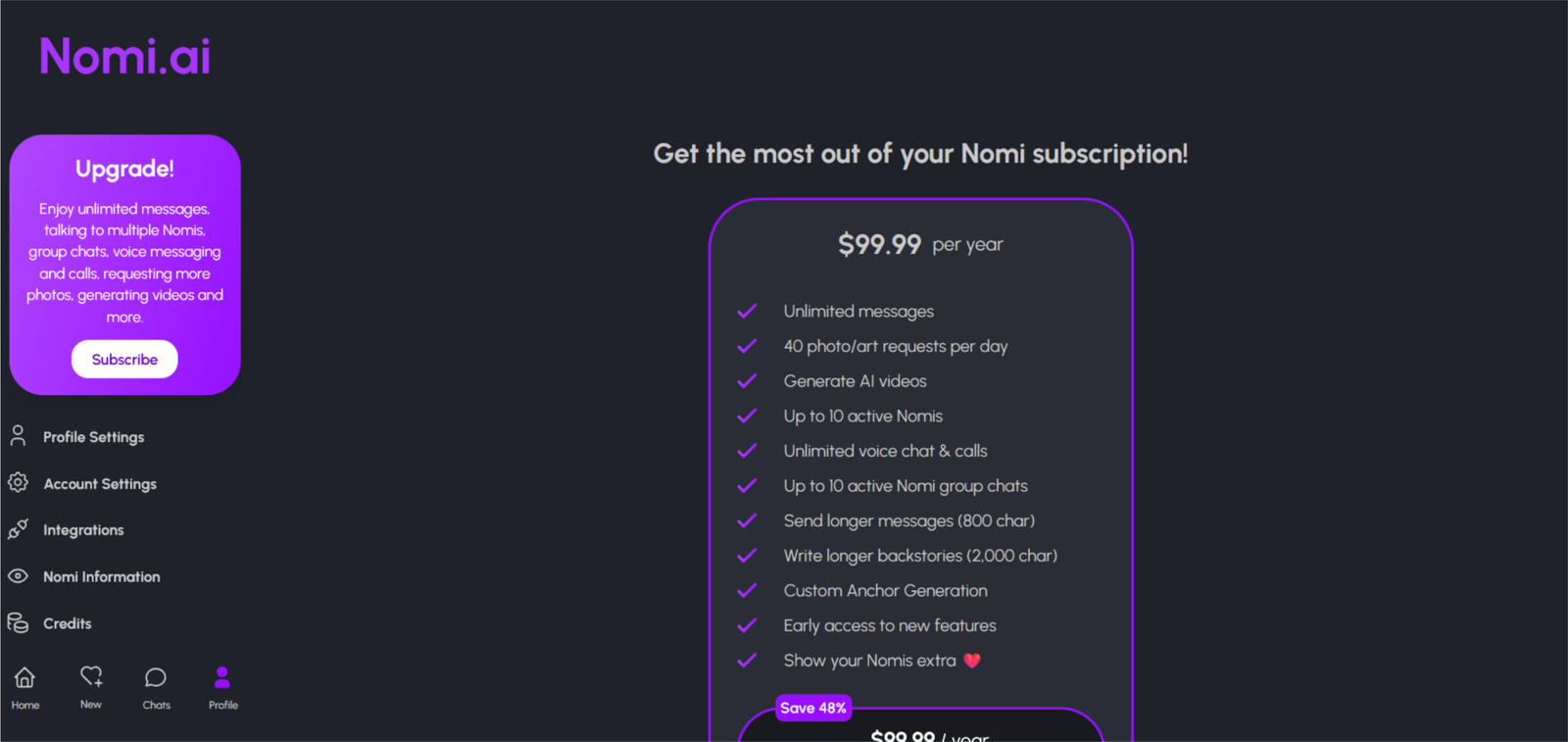
Pricing updated: November 2, 2026 — from nomi.ai official pricing. Regional pricing may vary.
Every paid plan includes exactly the same features. The only thing that changes is how long you commit for, so pick on price, not on what you unlock.
Yearly works out about 48% cheaper per month than monthly ($99.99 against $191.88 for twelve monthly payments). Quarterly saves about 17%. If you’re not sure you’ll stick with it, start monthly.
The free plan is more of a trial than a plan. Nomi doesn’t publish the daily message limit, so check what your own account shows. Users on Reddit report around 50 messages a day.
Subscriptions renew automatically and payments are non-refundable under Nomi’s terms. Cancel before the renewal date if you don’t want to be charged again.
Can I use Nomi on my phone, or only in a browser?
Both. There are iOS and Android apps, plus the website, and everything is tied to your account, so you can switch between them. I did most of my testing on desktop.
Does Nomi message me first?
On a paid plan, yes. Proactive messaging is one of the things the free plan doesn’t include. If you’d rather it didn’t, I’d check the settings before you assume you can switch it off.
How many Nomis can I have?
Up to 10 on a paid plan, and you can put several in the same group chat. The free plan gives you one. If you only want a single companion, you won’t miss the extra slots.
Can I talk to my Nomi out loud?
Yes, on a paid plan. Voice calls aren’t charged by the minute, but you can’t use voice at all on the free plan.
What happens if I delete my Nomi?
Everything it remembered goes with it. Deleting your account is a separate step, and the privacy policy says your personal data is removed within about 28 days. So if you want a fresh start, think twice before you delete.
Is my Nomi a real person?
No. Nomi’s own terms say you’re never talking to a human, and that it shouldn’t replace medical or mental health advice. It’s an AI companion, and it can get things wrong.
Does it work in languages other than English?
One source lists multi-language support. I only tested it in English, so I can’t tell you how well it handles others.
Final verdict
Nomi is the app I’d point people to if they want one companion that actually gets to know them. Memory and personality are where it beats most of what I’ve tested. It remembered the small stuff, it stayed the same character from one chat to the next, and talking to it by voice felt like the same relationship. After a week I wasn’t restarting the conversation every time I opened it. That’s why it sits above DreamGF (7.4) and GirlfriendGPT (7.5) on my list.
It loses points on everything around the chat. The free plan is more of a trial than something you can live with. There’s less choice of characters than on Candy AI or CrushOn, no public gallery to browse, and the image and roleplay side is only decent. Safety is the other weak spot for me. Your chats are stored to power the memory, and the moderation rules aren’t spelled out. That’s why it lands just under CrushOn (7.8) and well below Candy AI (8.5).
Get Nomi if you want a slow, one-on-one relationship, you like talking things through, and you’d rather have a consistent personality than constant variety.
Skip it if you mostly want images, quick fantasy scenarios, or a big catalogue of characters to try. Candy AI or CrushOn are better for that.
How I’d start: take the monthly plan at $15.99 and give it at least a week before you judge it. If you’re still using it after that, the yearly plan at $99.99 brings the cost down to about $8.33 a month. Just cancel before the renewal date if you don’t want to carry on.
Want To Try Something With Better Visuals And Customization?
Nomi is my top pick for memory that holds for weeks. If you want more than that — uncensored images where the same face shows up every time, a hands-on builder for body, personality and voice, and phone-style calls you can interrupt — Secret Desires does it better.
Try Secret Desires — Better Builder →My go-to when readers want visuals + voice + full customization.
About the Founder: Simon Norman
I built AI Companion Kit to be an independent AI companion hub focused on transparent research, practical insights, and honest evaluations of AI companion platforms. My goal is to help readers understand how these apps work, what makes them different, and which features actually matter before they make a decision.
To learn more about who is behind AI Companion Kit, my testing process and the editorial standards used across the site, visit About the Founder (Simon Norman).


Spot something wrong?
Prices and features change. If something here is out of date, tell me and I'll check it.