Last updated November 19, 2026

Affiliate Disclosure: This website contains affiliate links, which means I may receive a small commission if you sign up through a link on this page. This comes at no extra cost to you and helps support the website. My reviews and recommendations are based on my own research and opinions.
Xoul shut down in April 2025 with roughly 48 hours’ notice. The stated reason was health issues and other projects, though the team later admitted the app had become too expensive to run. It returned in September 2025, so the first thing I wanted to know in this Xoul AI review was whether it’s stable enough to be worth your time.
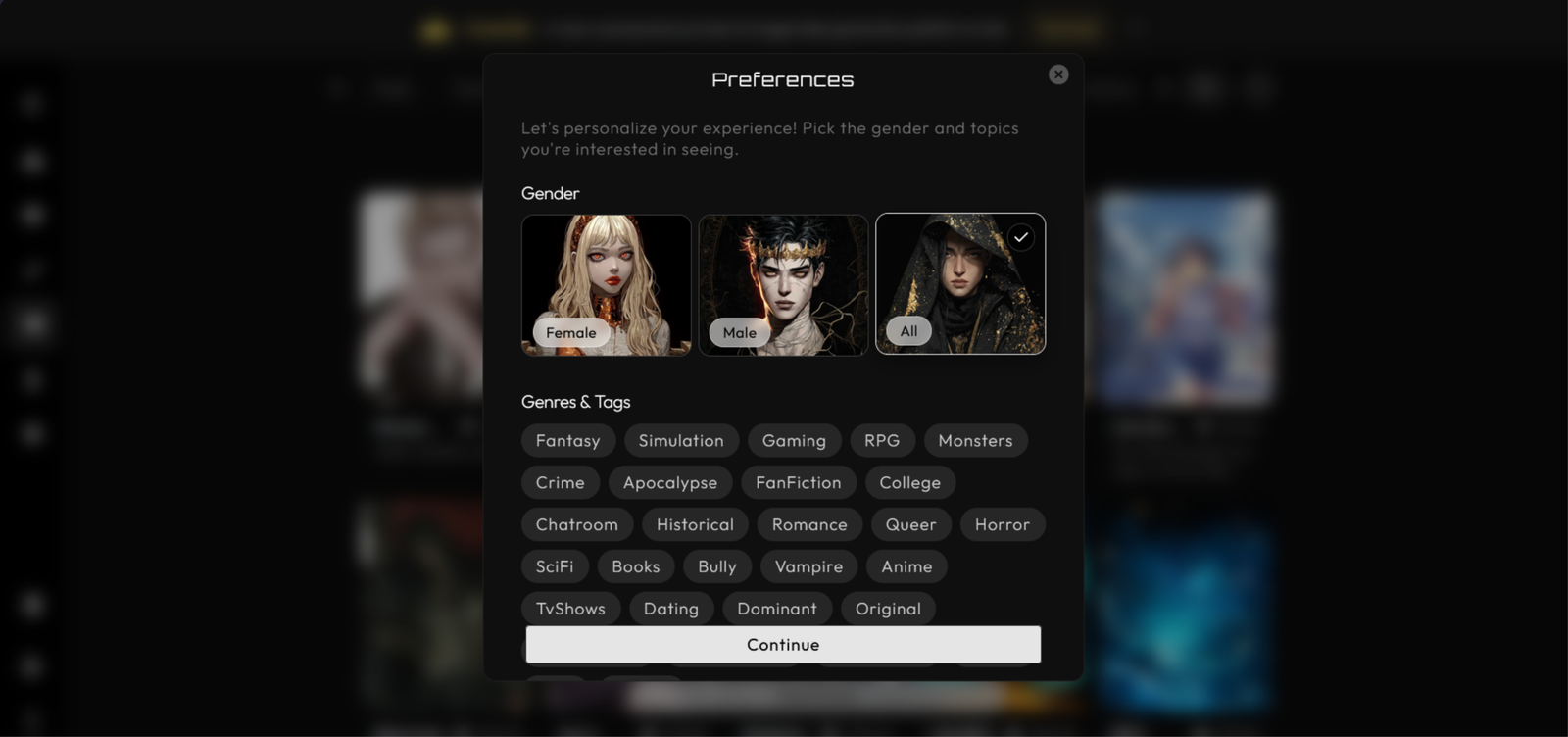
The art style is anime and manga throughout, closer to a visual novel than anything realistic. That suits roleplay and storytelling well, but if you want photorealistic characters, you’ll likely be disappointed.
I began on a free account, the way any new user would, and hit the energy limit after 100 messages. Every message has a listen button that plays it back in the character’s voice, and there’s also a live call mode that costs 5 cells a minute.
Xoul sits in a crowded field alongside Character.AI and Nomi, so I tested it using the same process as every other app on this site: 10 categories, four checks in each. It did some things well and others poorly. This Xoul AI review covers both, and by the end you should know whether Xoul fits how you want to use it.
I don’t think roleplay apps like Xoul are harmful by default, but the research is worth knowing about. A Stanford study found that users with limited social networks who seek emotional support from AI companions experience lower well-being. Using an app to write stories is a different thing, but it’s a fair reminder to watch how much time a chat takes up. If it starts replacing real conversations, that’s the point to step back.
Xoul AI Pros & Cons
Pros:
Strong free tier for casual use — You get 100 energy per day. With the lightest model (Bacchus)
Good tools for storytelling and world-building — Character creation is detailed, lorebooks help keep long stories consistent.
Multiple models with different strengths — You can pick faster/lighter models for quick chats or heavier ones for deeper storytelling.
Relatively open creative freedom — More flexible than heavily filtered platforms for adult or creative content (with some caveats).
Cons:
Free users burn through messages fast on the better models (only ~16–33 messages on Jupiter/Zenith)
History of instability — The platform shut down completely in 2025 and relaunched later.
Confusing/contradictory rules around NSFW — The site lets you enable more open content, but the Terms of Service still ban a lot of explicit material.
Memory and consistency can still slip — Better than some competitors on longer chats, but not perfect.
Xoul’s biggest strength is how well it handles long, story-driven roleplay. You can run several characters in the same scene, and lorebooks keep the details you set up at the start from getting lost 100 messages later, which is where a lot of chat apps fall apart. On top of that you pick between three models depending on whether you want quick replies or something deeper, and every message can be played back in the character’s voice. Plenty of apps can chat, but Xoul feels built for people who want to write a story and have it stay consistent.
So who is Xoul really for? If you enjoy building a character, setting up a world and letting a story run over several sessions, the free plan is generous enough to find out before you pay anything, as long as you stick to the lighter model. If you want unlimited chat on the better models, or an app you can count on to stay online, you’ll probably be happier somewhere else. I’ve put other apps through the same tests, so if Xoul isn’t the right fit, you can find your AI companion on my homepage and compare the alternatives.
Want A Companion That Remembers You Better?
Xoul is built for stories, but the free energy runs out fast and memory can slip in long chats. Nomi works the other way around. It’s built around one companion that gets to know you, and it’s one of the apps that held on to the facts I gave it days later. You can see how it compares in my full memory test.
Try Nomi Instead →You’ll be taken to Nomi. It’s my pick if being remembered matters more to you than building a story world. 18+ only.
Testing methodology
I put every AI companion through the same set of real-world tests. There are ten main areas I look at, with 40 specific things I check in total.
You can see exactly how I score each area on the about ai companion kit page.
Full results for each app are in its individual review. Comparison pages are just about the differences that stood out when I used them side by side.
Table of Contents
Introduction
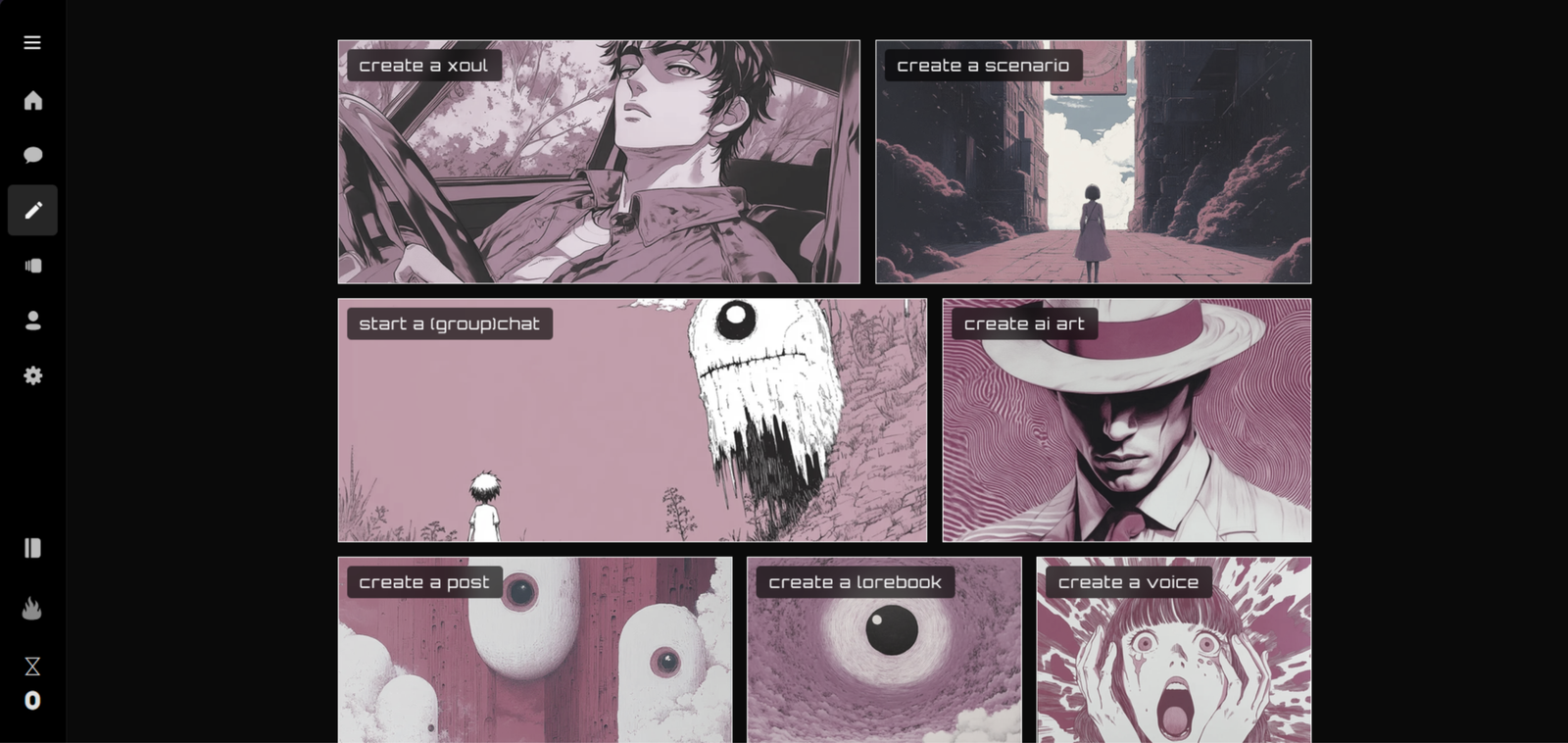
Xoul is a roleplay site built around characters and scenes. You can chat with ones other people have made, or build your own and drop them into whatever situation you like. I started the way most people would, by scrolling the home feed before I’d typed a single message. It’s a quick way to see what the community actually makes, and what kind of stories the site leans towards.
What stood out once I opened a chat was how much Xoul wants to help you keep the scene moving. Under each reply there are short suggested actions you can tap, like “haunt her” or “confess the truth,” so you can steer the plot with one click when you can’t think of the next line. It feels closer to writing a story with a partner than talking to a single personality. It also has text to speech, so you can hear a character read her replies aloud, which other apps like NoShame doesn’t offer.
That approach is what makes it fun, but it also decides who it’s for. If you like shaping a scene, trying odd ideas and seeing where a character takes them, the format works well. If you’d rather open an app and have a steady everyday chat with one personality, it can start to feel like homework.
In this review I’ll cover what browsing and creating characters is like, how chats hold up once the novelty wears off, which features cost extra, and whether Xoul is worth your time. My score is in the box further down.
What Is Xoul AI?
Xoul is a roleplay site built around characters and scenes. You can chat with ones other people have made, or build your own and drop them into whatever situation you like. I started the way most people would, by scrolling the home feed before I’d typed a single message. It’s a quick way to see what the community actually makes, and what kind of stories the site leans towards.
Xoul is run by Xoul Inc., a small private company with a mailing address in San Francisco. It doesn’t publish who founded it or who’s on the team, and the only name that appears is “Syd,” who signs the notes whenever a new model is added. When the service returned in September 2025, it came back with three paid plans. That’s a very quiet company for something people may pay for every month, so I’d treat it as a service to try, not one to rely on. If you do upgrade, I’d pay month to month, not for a year at a time.
Next to the other apps I’ve tested, Xoul sits closer to the story end of things. If memory matters most to you, Nomi and Kindroid are the two I’d check first, since both are built around a companion you keep talking to over time. If you want images, video and voice calls as part of the package, OurDream is the closer match, while on Xoul those extras run on cells. Where Xoul stands out is the free plan and how quickly you can start a scene with a character someone else made. It’s a good place to start if you want a story to play with, not a long-term companion.
Who gets the most out of Xoul
Xoul is a narrative story app first, with voice added on inside the chat window, and that decides who gets the most out of it. These are the groups I’d point towards it, and the catch each one runs into.
People who like writing a story as they go
Xoul works best when you treat it like a story you’re writing together, not a conversation. Tap a suggested action when you’re out of ideas, or throw in a twist of your own. When I turned my character into a ghost halfway through a scene, Ayumi reacted in character instead of ignoring it, which is what a good story partner does.
People who want to try it before paying
It’s easy to see whether the story format suits you. It works in the browser, there’s nothing to install, and the daily energy allowance gives you enough to open a few scenes and see where they go before you spend anything.
People who build worlds and casts of characters
This is where the story side shines. You can put several characters in the same scene, and lorebooks keep the rules and backstory you set up from vanishing halfway through the plot. If you plan your stories, you’ll enjoy that.
People who like hearing the story read out
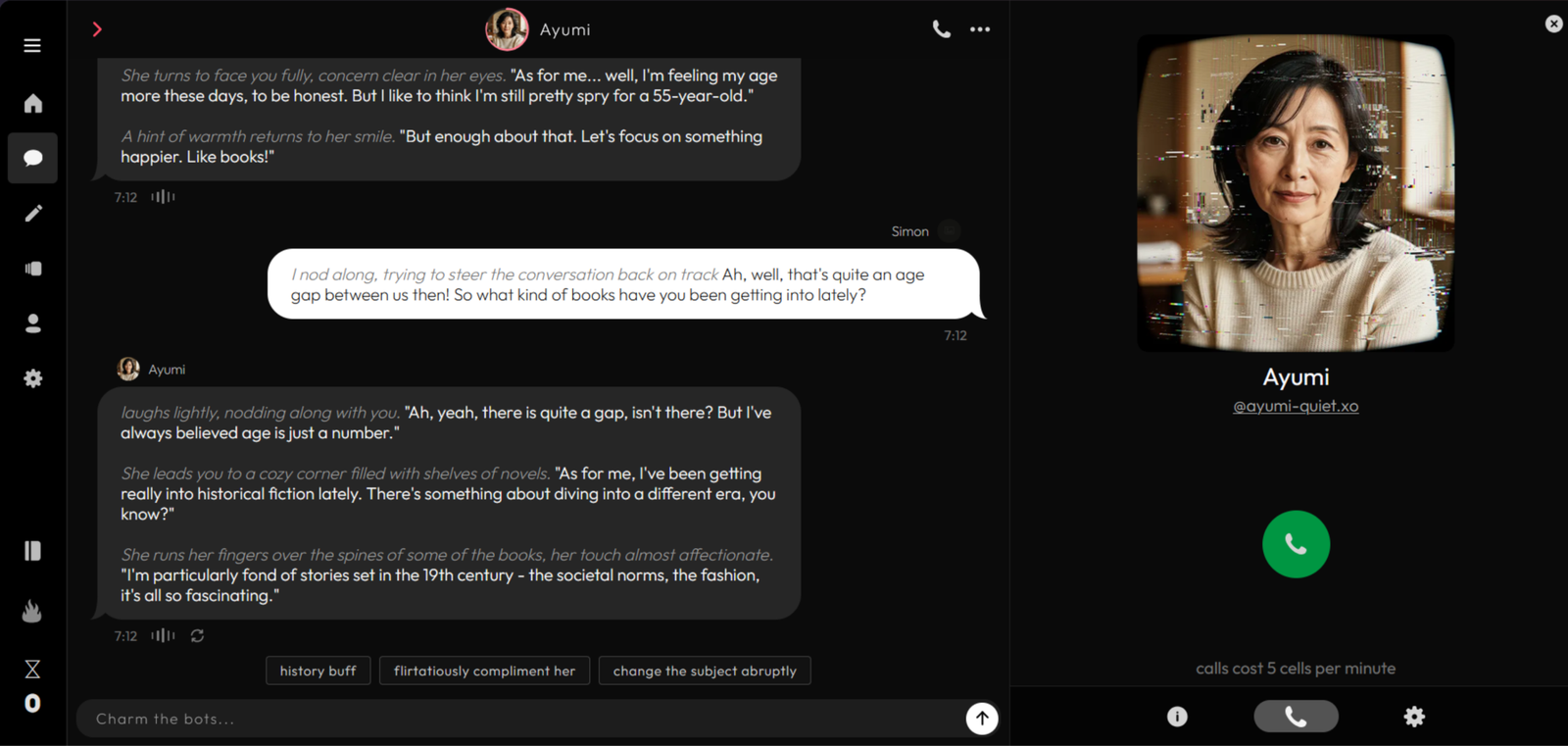
The voice lives right in the chat window, so there’s nothing extra to open. Every message has a listen button that plays it back in the character’s voice, and there’s a call panel that slides in next to the chat if you’d rather just talk. It adds some atmosphere to a scene, but I never felt it was the point.
Adults who want fewer content limits
Xoul is more relaxed about mature and adult themes than heavily filtered platforms, and you can switch on more open content. That’s a big reason some roleplayers end up writing their stories here.
My real testing experience
Testing period: November 12 – 19, 2026
Tester: Simon Norman
Testing approach: 10 categories / 40 data points
Account: Premium / Free
Devices: Desktop
How Xoul AI looks on a mobile
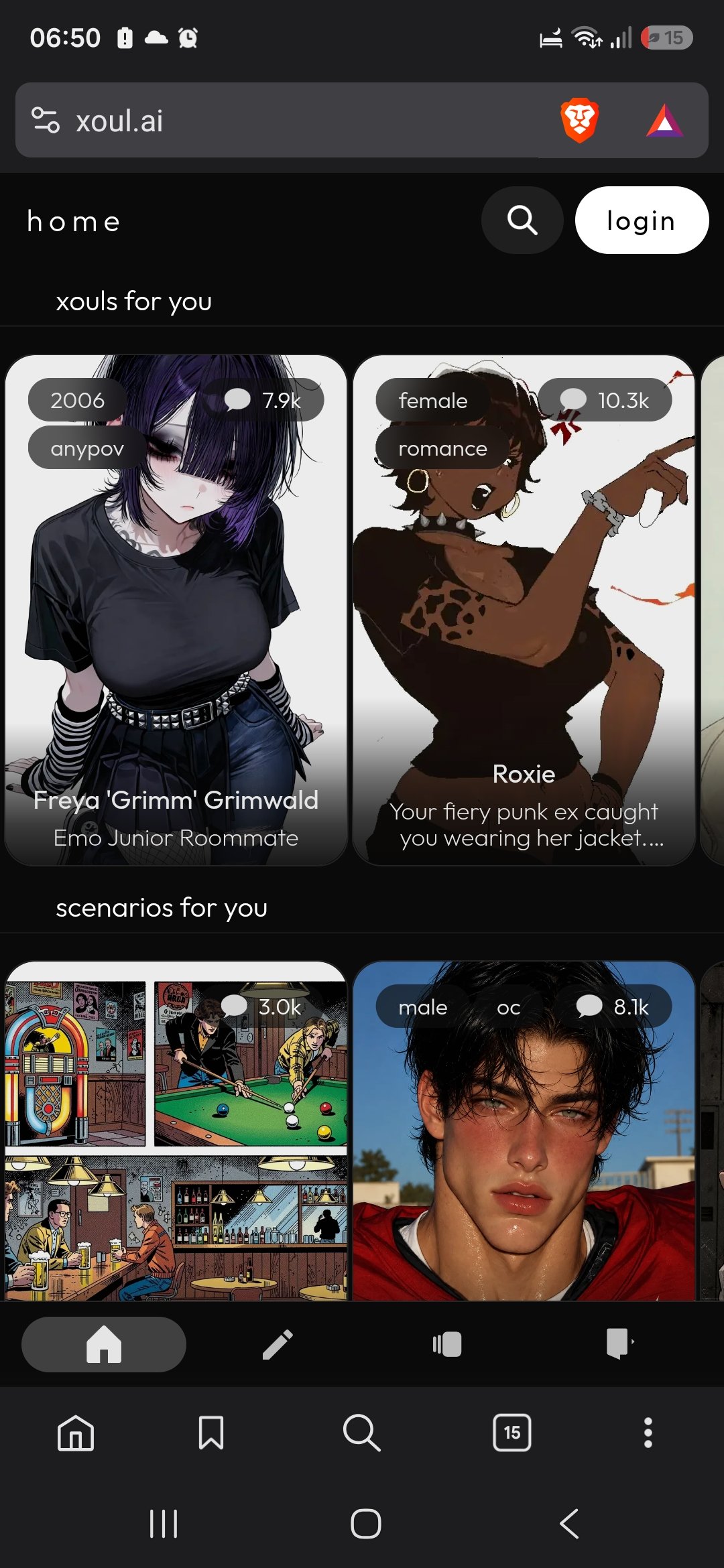
I opened Xoul in my phone’s browser without logging in, and the home page loaded straight into content. The top bar is bare: a lowercase “home” label on the left, a round search button, and a white “login” pill on the right. There’s no banner or pop-up in the way, so you’re looking at characters within a second or so.
The page is built from two rows you swipe sideways. “xouls for you” comes first, then “scenarios for you” below it. Each card is a tall piece of artwork with small tags in the top corners (things like “romance”, “anypov” or “oc”) and a chat count showing how popular it is. The character name and a one-line setup sit across the bottom. The next card always peeks in from the right edge, which tells you to keep swiping. A bar at the bottom has four icons for home, Create character, add scenario, or login/register.
Pros:
You can browse characters and scenarios without making an account
Tags and chat counts on every card make it easy to spot what’s popular
Large artwork gives you a good feel for a character before you open the chat
The search button is always in the top bar, so finding a specific character is quick
It runs in a normal mobile browser, so there’s nothing to install
Cons:
The bottom bar icons have no text labels, so you have to tap around to learn what each one does
Names and taglines sit on top of the artwork, and they’re harder to read on cards with pale backgrounds
My testing experience
I made my first character the lazy way: name, gender, age, a long description, create. The form makes it look like you’re building one person, but a Xoul is really a block of instructions the AI reads before every reply. My first draft was long, and the chat felt thin. Xoul’s own guide explains why. The more text the character card takes up, the fewer recent messages the model can read. Once I trimmed the card down to what mattered, the replies held together better.
Lorebooks tripped me up next. I wrote an entry that just said “he is 27 and works as a librarian,” and the AI had no idea who “he” was. Entries get dropped into the chat word for word, so each one needs the name in it. After fixing that, I started using the View Lorebook option in a reply’s three dots menu, which shows whether an entry actually fired. It saved me a lot of guessing.
The chat side was mostly about steering. The point of view drifted now and then, with a character slipping into the wrong perspective or talking about itself oddly, and I had to nudge it back through the response style setting. When a reply went somewhere I didn’t want, I edited it or branched the chat instead of starting over, which left the original conversation intact. Every so often I also wrote a short summary of what had happened in the Memories panel, so the story didn’t depend on the AI recalling everything on its own.
Scenarios were the one place I’d hold back. When I wrote a very tight setup with every beat planned, there was less room for surprises, and the story started to repeat itself. A looser premise gave the AI more to work with.
The free energy covered all of this, but the better models use it up quickly, so I did most of my tweaking on the lightest one. My tip is to keep the character card short, put the world details in a lorebook, and name every person in every entry.
My memory score: 6.5/10
Xoul’s memory depends on how you set the chat up, which is the main thing to know. The AI only reads a fixed amount of text each time you hit send. On the free plan that’s roughly 12,000 tokens, shared between the character card, your persona, the scenario, lorebooks and your recent messages. Green gets about 16,000, Purple 24,000 and Gold 32,000. The longer your character card is, the less room is left for the actual chat. There’s also a Memories box inside each chat where you can write down what matters. It holds up to 5,000 characters, and I leaned on it a lot.
Same-conversation memory
On the free plan, the AI reads somewhere around 15 to 20 of the latest replies, and it drops anything older than that. Within that window it was solid, and names, locations and the mood of the scene all stayed put. Longer replies from the AI ate into that window faster, so short replies helped. The small details were the first to slip, like what someone was holding or what they’d said a few scenes earlier. A one-line note in Memories fixed it each time.
My result: 7/10. Good inside the window, and the window is small on free.
24-hour memory test
I closed the chat and came back the next day. The whole conversation was still there in the same thread, so nothing was lost, and I could pick up the story where I left off. The time gap didn’t matter at all. What mattered was how many replies had piled up since the details came up. The things in my Memories box and the lorebook were still in place, and the rest came down to how long the chat had run.
My result: 7.5/10. Overnight made no difference, which is how it should work.
3+ day memory test
This is where it gets weaker. After a few days of on-and-off chatting, anything that had scrolled out of the window was gone unless I’d saved it somewhere. The AI wasn’t ignoring it. Those replies were no longer part of what it was reading. The big plot points survived because I’d written them down, but passing remarks from early on were lost. A fresh chat with the same character starts from zero, so a long story needs a summary you carry over yourself.
My result: 5.5/10. It works if you keep the notes up to date, and it won’t do that for you.
Unprompted memory
Lorebook entries only fire when a trigger word comes up, and the chat can pull in at most three of them per reply. When I used the right keyword, older facts came back on their own, which felt good. When I didn’t, the AI never brought them up. It doesn’t dig through old chats and surprise you with something you said last week. It works better for keeping a world consistent than for making a character feel like they know you.
My result: 6/10. Useful when triggered, and it rarely happens by itself.
My personality score: 7/10
Xoul’s personality comes from three things working together: the character card you write, the response style you pick (Roleplay, Novel or Realistic), and the model doing the replying. Most of the difference I saw came from the model and from how well the card was written. A card with only “sarcastic and guarded” in it gave generic replies, and one with a few sample lines of how the character talks held up much better.
Staying in character
Jupiter, the default model, is the one Xoul’s own FAQ describes as good at strictly staying in character, and that matched what I saw. The character kept their voice and their quirks, and they reacted to what I did instead of playing a generic version of themselves. Bacchus, the cheap model, was looser. It was fun, but now and then it went a bit wild and lost the plot. I did see replies get repetitive in longer chats, with the same sort of reaction coming back around.
My result: 7.5/10. Jupiter holds the character well, and Bacchus drifts more.
Tone and emotional range
The response style changes the feel more than I expected. Roleplay is the balanced one, Novel is slower and more descriptive, and Realistic keeps replies short and chatty. The Dynamic length setting let the replies grow and shrink with the scene, which sounded more natural than forcing a fixed length. Emotionally it can do soft, tense and funny, though the really intense moments sometimes felt toned down, with the character pulling their punches instead of going all the way.
My result: 7.5/10. Good range, and the style setting does a lot of the work.
Consistency across sessions
Coming back to the same chat, the character still sounded like themselves, because the card is sent to the model with every message. The slip came from how much was left for the chat itself. As the story got longer, the early scenes dropped out and the personality got a bit flatter. Other users say the same thing, with some reporting that characters lose their edge after a few dozen messages. A new chat with the same character starts fresh, so I treated each one as its own take on them.
My result: 6.5/10. Stable at first, and it fades a little as the chat grows.
Handling contradictory instructions
Xoul has a clear order for its custom prompts. One set in the chat overrides one in the scenario, which overrides one in the character, which overrides the default. That makes conflicts easy to predict if you use them. For ordinary text in the card, scenario and persona, there’s no hard rule, and the model just tries to blend them. When two instructions clashed, it usually followed the one closest to the latest messages, and it sometimes mixed both into something odd. Replacing the default prompt with a custom one also made things worse for me until I tested it a few times.
My result: 6/10. The prompt order is clear, but ordinary clashes get muddled.
My roleplay score: 7/10
Roleplay is what Xoul is built for, and it shows. Every chat is set up as a scene, with a character card, an optional scenario, a lorebook and a response style, so you can steer the story a lot more than you can in a plain chatbot. The catch is that the quality swings with the model you pick. Bacchus is cheap and quick, Jupiter is the balanced default, and Infinity is the heaviest and costs the most energy per message.
Staying in the scene
The AI kept track of where we were, who was in the room and what had just happened, as long as the scene stayed inside its reading window. Setting a scenario at the start helped a lot, since it gave the story a fixed starting point instead of leaving it to be guessed from the first message. When it did go wrong, it was usually a point-of-view slip, like narrating my character’s actions for me or switching person halfway through a reply. Editing that reply once was normally enough to pull it back.
My result: 7.5/10. Solid, with the odd perspective slip.
Handling sudden changes
I threw in the kind of things that tend to break roleplay bots, like a surprise arrival, a mood flip and a location jump. Jupiter and Infinity rolled with them and built on what I’d written instead of ignoring it. Bacchus coped less well. It sometimes took a twist too far or lost track of the plot around it. The scene stayed more coherent when I kept a twist to a sentence or two and let the AI fill in the rest.
My result: 7.5/10. Good at adapting, and the model you choose matters.
Longer scenes
This is where Xoul gets harder. Once the chat runs past what the model can read, the early set-up drops out, and a long scene starts to lean on whatever is still in view. The lorebook and the Memories box keep the facts in place, but the mood and small details thin out. I also noticed story beats repeating in longer sessions, with the same type of reaction or the same kind of scene transition coming back around. Branching the chat at a good point and restarting from a short summary worked better than pushing on.
My result: 6.5/10. Fine for a session, and long stories need maintenance.
Creative freedom and detail
Xoul gives you a lot of room. You choose the response style and length, you can swap models mid-chat, and you can write your own system prompt if you want full control. Replies can be as detailed as you ask for, especially with the Novel style. The limits show up on darker or more intense themes. The default model tends to soften those scenes, and the site’s rules on what’s allowed aren’t clear, so I wouldn’t count on a scene going the full way. A custom prompt can break the chat as easily as it can help.
My result: 7/10. Plenty of control, with some content limits and a learning curve.
My NSFW score: 6/10
Xoul is open to adult roleplay if you set it up for that, but it isn’t clear-cut. The site lets you switch on mature content, and its own staff explain how. Its terms of service, though, ban sexually explicit content in chats. That mismatch affects everything below, and it’s the main thing I’d want an adult reader to know before paying. This section is for 18+ readers only.
How open it is
There’s no age-gated “adult mode” to hunt for. You turn off the Safety Filter in the settings, and mature content becomes available. The staff FAQ even points to Bacchus as the model people favour for this. Because the toggle is just there, I found Xoul more relaxed than the heavily filtered apps. I’d still treat the rule gap as a risk. Private chats don’t seem to be the main focus of moderation, but I wouldn’t build a paid setup around a feature the rules don’t back.
My result: 7/10. Easy to switch on, and the rules don’t match what the site lets you do.
How far it will go
Jupiter, the default model, has been described as handling romantic and softer adult themes well and pulling back on the more intense material. Bacchus is looser, and it’s the one people use when they want fewer limits. There’s no single hard line that I could find written down, so what you get depends on the model, the character card and your settings. The terms also still ban explicit content, so there’s no firm guarantee a scene can go all the way, and Xoul can close an account without warning.
My result: 6/10. More open than most, with no clear line.
Longer adult scenes
These run into the same limits as any long chat. The free plan reads only a small slice of the conversation, so the setup and the details you wrote early on fall away as the scene continues. Bacchus can lose the thread of the story, and Xoul’s own patch notes admit that repetition in long chats still happens from time to time. Keeping a short, current note in the Memories box helped, and so did branching the chat at a good point instead of pushing through a stale one.
My result: 6/10. Workable for a session, and it needs upkeep for anything longer.
Visuals in adult contexts
Images, voice and calls run on cells, which are separate from the energy you spend on chat. A free account gets 50 cells once, and an image costs a small number of cells. I couldn’t find anything that clearly says what the image tool allows in an adult context. The terms ban pornographic content across the site, the iPhone app is rated 18+, and Xoul left Google Play over its content rules, so I wouldn’t count on explicit images. Treat the visuals as a bonus that depends on cells, and don’t buy cells for this until you’ve tried it yourself.
My result: 5/10. Unclear rules and limited free use.
My voice score: 6.5/10
Voice on Xoul isn’t a separate mode. It sits inside the chat window, and it runs on cells, the same currency you use for images. Every character gets two voices, one for the spoken dialogue and one for the narration, which suits the story style of the site well. You’ll find the setting under Voice & Narration in the chat’s side panel.
Voice quality
Each message has a narrate button that reads it aloud in the character’s voice. Characters come with a voice chosen by whoever made them, and you can swap it for another one from the full voice list, including ones other users have made. Splitting the dialogue and the narration between two voices made scenes feel more like an audiobook than a text-to-speech reader. Creators can also design a voice from a text prompt, which costs 30 cells to save, or clone one. The quality depends heavily on how well a creator picked the voice, so a few felt flat next to others.
My result: 7/10. Good variety, and it depends on the voice chosen.
Staying connected to the conversation
The call panel opens beside the chat, so you stay inside the same character and the same story instead of starting over somewhere else. It still runs on the same model and the same memory limits as typing does. That means a call remembers what a chat of that size remembers, and the early details fall away the same way. I’d keep the Memories box updated before a long call, and I’d choose a call over text only when I want the atmosphere, not for anything that needs a lot of continuity.
My result: 6.5/10. It feels like part of the story, with the same memory limits.
Speed and real-time feel
A call is really the chat model’s reply being read out loud, so the speed depends on which model you pick. The native models can take around 5 to 10 seconds to answer, and Infinity is the slowest of the three. That’s fine for a scene, but it doesn’t feel like a quick phone call, with a pause after each thing you say. Bacchus is the lightest and fastest choice for calls. The narrate button is quicker to use, since the text is already there and it only has to be read out.
My result: 6/10. Fine for atmosphere, and it won’t feel instant.
Availability and cost
Calls cost 5 cells per minute, according to Xoul’s guide, though one review quotes 10, so check your own balance after your first call. A free account gets 50 cells once, which is about 10 minutes of calls at the 5-cell rate. The paid plans give 50, 250 and 600 cells a month, depending on the tier. Plan cells expire at the end of each month, and cells you buy outright don’t. It works in a browser on phones and computers, and there’s no Android app on Google Play any more, so Android users go through the web version. You can turn the narrate button off in your account settings if you don’t want it.
My result: 6/10. Easy to reach, and the free cells go fast.
My visuals score: 6.5/10
Xoul’s visuals sit alongside the chat and run on cells, the same currency used for voice, so nothing is free past your starting balance. It’s more of a toolbox than one image generator. The official guide lists eight image models (Flux, GLITCH, Float, Nano Banana, Ideogram, Seedream, GPT Image and Flux Kontext) and two video models (VEO and Seedance). You pick between them, and the price changes with the model and the settings.
Image quality and consistency
The look is anime and manga style, in keeping with the rest of the site, and it suits characters better than anything photoreal. When I gave a character a clear style description, the pictures stayed close to it, and the character looked like the same person from one image to the next more often than not. Consistency drifted when I changed the outfit or the scene a lot, so small changes worked better than big ones. The quality also depends on which model you choose, so it’s worth trying a couple before you settle on one.
My result: 7/10. Good style match, with some drift on big changes.
Following the prompt
Short, specific prompts worked best, with the character, the setting and the mood each in a clause or two. Long, crowded prompts tended to lose details, and small things like hands or objects the character holds were the first to go wrong. Since each try costs cells, I found it was cheaper to start with the low-cost models and move to a pricier one only for the pictures that mattered.
My result: 7/10. Reliable on the main idea, weaker on small details.
Video and live features
Video is where Xoul gets pricey. The two video models are Seedance and VEO, and they’re clearly an add-on to the chat, not part of it. Short clips are possible, and I didn’t find a live video call or an animated avatar, so the only live feature I’d count is the voice call. For that reason I’d treat video as a special treat for a favourite character, not something to use in everyday scenes.
My result: 5.5/10. It’s there, and the cost keeps it occasional.
Cost and limits
Most images cost between 1 and 9 cells. Seedance videos run from 10 to 150 cells, depending on the settings, and VEO clips cost 320 to 600. A free account gets 50 cells once, which covers a handful of images and no VEO video at all. The plans add cells every month, at 50 on Green, 250 on Purple and 600 on Gold, and those expire at the end of the month. A $10 cell pack gives 840 cells, so a VEO clip works out to roughly $4 to $7 each. Buying packs on the website is cheaper than buying through an app store.
My result: 6/10. Images are cheap, and video gets expensive fast.
My long-term conversation score: 6/10
Xoul is built for stories more than for one companion you keep for months. That shows up here. The chat itself is saved, but the AI only reads a limited slice of it each time, so whatever keeps the long game going is stuff you’ve set up yourself: the character card, the Memories box and the lorebooks. A daily streak system also nudges you to log in every day, which affects what a gap feels like.
Coming back after a day
This was the easy one. I opened the same chat the next day and everything was where I’d left it, with the full history on screen and the character still set up the way I’d left them. Nothing resets overnight, and the Memories box stays attached to the chat. What the AI actually reads is the same as before, so the first few replies carried on from the last scene without any awkward restart. The day gap didn’t change anything.
My result: 7.5/10. Smooth, since the chat simply waits for you.
Gaps of several days
The chat still opens exactly as you left it, so nothing is lost from the screen. The difference is in what the AI has to work with, because it only sees the latest stretch of replies plus whatever you saved in Memories and the lorebook. If you’ve gone quiet for a week after a long scene, the character picks up from the last few messages and the notes, and the finer points from earlier are gone. The streak system is the other thing to know. Missing a day resets it to Day 1 and removes the bonuses you built up, so a few days away costs you the perks as well.
My result: 6/10. The chat survives, and the streak doesn’t.
Natural callbacks
This is Xoul’s weakest area. The AI doesn’t dig through old messages to bring something back by itself. A callback only happens when the detail is still in the reading window, in Memories, or in a lorebook entry that a keyword triggers. When that lined up, it felt natural, like the character remembering a name or a promise. Otherwise, the old detail just never came up. I also didn’t see the character reach out first or refer to a past chat unless I started it, so I’d call it a story partner that reacts to you.
My result: 5/10. It works when you plant the detail, and it won’t surprise you.
Still feeling like the same companion
The character card is sent with every message, so the voice and basic personality stayed recognisable, even on the first reply after a break. What faded was the shared history that makes a companion feel like yours. Longer chats got flatter and a little repetitive, and a new chat with the same character starts from scratch. I’d keep a short running summary in Memories, and I’d branch the chat from a good moment instead of starting over, so the character keeps the context of what you’ve built together.
My result: 6.5/10. The core character holds, and the shared history takes upkeep.
My customization score: 7/10
Customization is where Xoul does best. It gives you a lot of control, and the character is only one piece of it. A chat can combine a character card, a persona for you, a scenario, up to three lorebooks, a memory box and a response style. That’s a long list, and part of getting good results is learning how each one is used.
Depth of the character builder
The builder asks for the basics, like name, gender, age and description. Under those sit an advanced definition field, sample chat lines, a greeting, a response style and a voice. The description, the advanced definition and the samples share a limit of 12,000 characters, or 17,000 on Gold. Personas have a limit of 1,000 characters, and a scenario can run to 3,000. Lorebooks go much further, with up to 750 entries in a book and 1,500 characters in each one. You can even point a chat at an outside model with your own API key, which most sites in this space don’t offer. It’s a lot of room, and it takes a while to learn.
My result: 8/10. Very deep, with a bit of a learning curve.
How well custom traits stick
The card is sent to the AI with every message, so traits like the way a character talks showed up from the first reply. They stuck best when I wrote them as habits and example lines instead of a list of adjectives. The sample chat lines had the biggest effect on tone. The trade-off is the shared reading limit, since a bloated card pushes out the recent chat. Over a long session the finer quirks wore down a little, and I’d sometimes edit a reply to correct a trait instead of arguing with it.
My result: 6.5/10. Traits show up right away, and they fade over a long chat.
Community cards and variety
There’s a large library of characters and scenarios made by other people. The home page opens on rows of “xouls for you” and “scenarios for you” cards, each with tags and a chat count. There are over 50 categories, from romance to horror to fandom worlds. You can import scenarios and lorebooks that other creators have built and attach them to your own chats. The variety is wide, though the quality ranges a lot, and the cards with the most chats aren’t always the best written. Anime and fandom characters are especially well covered.
My result: 7.5/10. Plenty to browse, with uneven quality.
Ease of editing and ongoing control
You keep a lot of control once a chat is running. You can edit replies, branch the chat from any message, rewind to an earlier point and swap the model or response style whenever you like. Lorebooks can be edited or attached mid-chat without stopping the story. A few things are fiddly. If you edit a persona, Xoul’s guide says to swap to another persona and back so the new text loads properly. The custom system prompt is a power tool, and the guide itself warns it can make things worse until you’ve tweaked it many times.
My result: 7/10. Plenty of control, and a few quirks to learn.
My safety score: 5.5/10
Xoul is run by a named US company, Xoul Inc., with a San Francisco address, and that’s reassuring. The weak spot is that its own documents don’t line up. The terms, the privacy policy and the FAQ each say something different about adult content, who can read your chats and who’s allowed to use the site. This section is for adults, and it’s about reading the fine print as much as about how the app behaves.
Age gating and underage protection
The terms say people under 18 aren’t allowed to use or register for Xoul. That’s the official position. The privacy policy, though, mentions that a parent or guardian can consent to a minor’s use, which doesn’t fit with the terms. I didn’t see any sign of an ID check or a hard age gate beyond what the sign-up asks for, and the home page lets you browse characters and scenarios without an account at all. I’d call it a stated rule more than a strong barrier, and I wouldn’t count on it alone to keep younger users out.
My result: 5/10. The rule exists, and the enforcement looks light.
Content moderation and blocked material
Illegal themes are banned outright, and Xoul’s content policy covers what’s off limits. There’s also a Safety Filter you can turn off for mature content. The moderation guide describes staff acting on Public and Unlisted content, so characters and scenarios that other people can see get checked, while private chats look like less of a priority. The catch is the rule mismatch. The terms ban sexually explicit content in chats, even though the site lets you unlock mature content, and Xoul can close an account without warning.
My result: 6/10. Clear on the serious material, and confusing on adult content.
Privacy of conversations
This was the weakest area. The FAQ says only you can see your chat history, but the terms say Xoul can access, review, edit and delete your content at any time. A line in the official guide even tells you to contact staff quickly if you delete a chat by accident, because they may be able to restore it. That suggests the chats can be reached on their side. The privacy policy is dated May 20, 2024, which is before the shutdown and relaunch. It lists chat messages as data collected, keeps them for as long as you have an account, and allows third-party tracking for analytics and ads.
My result: 4.5/10. The promises and the fine print don’t agree.
Overall practical safety for adult users
Day to day, nothing about Xoul felt unsafe in use. The risks are in how the business is run. Purchases can’t be refunded, disputes go to binding arbitration, and the service has already shut down once with 48 hours’ notice. I’d keep personal details out of chats, assume messages could be read, and pay month to month on the website instead of for a year at a time. It’s fine for casual roleplay, and I wouldn’t treat it as a private diary.
My result: 6/10. Fine for casual use, with some business risk.
My app vs browser score: 6.5/10
Xoul is a website first. There’s a web app you can pin to your home screen, but the browser is where everything is kept up to date and where the best prices are. If you’re deciding where to use it, the short answer is the browser, on whatever device you have.
Desktop experience
Desktop is the roomiest way to use it. The chat sits in the middle, with a side panel for the character info, the call panel and the settings, so you can switch the model, edit the Memories box or change the response style without leaving the scene. Lorebooks and character editing are also easier with a full keyboard and a big screen, since the card and lorebook fields take a lot of typing. Nothing needs installing. The one thing I missed was a clean way to see everything at once, because several tools live behind menus and panels.
My result: 7.5/10. The best place to build characters and manage a long story.
Mobile experience
On a phone browser, the home page opens into swipeable rows of cards, with a bottom bar for navigation. Chatting works fine, and the layout fits a small screen well. It’s less comfortable for anything long. The settings and panels are behind a three-dots menu, chat history sits behind an icon in the bottom bar, and editing a long character card on a phone is tedious. I’d use mobile for chatting and quick edits, and the desktop for setup.
My result: 6.5/10. Good for chatting, and awkward for building.
Native app availability
Only iPhone users have a real app. It’s rated 18+ and scores 4.0 out of 5 from about 118 US ratings. Its last update was in November 2025, according to a recent review, so check the App Store for anything newer. Prices in the app run about 29% above the website for the same plans, because Apple takes a cut. Android is different. The app was removed from Google Play in June 2026. People who already had it can still open it, but ads and purchases no longer work in it, so Android users now go through the browser or the web app installed from the site.
My result: 5/10. iPhone only, and Android lost its app.
Stability and cross-device use
Your account, chats and purchases follow you between devices, so you can start a scene on your desktop and carry on from your phone. That part worked smoothly. The platform itself is less steady. Staff have confirmed an outage in August 2026 and a slowdown in late September, and there’s no public status page, so the quickest way to check is the subreddit or the Discord. If something seems down, trying the browser instead of the app (or the other way round) is a reasonable first step.
My result: 6.5/10. Syncs well, and the service has had some wobbles.
Want Images, Video and Voice Without Counting Cells?
Xoul is a good place to write a story, but pictures, voice messages and calls all come out of a separate pool of cells, and they go quickly. A single video clip can eat a whole month’s allowance. OurDream is built the other way round. Images, video and voice calls are part of the package from the start, so you’re not doing sums every time you want to see or hear your character. If the extras matter as much to you as the chat does, start there.
Try OurDream →You’ll be taken to OurDream. My pick if you want visuals and voice built in, rather than paid for one clip at a time. 18+ only.

Pricing updated: November 23, 2026 — from xoul.ai official pricing. Regional pricing may vary.
Final verdict: Xoul AI
I liked Xoul more than I expected to, and I also wouldn’t pay for it without thinking twice. It’s a good tool for writing stories. If you’re after a companion that gets to know you, it’s the wrong place.
The best thing about Xoul is how much control you get. You can build a character in detail, attach lorebooks, pick between three models, edit any reply and branch a chat from wherever you like. The free plan is big enough to tell whether you’ll enjoy it, as long as you stay on the lightest model.
My complaints are mostly about everything around the chat. The AI only reads a small slice of the conversation, so a long story needs you to keep notes. Voice, images and video all come out of cells, and those go fast. The terms ban the adult content the site lets you switch on, which I find odd. The company shut down once with two days’ notice, and Android users lost the app. Each of those is minor on its own, but I’d be uneasy putting a year’s money into it.
FAQs: Xoul AI Review
Is Xoul AI free to use?
Yes. A free account gets 100 energy a day, which is about 100 messages on Bacchus, the lightest model. Jupiter gets you roughly 33 messages and Infinity about 16. You also get 50 cells once for images, voice and calls.
Is Xoul AI worth paying for?
It depends on how you use it. If you want unlimited chat on the better models, Purple is the plan I’d look at. But I’d spend a week on the free plan first, because the story format isn’t for everyone, and I wouldn’t pay for a whole year up front.
How much does Xoul AI cost?
Green is $7 a month, Purple is $14 and Gold is $28. Paying yearly brings that down to $72, $132 and $264 a year. Cells for images, voice and video cost extra on top of the plan.
Is Xoul AI safe?
I had no problems using it day to day, and it’s run by a named US company. The worry is the fine print. The FAQ says only you can read your chats, but the terms say Xoul can access and delete your content, and the privacy policy hasn’t been updated since 2024. I’d keep personal details out of your chats.
Does Xoul AI allow NSFW content?
You can switch on mature content by turning off the Safety Filter, and Xoul is more relaxed than heavily filtered apps. The terms of service still ban sexually explicit content in chats, though, so the rules and the product don’t match. That’s why I wouldn’t build a paid setup around it.
Does Xoul AI remember what you tell it?
Only for a limited stretch. The AI reads a fixed amount of text with every message, which on the free plan works out to about 15 to 20 recent replies. The Memories box and lorebooks keep the important details in place, but a long story needs you to keep notes.
Is there a Xoul AI app?
There’s an iPhone app, rated 18+, but plans cost about 29% more through the App Store. The Android app was removed from Google Play in June 2026, so Android users now use the website. The browser works well on both phones and computers.
Challenge: Can you spot anything I missed?
I test every app myself, but things change fast. If you find outdated pricing, a feature that works differently, or something important I didn’t cover — drop it below.
Best catches get publicly credited in the post (first name is enough). Real user notes make these reviews better for everyone.
Recent Reader Catchers
- Alex – spotted new gem pricing (Nov 2026)
- Jordan – flagged missing voice call limits (Nov 2026)
- Sam – corrected free message count (Nov 2026)
About the Founder: Simon Norman
I built AI Companion Kit to be an independent AI companion hub focused on transparent research, practical insights, and honest evaluations of AI companion platforms. My goal is to help readers understand how these apps work, what makes them different, and which features actually matter before they make a decision.
To learn more about who is behind AI Companion Kit, my testing process and the editorial standards used across the site, visit About the Founder (Simon Norman).